How to build a scalable online education business with live classes, challenges and leaderboards
Live teaching doesn't scale by making the room bigger. It scales by splitting it, handing sections to instructors, and letting challenges and points carry students between classes. Here's what breaks at 100 and 1,000 students, and what to check in a platform.
The short answer
A live-taught online school scales by multiplying sections, not by enlarging one room: split students into cohorts small enough for real interaction, give sections to instructors you hire, and use challenges and points to keep students practicing between classes while automation handles enrollment, reminders and follow-up. Expect two breaking points. Near 100 students your inbox, manual enrollments and chasing payments fail first; near 1,000, a single teacher, a single room and a single leaderboard do. On Prolaud, Pro covers up to 1,000 active students, 2 teacher seats, 5 communities and 49 people per live room; Studio removes the student, course and community caps and allows 5 seats and 99 per room; Institute is sales-led. Every plan takes 0% of sales. Pick a platform whose limits you can read before you hit them.
Most teachers who start online hit the same wall. The first live class has twelve people and feels wonderful. By the time there are two hundred, the class is a webinar, the chat moves too fast to read, half the students watch the recording instead, and the teacher spends evenings answering the same five questions by email. The business grew. The teaching didn't.
This article is about building the delivery system so it can grow without that happening: how to structure cohorts and sections, when to hire instructors, where challenges and leaderboards actually help, what to automate, and what to measure. If your question is more about offers, pricing ladders and getting clients, read how to scale a coaching business online alongside this one.
I'm Renu Rawat, and we build Prolaud, a course platform with the classroom built in. That's a bias, so I'll state our limits in numbers, read straight from the plan catalog we bill from, and name the platforms that fit better at some sizes.
What does "scalable" mean for a business built on live teaching?
A business is scalable when serving the next student costs less of your time than serving the last one. Self-paced video scales almost perfectly, which is exactly why it's crowded, and on its own it is rarely finished: in free HarvardX and MITx courses on edX, only 3.13% of all participants completed in 2017-18 (Reich and Ruipérez-Valiente, 2019, Science), though learners who paid for a verified certificate finished far more often. Live teaching doesn't scale on its own: every hour in the room is an hour of someone's time. So a scalable live business does three things deliberately.
- It caps the room, not the business. Interaction dies above a certain size. Instead of one huge class, you run several sections of a size where students can still speak.
- It separates the teacher's hours from the founder's. Instructors you train run sections. You design the curriculum and teach the flagship group.
- It moves the work between classes onto the system. Practice, reminders, questions, follow-up and progress tracking happen in the platform, so live time is spent on teaching.
What breaks at 100 students?
Around 100, the first things to fail are almost never the live class. They're the jobs you've been doing by hand.
| What breaks | The symptom | The fix that scales |
|---|---|---|
| Enrollment by hand | You add buyers to the right group yourself, late at night, and miss some | Checkout that enrolls automatically, and a community attached to each course so buyers join it with no step |
| Your inbox | The same questions arrive by email, one at a time | Questions asked under each lesson and in the course's community, with trusted students as moderators |
| Chasing payments | Installments collected by reminder messages | Payment plans that charge on schedule, through Stripe or (in India) Razorpay |
| Remembering who's slipping | You notice a student has vanished three weeks after they did | A list of who has gone quiet, and nudges that go out on their own |
| Class follow-up | You write a recap and post the recording by hand after each class | A recap drafted when the class ends, with the recording when it's ready |
On Prolaud, each of those exists today. A course can have a community attached, and everyone who enrolls or buys joins it automatically (how levels and cohorts map onto courses). Discuss this lesson puts questions under the lesson they're about and in the course's community (discuss this lesson), and you can make a trusted student a moderator (moderators and approvals). Payment plans collect installments automatically, by card through Stripe or, for academies in India, through Razorpay (payment plans). Gone quiet lists members who haven't taken part for a week, and automatic nudges send one note from you to a member who goes quiet, once per quiet spell (see who has gone quiet, automatic nudges). And when a live class ends, a recap is drafted for the community (class recaps).
What breaks at 1,000 students?
At 1,000, the problems are structural. You can't fix them with a better email template.
- One teacher. Even at two classes a week per student, a thousand students in sections of 50 means about 40 class-hours a week. That's not a schedule one person can teach well. You need instructors, and a way to give each one their own sections and courses without handing over the whole business.
- One room. A live room has a ceiling on every platform. On Prolaud it's 49 on Pro, 99 on Studio and 150 on Institute. Above that, you need sections, which is what you wanted anyway.
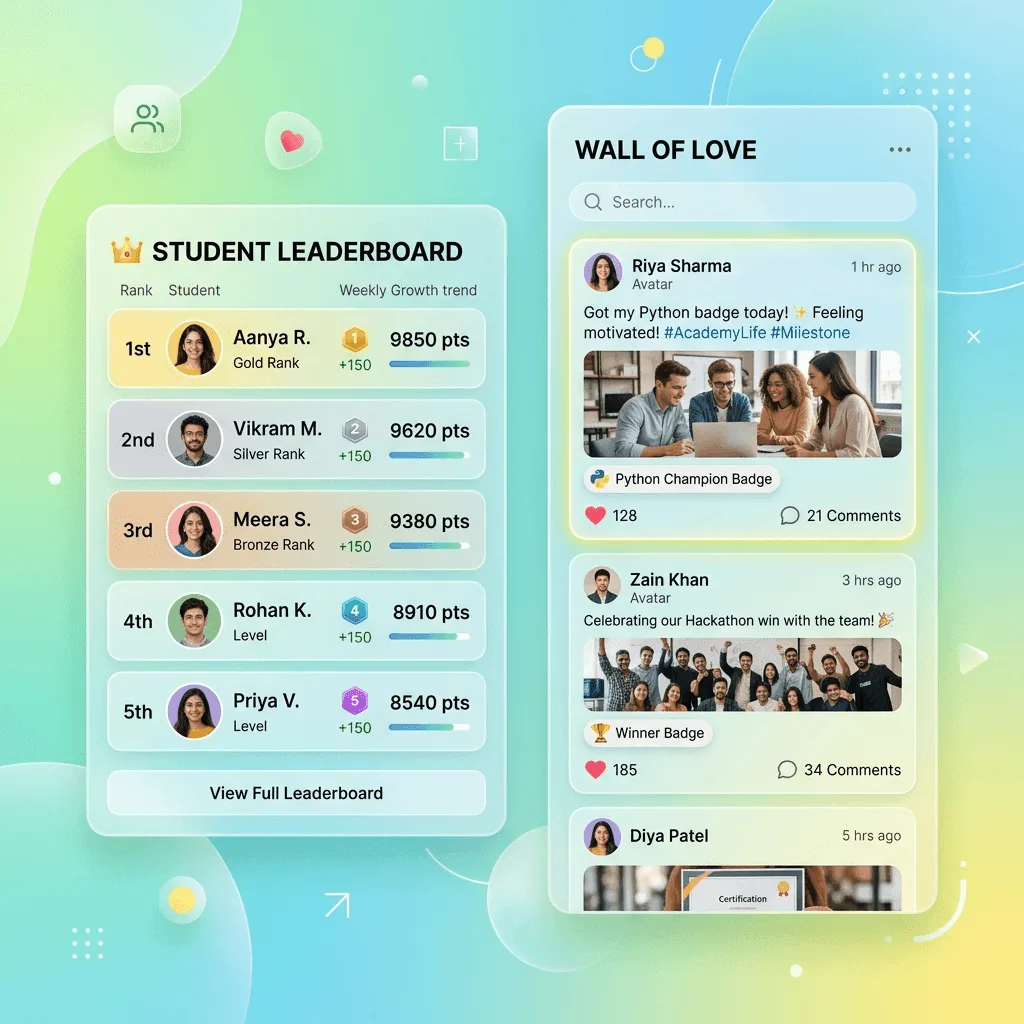
- One leaderboard. An academy-wide board with a thousand names shows a newcomer that they're 940th. The early joiners own the top forever. At this size, the board needs help: weekly goals that reset, team totals, levels that unlock something, or no public board at all.
- One community. A single feed for a thousand people becomes noise. Split communities by cohort or level, and keep an all-academy space for announcements and wins.
- Knowing what's happening. You can't feel the mood of a thousand students. You need numbers: attendance by section, who's slipping, which lesson people stall on.
How many sections, seats and live minutes does each size need?
Here's the arithmetic for a hypothetical academy whose students each get two 60-minute live classes a week, about 8 a month. Live usage on most platforms is measured in some form of participant time; on Prolaud it's participant-minutes, which is people multiplied by minutes, with a monthly allowance per plan: 60,000 on Pro and 300,000 on Studio.
| Students | Sections on Pro rooms | Sections on Studio rooms | Participant-minutes a month | Plan it points to |
|---|---|---|---|---|
| 40 | 1 of up to 49 | 1 of up to 99 | 19,200 | Pro fits |
| 200 | 5 of up to 49 | 3 of up to 99 | 96,000 | Studio |
| 1,000 | 21 of up to 49 | 11 of up to 99 | 480,000 | Beyond Studio's allowance: talk to us about Institute, or teach fewer live minutes per student |
Two lessons from that table. First, the room is rarely the binding limit; the teacher's time is. At 200 students you'd want sections well below the room ceiling, probably 25 to 30, which means 7 or 8 sections and two or three instructors. Second, at 1,000 students fully live, the live minutes outgrow a self-serve plan. That's normal for a school of that size, and it's why the mature model at scale mixes live and recorded: live sections for practice and feedback, recorded lessons for content, and challenges for the days in between. The allowance is soft on Prolaud: passing it never ends a class that's running; you're warned, and it applies to the next session.
How do cohorts and instructors work as you grow?
A cohort is a group that starts together, moves at the same pace and finishes together. It's the most natural unit to scale, because each new cohort is a copy of a process that already works. On Prolaud, a cohort is a course of its own with its own community; run two intakes as two courses, schedule each one's live classes on its course, and switch on Only these students can join so only that cohort gets in. A student keeps one account across everything they buy, so moving from a beginner course to an advanced cohort doesn't create a second login.
Instructors need their own seats. Pro includes 2 teacher seats (you and one co-teacher), Studio 5, and Institute, which is sales-led, lists unlimited seats. If your plan is to grow to five or more instructors, that's the line to check first on any platform. For comparison, Teachable's pricing page lists 1, 1 and 5 admin-level users on its Starter, Builder and Growth plans as of November 2026.
- Write the session plan once. Each live class in the curriculum gets a one-page plan: goal, warm-up, main activity, practice, what students do before next time. That's what makes a section taught by a new instructor feel like yours.
- Have new instructors shadow one full cohort before they run their own section.
- Give each instructor a cohort, not a list of classes. Ownership of a group keeps quality up.
- Compare sections, not just students. Attendance and completion by section tell you which instructor needs help.
- Keep one flagship section for yourself. It's how you stay close to what students actually struggle with.
Where do challenges help retention at scale?
Live classes are where students learn; the days between them are where they drift. A challenge fills those days with one small task a day and a visible check-in. At scale it does something a teacher can't: it gives every student in every section the same daily rhythm without anyone having to write it each week.
- A first-week challenge for every intake. Seven days of small tasks that get a new student through the hardest week: set up, say hello, finish the first lesson, try the first practice task. On Prolaud you can build a challenge from a course, one day per lesson, so finishing the lesson counts as that day's check-in.
- A practice challenge between live sessions. A 21-day speaking, drawing or problem-solving challenge where the check-in is the practice itself, with a photo, a few words, a video or a link.
- A paid challenge as a front door. A challenge can be sold on its own page, and On the last day, offer puts your next course in front of everyone who finished.
The teacher's side is what makes challenges workable at scale. A progress grid shows every member and every day; Nudge reminds everyone who hasn't checked in today in one click; check-ins can require approval when proof matters, and moderators can approve too; and certificates are issued automatically to everyone who meets the rule, with a public verify page. Details are in run a challenge, and the full playbook is in how to run a 21-day community challenge.
Nudges help, within limits
Don't expect reminders and streaks to fix a course on their own. A large study across 247 online courses and about 250,000 students (Kizilcec and colleagues, 2020, PNAS) found behavioral nudges had effects roughly an order of magnitude smaller than earlier small studies, raising early engagement but not final completion. Challenges work best when the daily task is genuinely useful practice, not just a reason to log in.
How should points and leaderboards change as you grow?
Points work at any size if they reward the right things. On Prolaud, students earn XP for lessons, live classes, quizzes, assignments and challenge check-ins, and for helping classmates, with daily limits on the XP that posting and replying can earn. What changes with size is the leaderboard, because Prolaud has one board for the whole academy. Here's how I'd set it up at each stage.
| Size | Leaderboard | What carries motivation |
|---|---|---|
| Up to about 100 | On, if the group is competitive by nature; off for beginners | Levels, streaks and badges for first wins |
| 100 to 1,000 | On, with weekly quests so there's a fresh goal every Monday | Levels renamed for your subject; level unlocks for a bonus lesson or a coupon |
| 1,000 and up | Consider houses (teams with a shared total) or switching the public board off | Team totals, personal progress, certificates |
| Children of any number | Kids mode: no other child's name on any board | Their own progress and their house's total |
Level unlocks deserve a special mention at scale, because they turn points into something that does work for you. A space, a lesson, a download or a coupon can open at a level, so a student who reaches the fourth level gets the advanced practice set without you deciding who's ready. See XP, levels, streaks and rewards for every setting, and our guide on selling courses with live sessions and gamification for where leaderboards backfire.
What should you automate first?
- Enrollment and access. Purchase to course to community, with no manual step. This is the one that breaks first.
- The welcome sequence. An automation is one rule: when something happens (a purchase, or a contact getting a tag), do something (send an email, or add a tag), optionally after a wait. Three emails over the first week cover most of what you'd otherwise answer by hand (build an automation).
- Quiet-student follow-up. Automatic nudges send one note in your words to a member who goes quiet, at 10am, once per quiet spell.
- Certificates. Issued automatically when a student meets the rule, each with a public verify page.
- Installments. Payment plans charge on schedule, so you're not sending reminders for money.
- Partner sales. An affiliate program records which partner sent each sale. You pay partners yourself; Prolaud only records and reports (affiliate program).
Leave two things manual for as long as you can: the first reply to a new student's first question, and the message to someone who's about to quit. Those are where a school feels human.
What should you measure?
- Attendance by section and by week. A section whose attendance falls two weeks running has a problem the curriculum won't fix. On Prolaud, live attendance is written to each student's record, not left in a meeting tool's export (live class attendance).
- First-week activity. Students who don't do anything in week one rarely start in week three. Watch the first-week challenge grid.
- Where students stall. The lesson where most people stop is the lesson to fix first.
- Completion and renewal by cohort. Compare intakes, not just this month to last month.
- Revenue per teaching hour. The number that tells you whether growth is making the business better or just bigger.
Dashboard → Students → Engagement on Prolaud gathers summary cards, charts and a needs-attention panel in one place (the engagement hub). Engagement and course-completion analytics are on Pro; cohort comparisons, funnels and exports are on Studio.
What should a platform give you before you scale on it?
| Requirement | Why it matters at scale | How to check in a trial |
|---|---|---|
| Live room inside the platform, with attendance on the student record | Attendance you can't see per student can't drive follow-up or points | Run a class with two devices; find the attendance afterward |
| Room size and class length you can read | Sections are planned around the room ceiling | Find the number on the pricing page, not in a sales call |
| Instructor seats | Hiring is the main way a live school grows | Count seats on the plan you'd buy at 1,000 students |
| Communities per course or cohort, joined automatically | One feed for everyone becomes noise | Buy your own course; see where you land |
| Challenges with check-ins and a teacher's progress view | Carries students between live sessions | Run a 5-day challenge with a colleague |
| Points you can tune, with limits on talk XP, and a board you can turn off | The wrong rules reward the wrong behavior across hundreds of students | Change a value; check it doesn't rewrite history |
| Automations, nudges and payment plans | Administrative work grows faster than students | Build one automation end to end |
| Full export and your own payment account | The bigger you are, the harder it is to leave | Export students and orders on day one |
| 0% or a known fee on sales | A percentage fee grows with every student; a flat fee doesn't | Add up a month at your target volume |
What are Prolaud's limits at each plan?
| Limit | Pro | Studio |
|---|---|---|
| Active students | 1,000 | No cap |
| Teacher seats | 2 | 5 |
| Communities | 5 | No cap |
| Published courses | 25 | No cap |
| Storefront products | 50 | No cap |
| People in one live room | 49 | 99 |
| Longest single class | 90 minutes | 180 minutes |
| Live participant-minutes a month (soft) | 60,000 | 300,000 |
| Recording storage | 100 GB | 1,024 GB |
| Recording retention | 90 days | 365 days |
| Analytics | Engagement and completion | Plus cohorts, funnels and exports |
| Commission on your sales | 0% | 0% |
Pro is $18/month billed monthly, or $15/month billed yearly ($180 a year). Studio is $42/month billed monthly, or $34/month billed yearly ($408 a year). Institute is sales-led, for schools and training teams that need more seats, larger rooms (up to 150), single sign-on or the REST API, which isn't on Pro or Studio. Every new academy starts on a 14-day Studio trial with no card, so you can test Studio's limits before choosing, and every first payment has a 30-day money-back window (refund policy).
Test your growth plan against real limits
Start on a 14-day Studio trial with no card: schedule sections, run a challenge, and check the numbers on your own academy.
Start your academyWhen does another platform fit a growing school better?
Prolaud is built for live-taught schools that want the classroom, community and checkout in one place. Some growing businesses are better served elsewhere, and these are the ones I'd point to, with facts from each vendor's own page as of November 2026.
- Kajabi, if you're scaling a large audience business around content and want contacts at volume: its Pro plan lists 100,000 contacts and unlimited products at $499 a month (monthly billing), with live cohorts on Growth and Pro and no revenue share.
- Thinkific, if your live teaching runs on Zoom and you need an enterprise route: Expand is $499 a month and Plus is "talk to sales", with live classes via Zoom on all plans and your own domain on every plan.
- LearnWorlds, if branded mobile apps are part of the plan: it lists a Learning Center & Mobile Apps plan at $598 a month, with multiple live accounts listed on its Learning Center plan.
- Circle or Mighty Networks, if the community is the main product and live sessions are occasional: their transaction fees fall to 0.5% on their top tiers (Circle Plus; Mighty Networks Growth and Mighty Pro).
- Teachable Growth, if you need five admin-level users and a large catalog of self-paced products: it lists 5 admin users and 50 products at $189 a month, 0% with Teachable Payments.
And some of our own limits to weigh: the media server is in Mumbai, so very latency-sensitive teaching in the Americas may feel better on a US-hosted room; we charge in USD and INR only and don't issue VAT or US sales-tax invoices; your academy is on a prolaud.com address until connecting your own domain ships; and the REST API is Institute-only. If any of those is a hard requirement now, take it seriously.
For the related decisions, see live course platforms with community and no commission for a fee-by-fee comparison, how to run a cohort-based course for the week-by-week teaching side, and student retention for online courses for keeping students through to the end.
Sources
- Teachable pricing · Teachable · read 17 November 2026
- Kajabi pricing · Kajabi · read 17 November 2026
- Thinkific pricing · Thinkific · read 17 November 2026
- LearnWorlds pricing · LearnWorlds · read 17 November 2026
- Circle pricing · Circle · read 17 November 2026
- Mighty Networks pricing · Mighty Networks · read 17 November 2026
- Kizilcec et al. (2020), Scaling up behavioral science interventions in online education, PNAS 117(26) · Proceedings of the National Academy of Sciences · read 17 November 2026
- Reich & Ruipérez-Valiente (2019), The MOOC Pivot, Science 363(6423), postprint · Science (author postprint) · read 17 November 2026

Renu Rawat
Founder of prolaud.com. Helping teachers and creators build profitable, independent learning businesses without losing a cut of every sale to platform fees.
About the founderFrequently asked questions
- Can live teaching really scale, or is it capped by my time?
- It scales if you stop being the only teacher. Split students into sections small enough for real interaction, train instructors to teach your curriculum from written session plans, and move practice and follow-up between classes onto challenges and automations. Your time then goes into curriculum, instructor quality and one flagship section, while the number of sections grows with demand.
- How many students can one live class hold on Prolaud?
- Up to 49 people in one room on Pro, 99 on Studio and 150 on Institute. There's no cap on the number of classes, but there is a monthly participant-minute allowance per plan. It's soft: passing it never ends a running class; you're warned and it applies to the next session. Most schools teach better in sections well below the ceiling.
- How many instructors can I add on Prolaud?
- Pro includes 2 teacher seats, which is you plus one co-teacher. Studio includes 5. Institute, which is sales-led and meant for schools and training teams, lists unlimited seats. Seats are the number to check first if your growth plan depends on hiring instructors to run sections.
- Do leaderboards still work with hundreds of students?
- A single public board gets less motivating as it grows, because most students see themselves far from the top and early joiners hold the lead. At scale, add weekly quests that reset every Monday, team totals through houses, and levels that unlock a lesson or a coupon, or switch the public board off and keep personal progress. On Prolaud each piece can be switched on or off separately.
- What should I automate first when my course grows?
- Enrollment and access first: a purchase should put the student in the right course and community with no manual step. Then a short welcome email sequence, follow-up for students who go quiet, automatic certificates and installment billing. Keep personal replies to first questions and to students about to quit; those are where a school still feels human.
- Does Prolaud take a percentage as my school grows?
- No. Prolaud takes 0% commission on sales on every plan, at any volume. Students pay into your own Stripe or Razorpay account, and you pay that processor's standard fee, which we don't mark up. What changes as you grow is the plan you need for seats, students, communities and live time, which is a flat subscription.
- When should a growing school move from Pro to Studio?
- When you pass 1,000 active students, 2 teachers, 5 communities or 25 published courses, or when sections need more than 49 people or classes longer than 90 minutes. Also look at live time: Studio's monthly participant-minute allowance is 300,000 against Pro's 60,000. Studio adds cohort comparisons, funnels and exports in analytics.
Keep reading

How to Scale Your Coaching Business Online
You're booked out and your income is capped by your calendar. Here's how to scale a coaching business online — past 1:1, with leveraged models, systems, a team and recurring revenue.
Read
What are the best platforms for hosting live courses with a community and no commission?
Four tests, eight platforms, one worked example. Which tools give you a live room, a community and your whole sale, as of November 2026, and where each one genuinely wins.
ReadHow to sell courses from your own website with live sessions and gamification
Points, streaks and leaderboards can keep a live course full, or quietly drive away the students you most want to keep. Here's how to choose tools, design the rules and sell it all from a site of your own.
Read
How to run a cohort-based course: a week-by-week playbook
A cohort is a promise that specific things happen on specific days. Here is how to size it, price it, fill it and run it as a weekly rhythm, from enrollment to certificate to cohort 2.
Read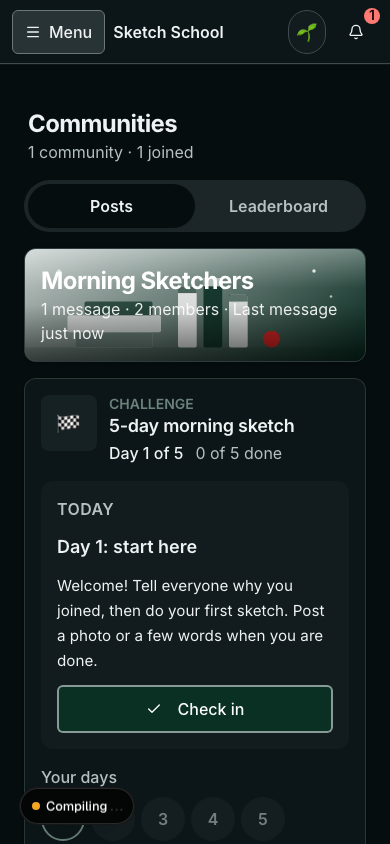
How to run a 21-day community challenge that people finish (template inside)
A good challenge turns a quiet community into the place your students check every day. A weak one goes silent in the second week. The difference is design: one outcome, small daily tasks, proof people can see, a plan for the dip, and a finish line worth reaching. A full 21-day template is inside.
Read
How to Get Students to Come Back and Finish an Online Course
Most people who buy an online course never finish it. Here's why they drop off, how to measure your completion rate honestly, and the features and habits that bring students back every week.
Read