For creators
Paid call funnel: pay → book on cal.com → WhatsApp reminders with the Zoom link
A coach sells a paid call. After paying, some people forget to book. This recipe nudges them on WhatsApp until they do, then confirms the booking with the Zoom link and reminds them before the call — and stops on its own when they book or cancel. Set up once, in about 15 minutes.
Last updated Nov 24, 2026
What it does, step by step
- Someone pays for the call — on your Prolaud storefront, your own Razorpay page, or Stripe. They're tagged call-not-booked.
- 8 minutes later, if they haven't booked, a WhatsApp with your booking link. Again at 30 minutes and 2 hours.
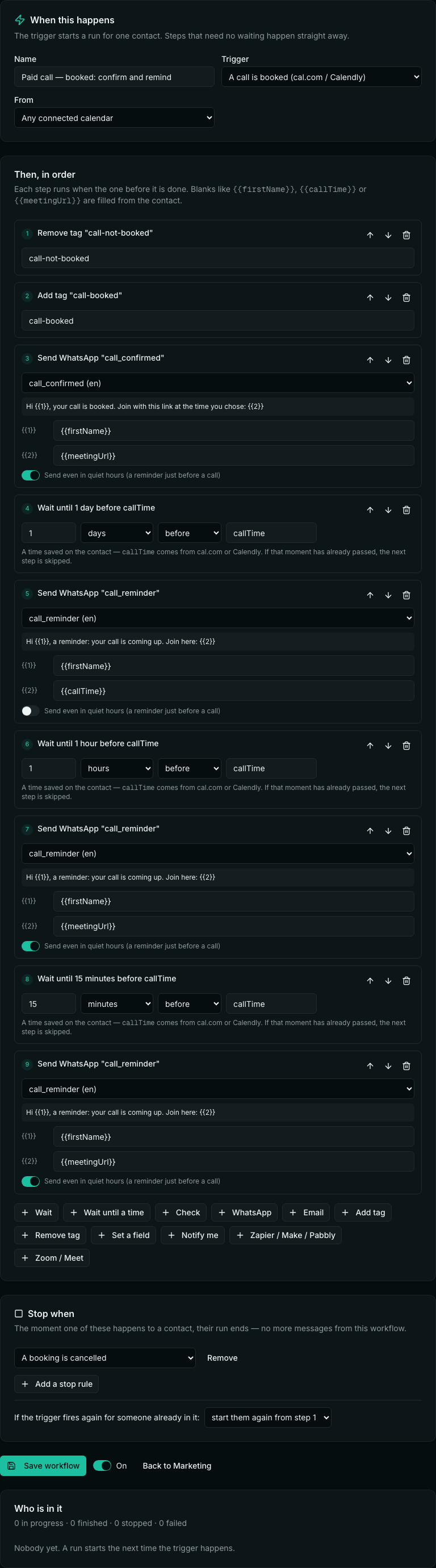
- They book on cal.com or Calendly: the tag becomes call-booked, the booking reminders stop at once, and a confirmation with the time and Zoom link goes out.
- 1 day before the call: what to prepare. 1 hour and 15 minutes before: the Zoom link again.
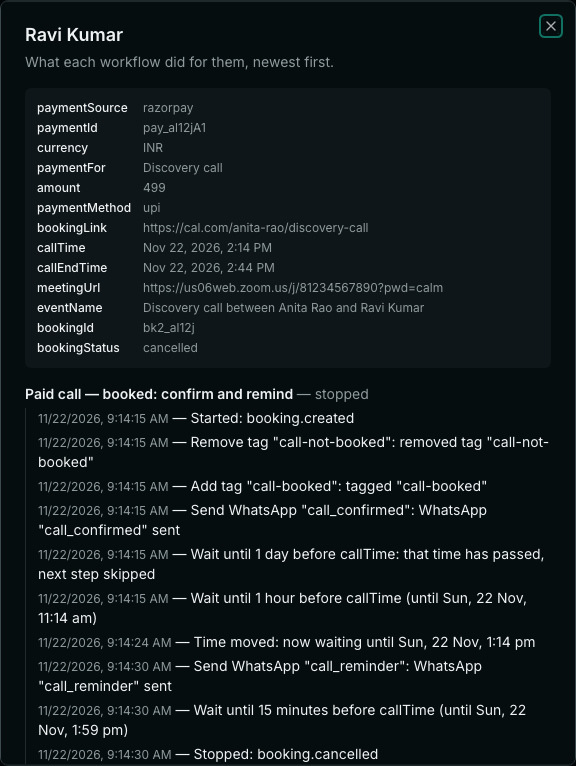
- They reschedule: the reminders move to the new time. They cancel: nothing more is sent.
Before you start
- Your WhatsApp Business number connected, and approved templates for: the booking nudge, the confirmation, the day-before message and the reminder (Sales & Marketing → WhatsApp campaigns).
- cal.com or Calendly connected in Integrations.
- If you sell on your own Razorpay page rather than your Prolaud storefront: Razorpay connected in Integrations.
Set it up
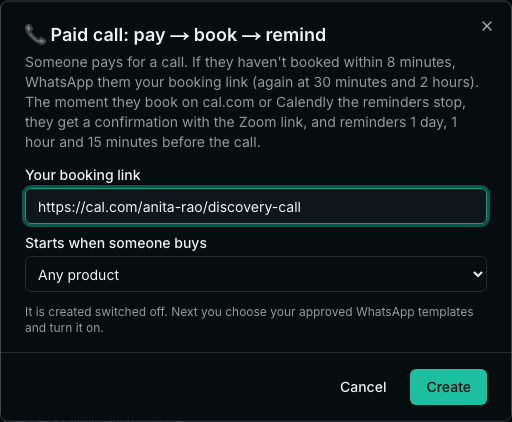
- Open Marketing → Automations → Paid call: pay → book → remind.
- Paste your booking link (your cal.com or Calendly page) and, if you sell on your storefront, pick the call product. Press Create.
- Two workflows are made, switched off: remind them to book, and booked: confirm and remind.
- In the first: if you sell on your own Razorpay page, set the trigger to A payment arrives on your own Razorpay. Pick your approved template in each WhatsApp step; the blanks are already filled with {{firstName}} and {{bookingLink}}. Switch it On and save.
- In the second: pick your templates; in the confirmation put {{meetingUrl}} where the link goes. Switch it On and save.
What it looked like for one person
Ravi paid on Calm Minds Academy's Razorpay page at 10:02. At 10:10 he got the booking link on WhatsApp. He booked for the next morning at 10:14: the booking reminders stopped, and the confirmation with the Zoom link arrived the same minute. He moved the call; the reminders moved with it. Every step is in his timeline.
- What if someone books within 8 minutes?
- They never get a booking nudge: the run stops the moment they're tagged call-booked.
- What if the call is in 30 minutes?
- The 1-day and 1-hour messages are skipped (their time has passed); the 15-minute reminder still goes.
- Does it work with Calendly instead of cal.com?
- Yes — connect Calendly; the second workflow starts on any connected calendar's booking.
- Will people get reminders at night?
- If you set quiet hours, the booking nudges wait until morning; the reminders just before a call are marked to go anyway.
- Can I change the times?
- Yes — every wait is editable: 8 minutes, 30 minutes, 1 day before… Add or remove steps as you like.
Related