For creators
Connect your own Stripe: payments start your workflows
If you take payments on your own Stripe account — a Payment Link, Stripe Checkout or an invoice — connect it once and every payment adds the buyer to Contacts and can start a workflow, such as the paid-call funnel.
Last updated Nov 24, 2026
In short: Integrations → Stripe → Create my address → paste it into Stripe as a webhook endpoint → copy Stripe's signing secret (whsec_…) back into Prolaud.
Connect it
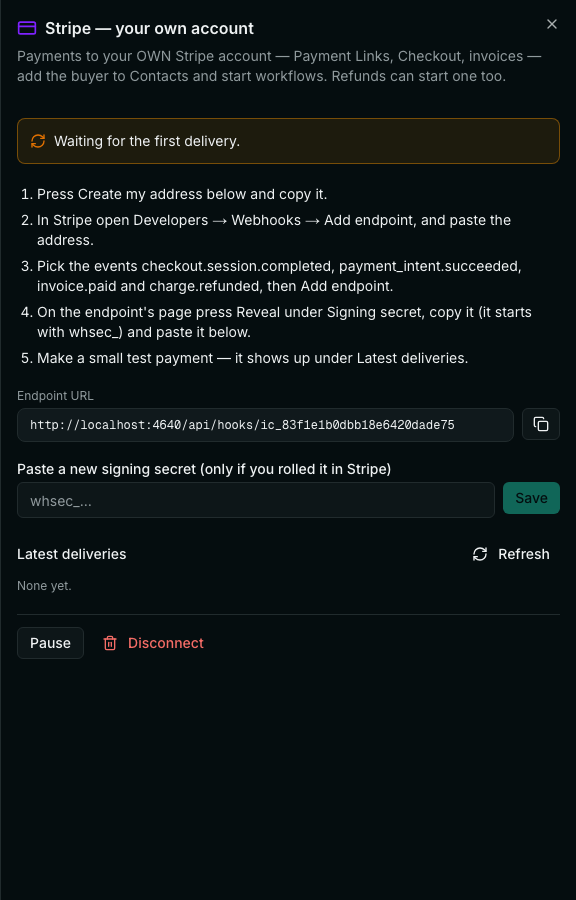
- Open Integrations and click Stripe — your own account. Press Create my address and copy the Endpoint URL.
- In Stripe open Developers → Webhooks → Add endpoint and paste the address.
- Pick the events checkout.session.completed, payment_intent.succeeded, invoice.paid and charge.refunded, then Add endpoint.
- On the endpoint's page, press Reveal under Signing secret, copy it (it starts with whsec_), paste it into Prolaud and press Save.
- Make a small test payment — it appears under Latest deliveries, and the buyer is in Contacts.
What Prolaud does with a payment
- Checks Stripe's signature on every delivery, and refuses one older than five minutes.
- Finds or adds the buyer by email or phone (Stripe Checkout can ask for the phone number — switch that on for WhatsApp).
- Saves the amount, currency and what it was for on the buyer, and starts workflows on A payment arrives on your own Razorpay or Stripe.
- One payment counts once: Checkout sends two events for one payment, and Prolaud acts on it once.
- A refund can start a workflow on A Stripe payment is refunded.
- Why does Prolaud ask for Stripe's secret instead of giving me one?
- Stripe makes the signing secret for each endpoint. Pasting it here lets Prolaud check every delivery came from your Stripe account.
- I rolled the signing secret in Stripe. What now?
- Paste the new one into the Stripe card and press Save. Until you do, deliveries are refused and the card says so.
- Do payments on my Prolaud storefront need this?
- No. Storefront and course-page payments already start workflows. This is for payments on your own Stripe account.
Related