For creators
Connect your WhatsApp Business number (Integrations → WhatsApp Business)
Connect your own WhatsApp Business number once, in Integrations. Campaigns, workflows and class reminders then go out from your number, in your academy's name. It takes about 20 minutes in Meta, once; Meta bills your business directly for the messages.
Last updated Nov 24, 2026
- Open Integrations → WhatsApp Business.
- Follow the five steps in Meta shown on the card: add your number in WhatsApp Manager, create a Business app, copy the Phone number ID and the WhatsApp Business Account ID, and generate a permanent token.
- Paste them and press Check with Meta and connect.
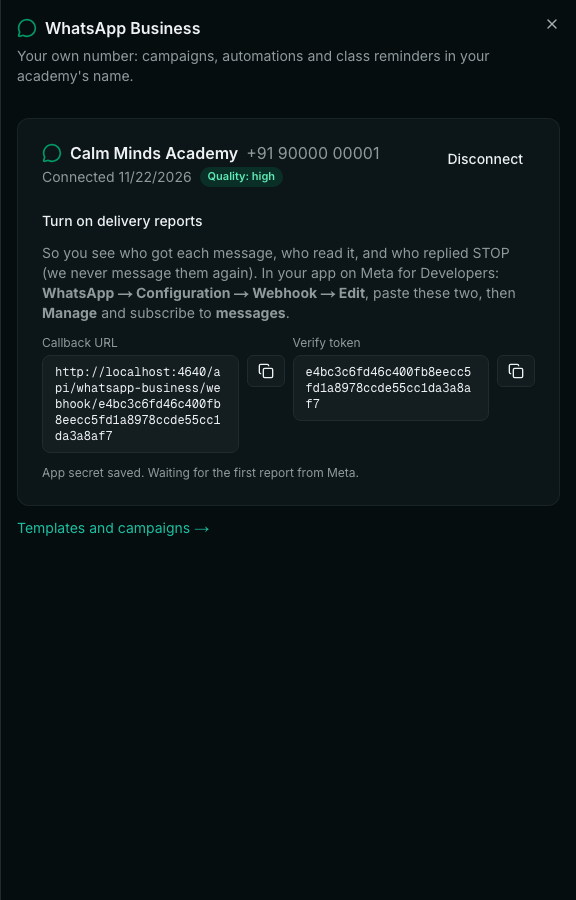
- Turn on delivery reports with the callback URL and verify token shown, so you see who got each message and who replied STOP.
Messages a business starts must use a template Meta approved. Create templates under Sales & Marketing → WhatsApp campaigns; in a workflow, each WhatsApp step picks one and fills its blanks — {{firstName}}, {{meetingUrl}}, {{bookingLink}}…
- Which plan do I need?
- Studio or Institute.
- Someone replied STOP.
- They get no more WhatsApp campaigns or workflow messages from your number.
Related