For creators
Connect cal.com: bookings, the meeting link, reschedules and cancellations
Connect your cal.com account once, and every booking reaches Prolaud with the time and the Zoom or Meet link — so workflows can confirm it and remind the person before the call, and stop when they cancel.
Last updated Nov 24, 2026
How to connect cal.com
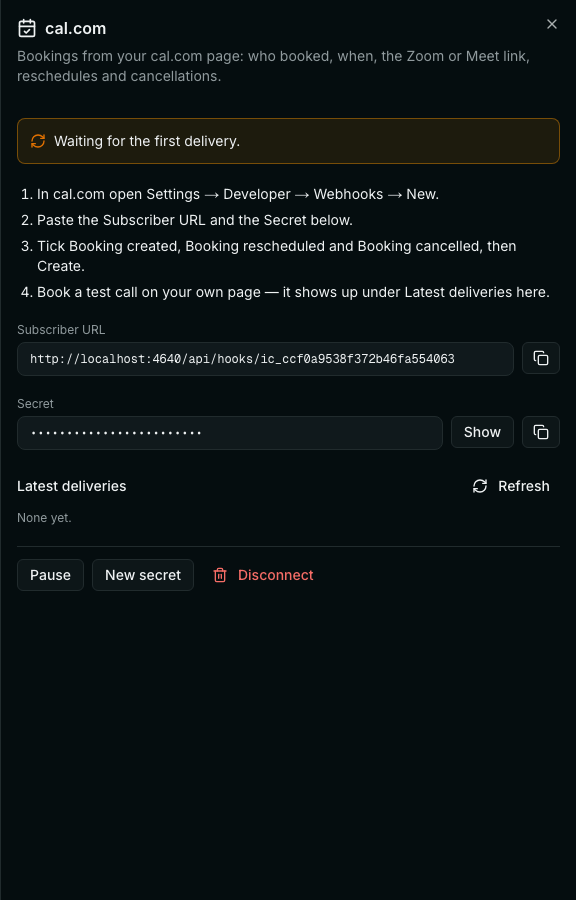
- In Prolaud open Integrations → cal.com → Create my address.
- In cal.com open Settings → Developer → Webhooks → New.
- Paste the Subscriber URL and the Secret from Prolaud.
- Tick Booking created, Booking rescheduled and Booking cancelled, then Create.
- Book a test call on your own cal.com page. It appears under Latest deliveries in Prolaud within seconds.
What is saved on the person who books?
- callTime — when the call starts (messages show it in your academy's time zone).
- meetingUrl — the Zoom, Google Meet or other video link cal.com made for the booking.
- rescheduleUrl and cancelUrl — so a reminder can say how to move it.
- eventName, bookingId and bookingStatus (booked or cancelled).
Use any of them in a message as a blank: {{callTime}}, {{meetingUrl}}, {{rescheduleUrl}}.
Reschedules and cancellations
- Rescheduled: the new time replaces the old one, and reminders counted back from the call move with it.
- Cancelled: a workflow set to stop on "A booking is cancelled" sends nothing more; the old reschedule and cancel links are cleared from the person.
- Where does the Zoom link come from?
- From cal.com. Connect Zoom (or Google Meet) inside cal.com as the event's location; cal.com puts the link on each booking and Prolaud saves it as meetingUrl.
- The booking arrived but no contact was made — why?
- The delivery had no email or phone. Make email a required question on the cal.com event (it is by default).
- Can I connect two cal.com accounts?
- Yes. Create a second address on the card; a workflow can listen to one or to any.
Related