For admins
Running a new intake every year
An institution does the same four things every year: bring in a cohort, tell them they got in, register them into a term, and move last year's cohort up. This page is those four things, in order, with what the software does for you and what it deliberately refuses to do without asking.
Last updated Aug 28, 2026
What a batch is here
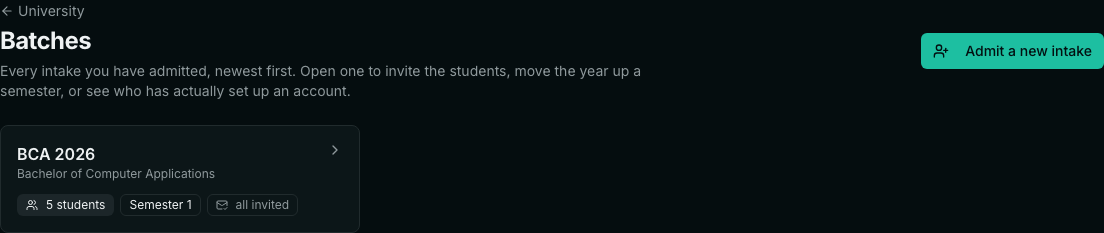
A batch is one programme's intake for one year — “BCA 2026”. It is not a record you create and maintain separately; it is simply every candidate admitted to that programme with that intake year. That matters in a practical way: the number of students on the batch card is a count of real registrations, so it cannot drift out of step with reality the way a manually-maintained cohort list does. Admit one more candidate in March and the batch is one larger, with nothing to update.
One programme running for three years therefore shows three batches — 2026, 2025 and 2024 — each sitting at its own semester. They never mix. That separation is the point: a term registration or a promotion applies to the batch you name and not to everybody on the programme.
1. Bring the intake in
Admissions takes the spreadsheet the registry already has. Drop the CSV in, or paste rows if somebody sent you ten addresses in a message. Column headings do not have to match ours — “Email ID”, “Student Email Address” and “email” are all recognized — and a file exported from Excel with its byte-order mark, Windows line endings and a comma inside a quoted name is read correctly. If there is no header row at all, the old “email, APAAR” form still works.
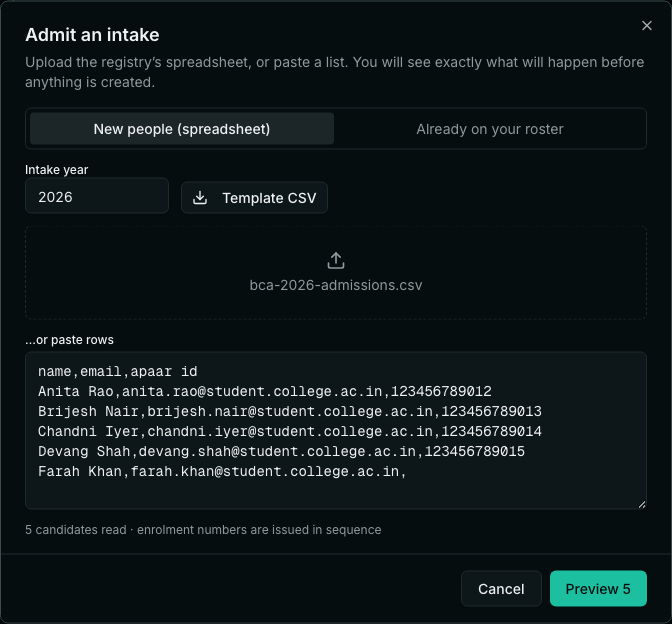
Set the intake year before you go on. It defaults to the current calendar year, which is right most of the time and wrong exactly when you are admitting an October intake for the following session — so it is an editable field rather than an assumption.
2. Look at the preview before anything is created
Admitting is close to irreversible. Enrolment numbers are issued in sequence and you cannot hand 20260007 back, so the screen shows you exactly what it is about to do: every candidate, the number they will be given, and whether they are already on your roster. Rows that will be skipped are listed with the reason.
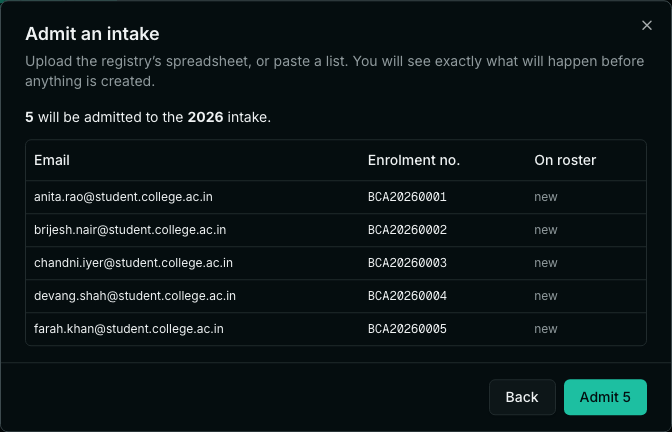
- Someone listed twice in one file is admitted once. Two enrolment numbers against one human being is very hard to unpick after marksheets exist.
- Someone who already holds a live registration on this programme is skipped, so a corrected file can be re-run without doubling the intake.
- A row with no usable email address is rejected rather than admitted without one — the email is how the candidate is later matched to their account.
3. Tell them they got in
This is the step that is easiest to forget, because nothing breaks if you skip it — the candidature exists, the enrolment number is issued, and the only person who does not know is the student. So it is offered immediately after the import, and it stays available on the batch afterwards.
The email carries the things a newly admitted student actually needs: their enrolment number, the programme they are on, the semester they start in, and a link to set up their account. It tells them which address to sign up with, because that is how they are matched to the candidature you just created. Replies go to whoever pressed the button, not to a no-reply sender.
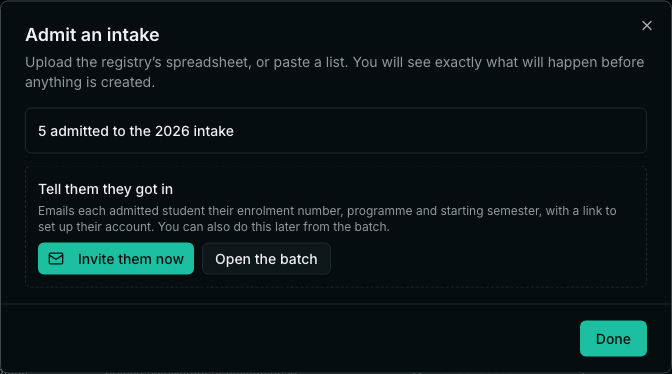
- Inviting again only emails people who have never been told. Re-sending to a whole intake to reach the last twelve is how a sender ends up marked as spam.
- “Resend to all” is there when you genuinely need it — after a domain change, say.
- Anyone without an email on file is reported by enrolment number rather than folded into the success count, so you know who to chase.
Invited is not the same as arrived
Opening a batch shows two separate columns, and the difference between them is the work of week one. “Invited” means we sent the email. “Joined” means the student actually set up an account and can sign in. A batch can be fully invited and barely joined, and that is the normal state for the first few days — what you do not want is to discover it in week six.
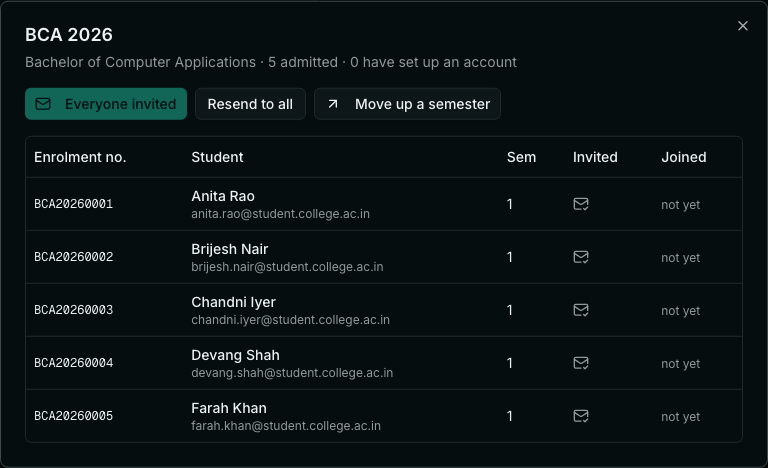
4. Register the batch into the term
Course registration is done per batch, not per programme. Naming the intake year matters: without it, registering “the first-year cohort” would sweep in every active candidate on the programme, including students repeating a semester from an earlier intake. Register 2026 and only 2026 is registered.
5. Move the year up
When the semester ends, promotion advances the whole batch by one semester. It previews first — how many will move, from which semester to which — because it touches every student at once and there is no undo.
- Candidates on hold do not move. A hold exists precisely to stop the machine carrying somebody forward while a fee or disciplinary matter is open, so promotion that ignored it would not be a hold at all.
- Candidates already in the final semester do not move, and are reported separately rather than silently skipped.
- Promotion changes which semester a student is in. It is not a result, and it does not award credits — those come from the examination cycle.
Next year
There is nothing to reset. Admit the new intake with the new year and a second batch appears alongside the first; the programme, its scheme of courses and its regulations are already there and are not touched. The previous batch keeps its own semester and its own students for the rest of its life.
- Can I admit into a batch after the intake has started?
- Yes. Admit with the same programme and the same intake year and the new candidates join that batch. This is the normal path for a late admission or a transfer-in, and the enrolment number simply continues the sequence.
- What if the same student is in two files?
- They are admitted once. Within a single file, a duplicate email is rejected with the reason. Across files, a candidate who already holds a live registration on that programme is skipped — which is what makes re-running a corrected import safe.
- Do students have to be invited to be counted?
- No. The candidature, the enrolment number and the academic record all exist from the moment of admission. The invitation is only how the student gets access to their own dashboard.
- A student never signs up. What happens?
- Nothing breaks and no record is lost — they show as invited but not joined. You can resend to them individually from the batch. Their marks and documents continue to exist against the enrolment number either way.
- Can I promote just some of the batch?
- Promotion moves the whole batch, minus anyone on hold and anyone already in the final semester. To hold a specific candidate back, put them on hold first; that is what the hold is for, and it records a reason.
- Why is the batch not something I create?
- Because a batch record you maintain by hand can disagree with the students it claims to contain, and then the number on the screen is a lie. Deriving it from the registrations means the count is always the truth.
Related