For creators
LMS evaluation checklist: security, payments and ownership
The complete answer sheet for a platform evaluation — content protection, live teaching limits, the real payment math, what you own when you leave, and what every plan costs. Written to be compared line by line against anyone else’s.
Last updated Aug 21, 2026
Most platform evaluations run on the same six questions. This page answers all of them in one place so you can put our answers beside anyone else’s. Content protection has its own, longer page — start there if that is your deciding factor.
Where the answer is no, it says no. A comparison sheet is only useful if the entries can be trusted.
1. Content security
Summarized here, with the mechanism explained in full on the content-security page: no Widevine or FairPlay DRM at any level; signed expiring delivery scoped to your academy; per-student dynamic watermarks; copy, print, right-click, selection and drag-save controls; PDFs rendered without a text layer; a per-student device limit; and no screenshot or screen-recording blocking anywhere, because a browser cannot do it.
- Content security in full — the mechanism, device by device, including what we cannot do
- The public certificate verify page — anyone can confirm a certificate is genuine at /verify/<id>
2. Live classes
- Live classes run natively in the platform on our own infrastructure hosted in Mumbai, with whiteboard, screen share, polls, hand-raise and attendance.
- Concurrency is governed by teacher seats — one host per live room. Starter is a solo workspace, Pro includes two seats, Studio five, Institute unlimited. Extra seats are ₹699 a month if you want one without changing tier.
- Class length: 60 minutes on the free tier, up to four hours on Pro and Studio, unlimited on Institute.
- Recording is manual — the host starts it in one click and the file lands in the workspace automatically when the class ends. There is no “record every class automatically” setting.
- Recordings are gated to the cohort or course that owns them, and enforced at the file: a recording will not open for anyone outside the academy that ran the class.
- No per-student, per-class or per-minute charges on any published plan. The free tier is limited to one class a week and that limit is enforced, not merely advertised; scheduling is never limited, only running a class counts against it.
- Schedule a live class — one-off, recurring, and specific days
- Inside the live room — whiteboard, screen share, polls, hand-raise
- Recording a class — starting one, and where the file lands
- The recordings library — search, share a timestamp, and who can watch
- Attendance — who joined, for how long, and the roster export
3. Payments
- Platform commission is 0% on every plan. We take no percentage of your course revenue — ever, on any tier.
- You get paid into your own payment account: Stripe (US dollars, by card) or, for academies in India, Razorpay (rupees, by UPI, card or net banking). You pay only your payment processor's standard fee, charged by them and not marked up by us.
- Payouts reach your bank on your processor's own schedule. The money never sits in our account, and because checkout runs on your own account, any rate you have negotiated with your processor applies.
- Recurring: memberships and subscription products, plus course installment plans with true auto-debit and grace-period handling.
- Refunds: we charge nothing for one. A Stripe order is refunded from Storefront → Orders, which also removes the buyer's access; a payment on your own Razorpay account is refunded from your Razorpay dashboard and the platform syncs the event to your orders automatically.
- Gateway charges cannot be added as a surcharge line at checkout. You control your pricing, so you can gross prices up to absorb them — in our experience a visible surcharge costs more in conversion than it recovers.
- Receipts for every paid order. For academies in India with GST switched on, course orders produce GST tax invoices. We do not produce VAT or US sales-tax invoices.
- How payouts work — a student's payment, end to end, into your bank
- Connect your Stripe account — the first payment account we offer
- Processing fees in detail — what your processor deducts, and what we don't
- Installments and auto-debit — split a course price across 2–12 charges
- Refund an order — and what happens to access
- GST invoices (India) — where to set your GSTIN
4. Website and apps
- Branded white-label site on Pro and above — your branding, your colors, no “powered by” badge.
- Custom domain on Pro and above. You register it, so it stays yours.
- No native Android or iOS app. Your academy is an installable progressive web app students can add to their home screen; it is not a Play Store or App Store listing. Since there are no native apps there are also no developer accounts and no app charges.
- Full desktop and MacBook browser access — it is the same responsive application.
- On exit: your domain is yours because you registered it, and there are no apps or developer accounts to transfer.
Do I own the website itself?
Worth separating, because “the website” is really three things and they do not all move together. Your CONTENT, branding, student data and domain are yours outright and leave with you. The SOFTWARE that renders the academy is ours, licensed to you while you subscribe — so the running site does not transfer, any more than it would with any hosted platform.
What that means in practice on the day you leave: you export your data and your media, you point your domain at whatever you build or buy next, and nothing of yours is held back or locked in a format only we can read. What you cannot do is take our software with you. Any vendor telling you otherwise is either selling you a source-code license or being loose with the word “own”.
- White-label your academy — your branding, your colors, no platform badge
- Connect your custom domain — put the academy on a domain you own
5. Data and content ownership
- You retain complete ownership of your student data and your course content. Unambiguously.
- One click in Settings exports the entire workspace — courses, lessons, students, enrollments, quizzes, attempts, assignments, submissions, certificates, orders, products, pages and branding — as a single plain-JSON file. Students, courses and orders also export individually as CSV.
- That JSON re-imports into any Prolaud workspace, and the CSVs open in any spreadsheet, so migrating elsewhere is a data-shaping job rather than a rescue mission.
- Media is handled separately: your dashboard lists every video, PDF, image and recording we hold with its size and date, and exports that inventory as a spreadsheet. Bundling video into the export would make a multi-gigabyte download out of a settings page.
- Your original uploads are stored exactly as you gave them to us. There is no proprietary container and no DRM packaging to unwrap — which is worth asking every DRM-based vendor on your shortlist, because there the answer is usually more complicated than it first sounds.
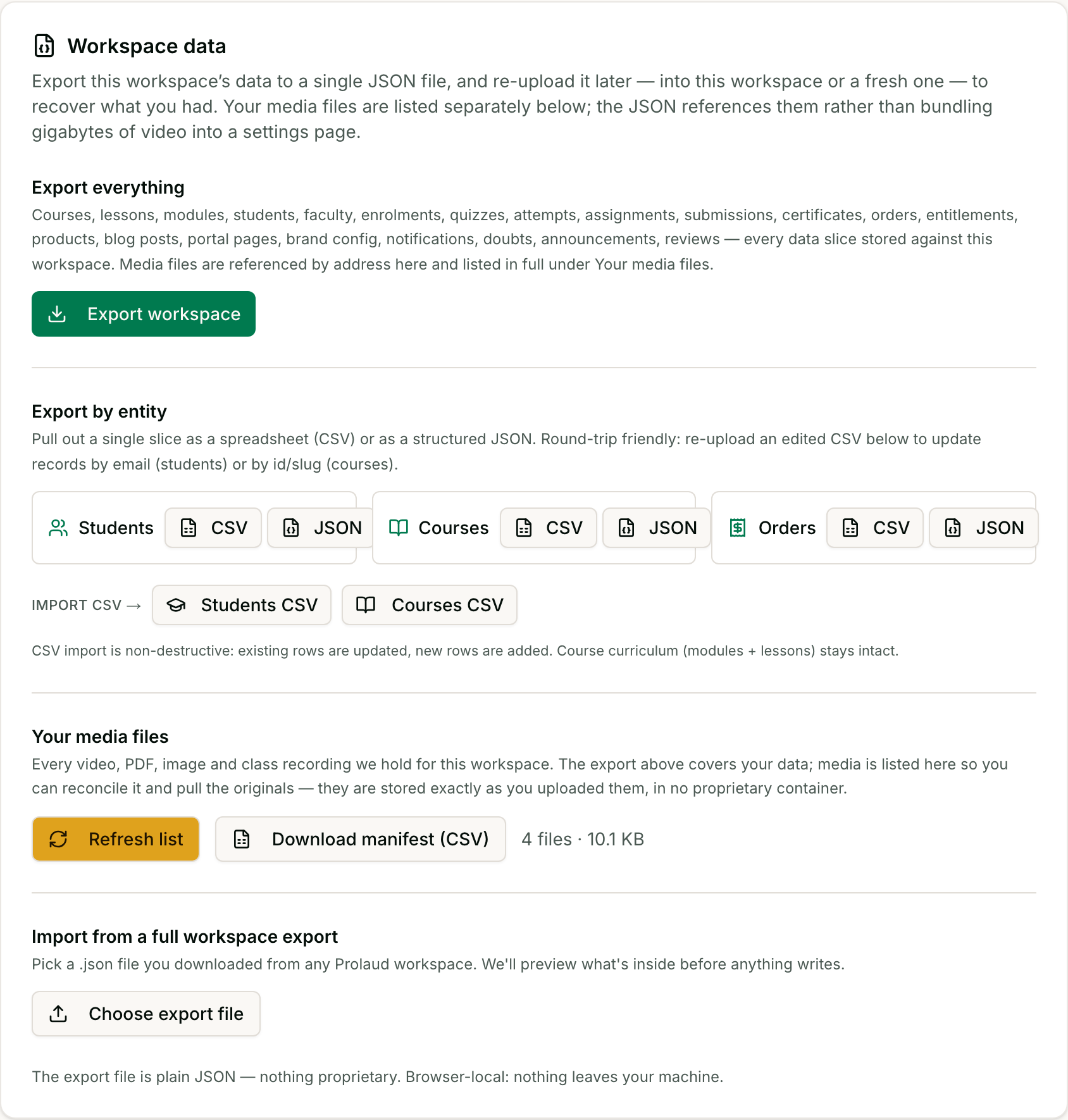
- Export your workspace — the JSON envelope, the per-entity CSVs, and the media inventory
What each plan includes
“Any limits based on students, classes or duration” deserves the actual numbers rather than a reassurance, so here they are. These are capacity caps, not surcharges — you are never billed extra for crossing one; the platform simply asks you to move up a tier.
- Starter (free) — 5 students, 2GB storage, 2 published courses, 5 storefront products, 1 batch, 1 teacher seat, two live classes a week of up to 60 minutes each, 30-day recording retention.
- Pro — 1,000 students, 100GB storage, 25 published courses, 50 storefront products, 5 batches, 2 teacher seats, unlimited live classes up to 4 hours, 90-day recording retention.
- Studio — unlimited students, 1TB storage, unlimited courses, products and batches, 5 teacher seats, unlimited live classes up to 4 hours, 365-day recording retention.
- Institute — unlimited everything, unlimited teacher seats, unlimited class length, and no recording retention limit.
6. Pricing
- Starter — free.
- Pro — ₹1,499 a month, or ₹14,990 a year.
- Studio — ₹3,499 a month, or ₹33,990 a year.
- Institute — ₹9,999 a month, or ₹99,990 a year.
- Quarterly and half-yearly billing are also available. There is no three-year plan — annual is our longest commitment, deliberately, because we would rather earn the renewal.
- No setup or onboarding charge on Pro and Studio; Institute includes hands-on onboarding and training as part of the plan.
- No app charges, because there are no native apps.
- No transaction fee and no revenue share — 0%, on every tier.
- Payment processing fees are paid to Stripe or Razorpay directly and are not marked up.
- No other recurring or one-time charges.
- Pricing your own courses — price, early-bird, coupons — separate from what you pay us
- Your plan badge — what tier you're on and what it unlocks
Questions buyers ask us
- Do you charge any percentage of course revenue on top of payment processing fees?
- No. Platform commission is 0% on every plan, permanently. The only percentage you pay is your payment processor's standard fee, which goes to Stripe or Razorpay, not to us, and which we do not mark up. You can verify every payment against your own processor's dashboard.
- How many live classes can I run at once?
- One host per live room, so concurrency follows teacher seats: one on Starter, two on Pro, five on Studio, unlimited on Institute — and extra seats are ₹699 a month if you'd rather not change tier. The number of classes per week is unlimited on every paid plan; only the free Starter tier is capped, at 2 classes a week.
- Are recordings automatic?
- No — recording is manual. The host starts it with one click and the finished file appears in the workspace on its own when the class ends. There is no setting that records every class automatically.
- Do I get a branded Android and iOS app?
- No. Your academy is a branded, installable web app on your own domain, which students can add to their home screen, but it is not a Play Store or App Store listing. If a native app is essential, that is a real reason to choose a different platform.
- Can I export my student and payment data if I leave?
- Yes — one click in Settings produces the whole workspace as JSON, and students, courses and orders also export as CSV for a spreadsheet. Nothing is held back and no request to support is needed.
- Can I migrate my content to another LMS?
- Yes. The export is plain JSON and CSV with nothing proprietary about it, and your media files are stored in their original formats, so the work is reshaping data for the new platform rather than extracting it from ours.
- Are there setup, onboarding or app charges?
- None on Pro and Studio, and no app charges on any plan because there are no native apps. Institute includes onboarding and training within the plan price.
- Is there a three-year plan?
- No. Monthly, quarterly, half-yearly and annual only. We would rather earn the renewal than lock in three years of it.
Related