For creators
Course pricing: free, paid, and discounts that actually apply
A course has up to four numbers — the price, a strike-through “was”, an early-bird rate and the date it ends. Two of them only take effect under conditions, which is why a discount can look set up and still charge full price. Here is each rule, and how to tell at a glance which one you are in.
Last updated Sep 25, 2026
Free or paid
Set the price to 0 and the course is free. Learners still go through enrollment, so you get their name on your roster either way — the checkout simply becomes a one-click enroll. On a free course every lesson is open to anyone enrolled, so the “free preview” marker does nothing; it only matters on a paid course, where it is what lets a visitor sample a lesson before buying.
Switching a free course to paid affects new enrollments only. Anyone already enrolled keeps their access, and the same is true in reverse — dropping your price does not refund earlier buyers.
The four numbers on a paid course
- Price — what the course costs. Set it to 0 to make it free.
- Original (strike-through) — an optional higher “was” figure, shown crossed out next to the price. Purely presentational; nobody is ever charged it.
- Early-bird price — a temporary lower price.
- Early-bird ends — the moment the early-bird price stops. Not optional if you have set an early-bird price.
The first two are independent of time. The last two are a pair: neither does anything on its own.
The case people hit: an early-bird price with no end date
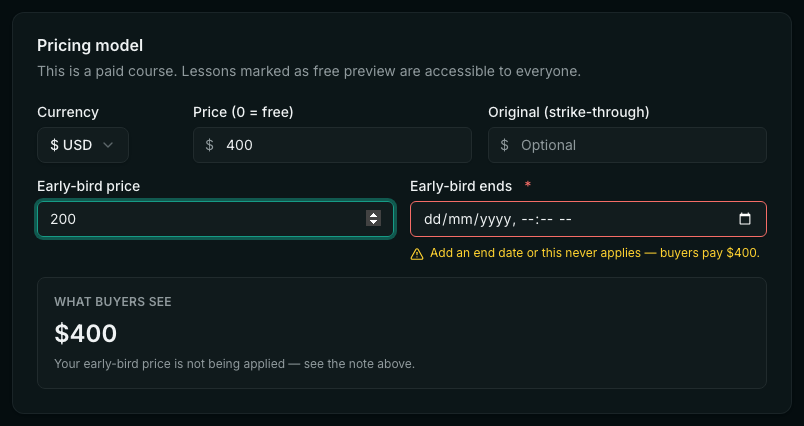
This is a ₹20,000 course with an early-bird price of ₹10,000 and no end date. The early-bird price is not applied — an early-bird with no deadline is not a deadline, so buyers pay ₹20,000. The editor says so in two places: next to the date, and in the preview.
The same discount, live
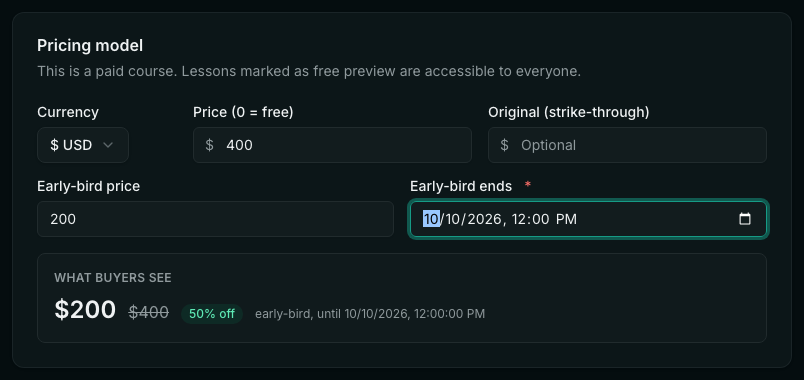
Add the date and the offer applies immediately: the price becomes ₹10,000, the ₹20,000 is struck through, and the saving is worked out for you. The deadline is shown so you can check it is the one you meant.
Every rule, in one place
A number is ignored, rather than rejected, whenever it cannot mean anything. Each of these shows a note in the editor explaining what buyers will pay instead:
- An early-bird price with no end date — never applies.
- An end date already in the past — the offer has finished; buyers pay the normal price again. Nothing to fix unless you meant to extend it.
- An early-bird price that is not below your price — it is not a discount, so it does nothing.
- A strike-through that is not above the price buyers pay — there is nothing to cross out, so it is not shown.
You can use the strike-through and the early-bird together. When both are set, buyers see the early-bird price with your “was” figure crossed out, and the percentage is worked out against that higher number.
Currency, and selling abroad
Pick the currency at the top of the Pricing tab. Whatever you type is charged exactly as typed — nothing is ever converted for you, so a course priced at 1 costs one rupee or one dollar depending on that setting, never a conversion of the other.
Which currency a visitor is shown follows the payment account you have connected: Stripe means dollars, Razorpay means rupees. Dollar checkouts take cards; rupee checkouts take UPI, cards and net banking. Academies in India can switch on GST invoices under Billing.
If you have connected both gateways, fill in the USD block on any course you want to sell abroad. It is a separate set of figures — price, strike-through and early-bird — charged as-is, and it shares the rupee block’s end date. Leave it empty and that course simply cannot be bought in dollars; the buyer is told to get in touch rather than being shown a dollar figure that was never your price.
- I set an early-bird price and nothing changed. Why?
- It almost certainly has no end date. An early-bird price without one never applies, and buyers are charged your normal price. Fill in “Early-bird ends” with a date in the future and the offer goes live immediately — check the “What buyers see” panel to confirm.
- My strike-through price isn’t showing.
- A strike-through only appears when it is higher than what buyers actually pay. If your price is ₹20,000 and you put ₹15,000 in the “Original” box, there is nothing to cross out. Put the higher “was” figure there, not the lower one.
- How do I check what a visitor will actually be charged?
- The “What buyers see” panel on the Pricing tab. It is rendered by the same code as the course page, the catalog and the checkout, so it cannot show one price while your storefront shows another.
- Do I have to publish for a price change to take effect?
- Yes. Pricing lives with the rest of the course, so publish your changes for visitors to see them.
- What happens when the early-bird deadline passes?
- The price returns to your normal price on its own, and the strike-through disappears unless you have set an “Original” figure of your own. You do not need to do anything.
- Can I discount for some students only?
- Use a coupon code instead — it is applied at checkout by the people you give it to, rather than changing the price everybody sees. Coupons are on the same Pricing tab.
- Do a coupon and an early-bird price stack?
- Yes — and this is worth knowing before you hand out a code. The coupon comes off the early-bird price, not off your normal price. A 50% coupon during a ₹20,000 → ₹10,000 early-bird is ₹5,000, a quarter of your list price. If that is not what you want, set the coupon to a fixed amount, or give it an expiry that starts after the early-bird ends.
- If I raise my price, do existing students pay more?
- No. A price is fixed at the moment of purchase; changes only ever apply to people who buy afterwards. Lowering the price does not refund earlier buyers either.
- Can I let buyers choose what to pay?
- Not on a course. Pay-what-you-want, subscriptions and bundles are pricing types for store products (Store → Products), so sell that way if the flexible price matters more than the course structure.
Related