For creators
Policy pages Razorpay will accept (India)
Before Razorpay lets you take money it fetches your Terms, Privacy and Refund pages and reads them. Most rejections are not about the links — those are usually fine — but about what the pages say. Here is what the check looks for, and how to get there in about ten minutes.
Last updated Sep 26, 2026
Razorpay's Page Compliance Check visits the URLs you give it and looks for specific things on each page. It reports three outcomes, and they mean different things: it could not find a page, it found one but the content falls short, or it passed. The middle one is the confusing one, because the link works when you click it.
The sentence that fails the check
If you created your policy pages before 26 September 2026, they open with this line: “Important: This is a starting template — replace the bracketed placeholders with your actual policies and have a lawyer review it before publishing to real students.”
That was meant for you, not for your students, and it should never have been published. A reviewer reads the first line of the page and sees a merchant declaring they have not written a policy yet. It is the single most common reason for “Page found but doesn't meet requirements”.
Fixing a page you already have
Open the page — Public Site → Pages → the page → and you will see this at the top of the editor:

“Update to the current template” swaps in the current wording: your business named at the top, your payment processor named, data retention, governing jurisdiction, and real cancellation terms. It replaces only the section holding the old boilerplate, so anything you added yourself stays where it is. Your support email is filled in automatically.
What you still have to fill in
Four details are left as placeholders, because they are facts only you have. The editor lists exactly which ones are still there:
![An amber banner reading “This page still has 4 placeholders to fill in: [LEGAL-ENTITY-NAME], [BUSINESS-ADDRESS], [PHONE], [CITY]” and explaining that payment gateways fetch the page and reject a policy that still shows a placeholder.](/help/payment-gateway-policy-pages/03-placeholders-remaining.png)
- [LEGAL-ENTITY-NAME] — the name exactly as it appears on your Razorpay account. A mismatch here is its own rejection reason.
- [BUSINESS-ADDRESS] — a full postal address including PIN code.
- [PHONE] — a number somebody actually answers.
- [CITY] — the city whose courts govern disputes, in the Terms only.
Do the same on each policy page, then publish. The banner disappears once the last placeholder is gone, which is a quicker way to check your work than re-reading the page.
Starting from nothing
If you have no policy pages yet, Public Site → Pages → Add legal pages creates all five, already written for a gateway review:
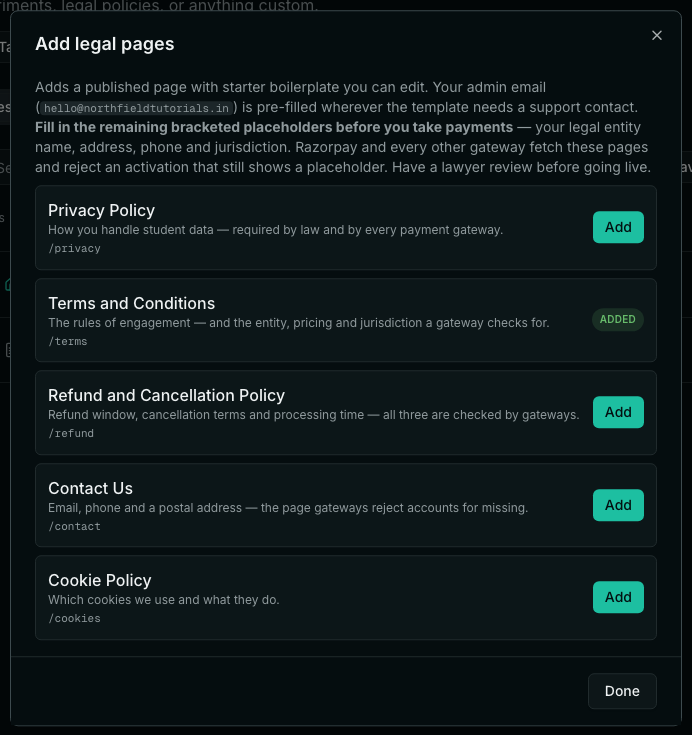
Contact Us is the one people skip, and it is a common rejection on its own. A gateway wants to see an email, a phone number and a postal address on a page of their own, not only in a footer.
Link them in the footer
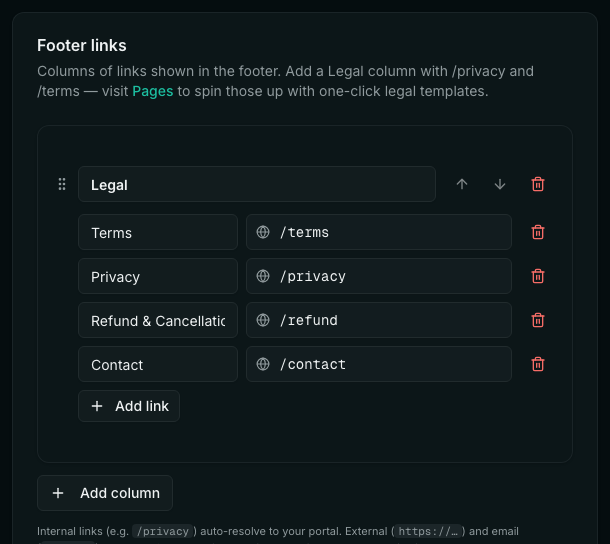
The crawler looks for the policies on your site, not only at the URLs you typed into the form. Brand → Layout → Footer links, add a Legal column with all four:
What each page has to say
If you would rather write your own, these are the things the check looks for. The supplied templates already contain all of them.
- Terms — who is operating the site, what you sell, that delivery is digital and immediate, prices in Indian Rupees, that Razorpay processes payments, and the city whose courts have jurisdiction.
- Privacy — what you collect, why, who you share it with (naming Razorpay as the processor), how long you keep it, how it is protected, and how someone asks for a copy or a deletion.
- Refund and Cancellation — a refund window in days, how to request one, how long the money takes to come back and to which account, what is not refundable, and cancellation terms in their own right. Cancellation and refund are two different questions and the check treats them that way.
- Contact Us — email, phone and a postal address.
Then submit
- Publish the pages and open each URL in a browser to confirm it loads and reads correctly.
- Paste the URLs into the compliance form. Your site's address is <your-slug>.prolaud.com, or your own domain if you have connected one.
- The Refund URL goes in both the refund and the cancellation field — one page covers both, as long as it has a Cancellation section.
- Press Verify Again.
- Razorpay says “Page found but doesn't meet requirements”. What does that actually mean?
- It reached your page and read it, but could not find what it needs. The link is fine — the content is the problem. Nine times out of ten it is the “This is a starting template” line at the top, or a placeholder like [LEGAL-ENTITY-NAME] that was never filled in.
- Why didn't my existing pages update when the templates changed?
- Because you may have edited them, and silently rewriting someone's published legal text would be worse than leaving it stale. Instead the editor offers the update on any page still holding the untouched old boilerplate, and you decide.
- I don't see the update banner on my page.
- Then the page is not carrying the old template — either it is already current, or somebody has edited it. In that case compare it against the list above and add whatever is missing by hand.
- Do I need a separate cancellation page?
- No. One Refund and Cancellation Policy covers both, as long as it genuinely addresses cancellation — our earlier template never used the word once, which is why the check asked for a second link. Give the same URL for both fields.
- My business has no separate phone number or office address.
- Use whatever is registered against your Razorpay account — a proprietor's address and mobile number are acceptable. What is not acceptable is leaving the placeholder in, or inventing details, which becomes a much larger problem after approval than before it.
- Does the entity name have to match Razorpay exactly?
- Yes. The name on your policy pages and the name on the account are compared. “Northfield Tutorials” and “Northfield Tutorials Pvt Ltd” are not the same name.
- Can I take payments while this is pending?
- Not through that gateway — activation has to complete first. Your site, courses and free enrollments all keep working in the meantime.
Related