For creators
Incoming webhook: connect Zapier, Make, Pabbly, n8n or your own site
Anything that can send a webhook can add people to your academy and start workflows: Zapier, Make, Pabbly Connect, n8n, Typeform through Zapier, or your own website. You get one private address, send one test, and tell Prolaud which field is the email, phone and name.
Last updated Nov 24, 2026
How to set it up
- In Prolaud open Integrations → Incoming webhook → Create my address. The address carries its own secret — keep it private.
- In Zapier add an action Webhooks by Zapier → POST (in Make: HTTP → Make a request; in Pabbly: API by Pabbly; in n8n: HTTP Request), paste the address, and send JSON.
- Send one test with at least an email or a phone number.
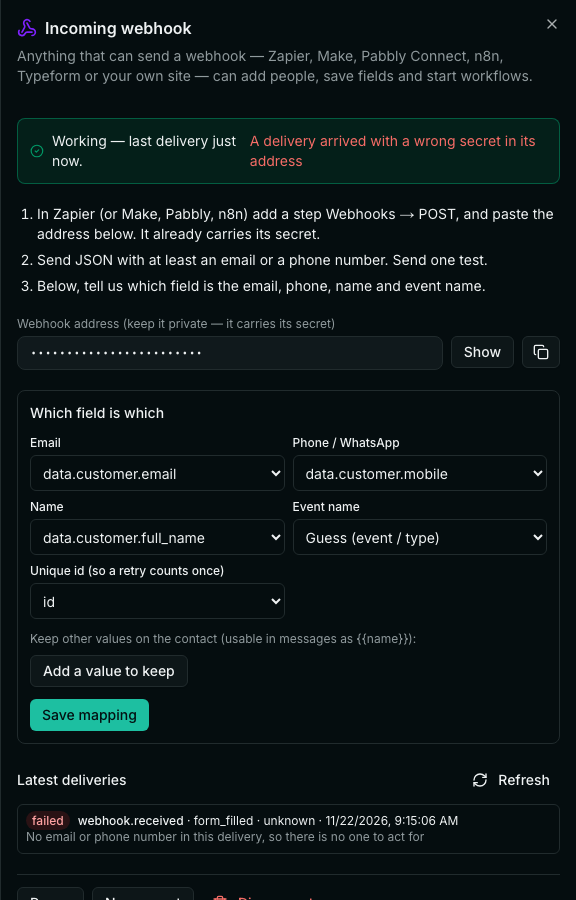
- Back in Prolaud, open the card and, under Which field is which, choose the email, phone, name and event name from the fields of your test. Pick a unique id too, so a retry counts once.
- Under Keep other values, name any value you want on the contact (for example callTime ← data.slot), then Save mapping.
A flat body such as {"email": "…", "phone": "…", "name": "…"} works without any mapping.
{
  "event": "form_filled",
  "id": "zap-1042",
  "data": {
    "customer": { "email": "[email protected]", "mobile": "+91 90000 00013", "full_name": "Asha Devi" },
    "slot": "2026-11-26T08:00:00Z"
  }
}
Start a workflow from it
In Marketing → Automations choose the trigger An incoming webhook arrives. To react to one kind of delivery only, type its event name (for example form_filled).
- A delivery shows as failed: 'No email or phone number'.
- The fields are nested, so Prolaud can't guess them. Map them under Which field is which and send again.
- Someone found my webhook address.
- Open the card and press New secret: the old address stops working at once. Put the new one into your tool.
- Can it remove a tag or stop a workflow?
- Yes, through a workflow: start one from the webhook whose steps remove the tag; any workflow set to stop when that tag goes will stop.
Related