For learners
Sitting a proctored paper: what happens, and what is recorded
Written for the person sitting the paper as much as the person setting it. Everything recorded is named before you begin, every flag has an innocent explanation that is more common than the guilty one, and nothing decides anything on its own.
Last updated Aug 28, 2026
Before anything is recorded
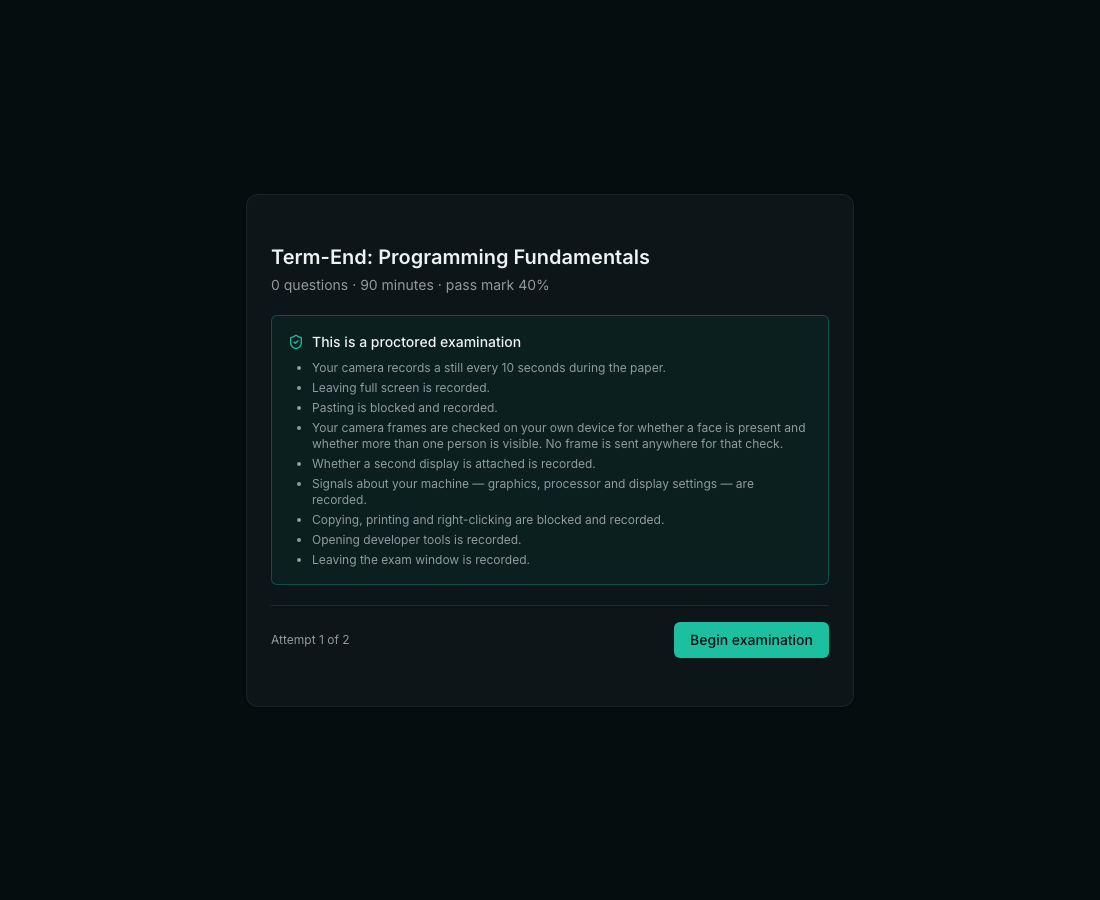
The first screen lists everything that will be recorded during this paper. Not a link to a policy and not a checkbox — a list, in plain words. Nothing has started at that point: no camera, no timer, no monitoring. If a paper asks for something you are not willing to give, that is the screen to raise it on, before you begin rather than after.
The paper
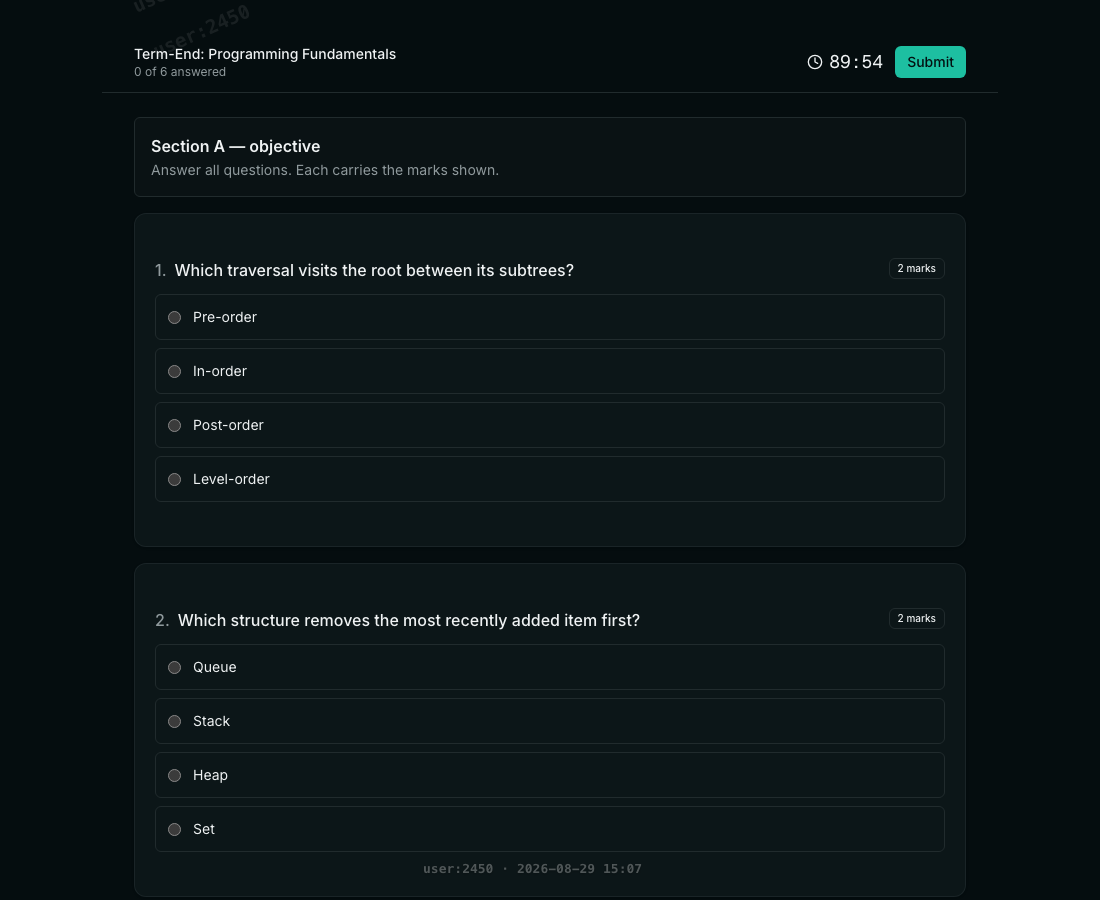
Questions are drawn from the course's bank, so the paper in front of you is not the paper next to you. Sections carry their own instructions, marks are shown per question, and the clock belongs to the server — changing your computer's time changes nothing. Answers are saved as you go: closing the lid, losing wifi, or a browser crash does not lose them.
What each flag actually means
Every one of these has an innocent explanation that is more common than the guilty one, and the invigilator's screen says so. They are written as observations, not accusations.
- Left the exam window — the tab lost focus. A notification steals focus. So does a phone call on a laptop, and so does the operating system deciding to update something. It does NOT mean you looked anything up.
- Pasted content — text was pasted into an answer. Only the LENGTH is recorded; the text itself is never stored. It does not mean the text came from outside the paper — people paste their own earlier draft.
- Another person appeared in frame — more than one face was found in a webcam still. It does NOT mean somebody was helping you. A flatmate crossing the room behind you, a child, a poster of a face on the wall behind your chair — all of these produce it, and all of them are more common than the thing it is looking for. The still it was counted from is attached, so a reviewer looks at the picture rather than the label.
- No face in frame — no face was found in a still. Looking down at your working, sitting outside the camera’s cone, or poor light all produce it. It asks whether you are still there; the flag above asks whether somebody else is. They are different questions and are recorded separately.
- Camera stopped — the webcam was switched off, unplugged, or taken by another application. A driver crash looks identical to a deliberate act, which is exactly why a person reviews it.
- Connection gap — the client stopped reporting for a while. On a distance programme this is expected often enough that it is weighted very low.
- A second display — more than one screen is attached. That is how a great many desks are set up permanently. It does not say what was on the second screen, because a browser cannot see that.
- Copy, print or right-click blocked — the attempt is recorded. People reflexively press Ctrl-C on their own answer.
- Identity not captured — the paper was sat without a photo and ID. This one is not about behavior at all: it means nobody can establish WHO sat it, which is half of what a proctored examination is.
- Exited full-screen — on a paper that asked for full screen, you left it. Leaving is recorded, never blocked: a candidate trapped in a window they cannot escape is a worse outcome than a recorded exit, and some assistive software needs the window.
- Virtual-machine signals — your machine reported a software graphics driver, very few processor cores, or an unusual color depth. A low-end laptop and a remote-desktop session look identical here, which is exactly why this is shown to a person and never acted on.
- Developer tools — the browser window changed shape in a way a docked developer panel produces. It catches a docked panel and misses an undocked window, so its absence proves nothing at all.
- A second camera stopped — where a phone was paired as a second camera, it stopped reporting. A flat battery and a moved phone look the same.
Several of them only appear in the summary at all once they have happened more than a handful of times. That is deliberate: one blocked copy is somebody pressing Ctrl-C on their own answer, and reporting it would train reviewers to ignore the line. Seven of them in a minute is a different sentence, and the software waits until it can write that one.
How “another person appeared” is worked out
In your own browser, on your own machine. A small model — about the size of a photograph — is downloaded the first time a paper needs it and looks at the webcam frame right there in the page. The frame it looks at does not leave your computer for that check, no third party is involved, and your institution does not need an account with anybody.
It is worth saying what this replaced, because the distinction matters. Browsers have their own built-in face detector, and the obvious thing to do is call it. That API has sat behind an experimental flag in Chrome for years without ever launching, and no other browser ships it — so a system built on it performs a check that, for practically every candidate, never happens at all. Ours did exactly that until it was replaced.
If the model cannot be downloaded — a poor connection, a restrictive network — the sitting records that we could not look. It does not record that no face was found. Those are very different things, and only one of them is true.
What the invigilator sees
Sittings ordered by how much they warrant a look, each with a plain-language summary of what was recorded. The ordering is deliberately gentle on the ordinary signals: a reviewer shown twenty red rows for somebody with a normal two-monitor desk stops reading the queue altogether, and then the one that mattered is missed too.
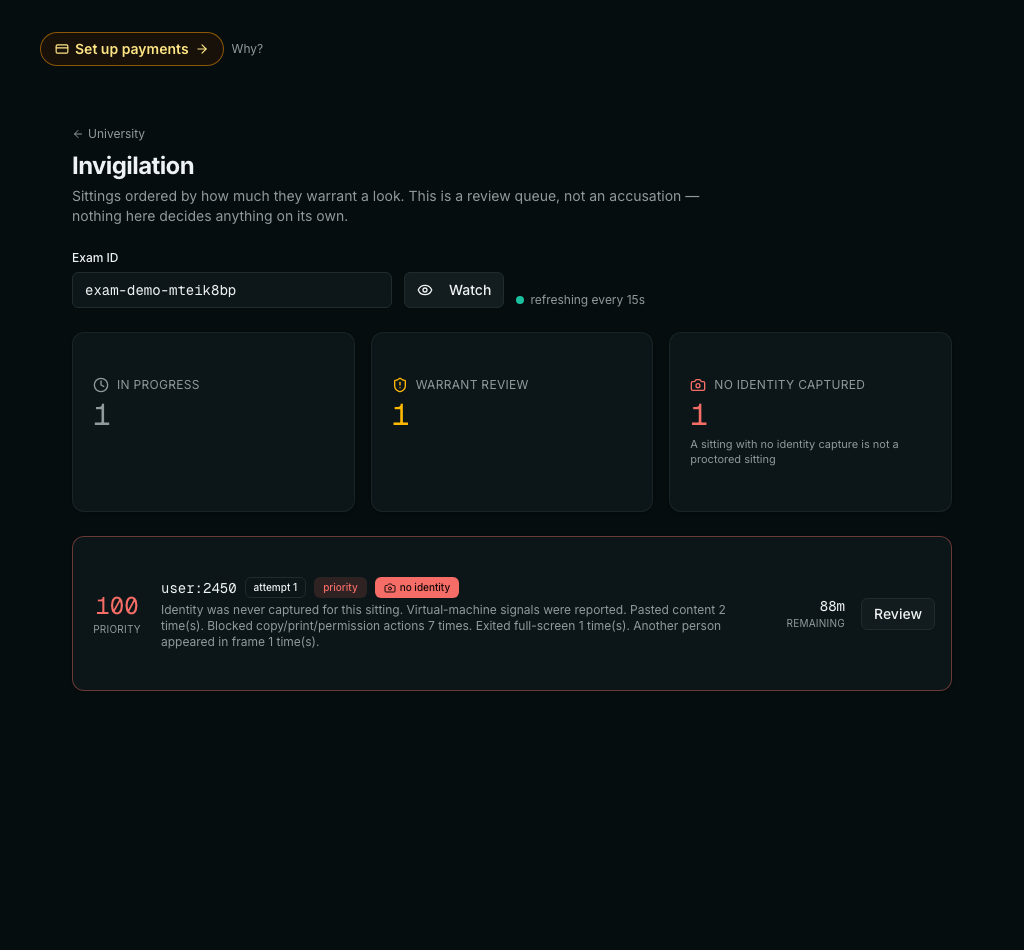
The number on the left is a priority, not a score and not a verdict. It exists only to order the queue, so that a reviewer with forty sittings and an hour starts with the one that has the most to explain. A sitting at 76 is not “76% likely to have cheated”; it is simply further up the list than one at 18.
Opening one: the trail, moment by moment
The summary is the headline; the trail underneath is the evidence. Every event carries the time it happened, measured from the start of the paper, so a reviewer can line it up against anything else they know — a power cut in a hostel, a fire alarm, a network outage the university logged.
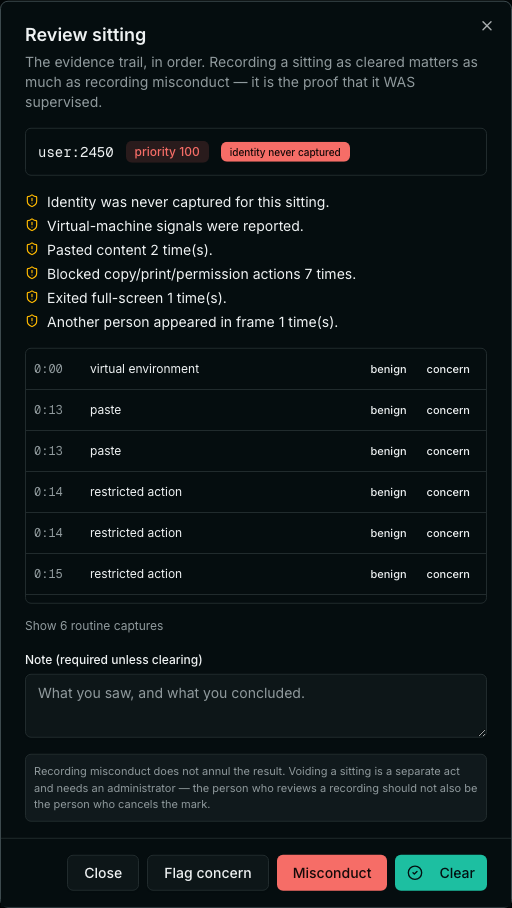
- Every event gets its own verdict — benign or concern. A sitting is rarely all one thing: the paste at 0:13 may be somebody moving their own draft, while the full-screen exit at 0:14 is worth asking about.
- Routine captures are collapsed by default. An hour of webcam stills at thirty-second intervals is a hundred and twenty rows of “nothing happened”, and burying the four rows that matter inside them is how a reviewer stops reading the trail at all.
- A note is required unless you are clearing the sitting. “What you saw, and what you concluded” — because in six months, at an appeal, the note is the only thing that will still make sense.
- Clearing a sitting is recorded as deliberately as flagging one. That record is the proof the paper WAS supervised, which is what an external examiner asks for.
If something goes wrong
- Your internet drops — keep going. Answers are saved server-side and the clock is the server's. Reconnecting resumes the same sitting; the gap is recorded but is not held against you.
- Your camera fails — the paper continues. The failure is recorded so that nobody later assumes you switched it off.
- You accidentally close the tab — reopen the exam link. The sitting is still yours and the remaining time is still counting.
- You are asked for something you cannot provide — a microphone on a machine that has none, say — raise it before you begin. Refusals are recorded rather than hidden, and an institution that knows in advance can make a different arrangement.
- Can they see my screen?
- Only if screen sharing was switched on for that paper, and it appears in the list before you begin. When it is on, you choose what to share and stills of it are recorded.
- Is my microphone recorded?
- No. Where microphone monitoring is on, what is stored is a loudness number every fifteen seconds — how loud the room is, not what anybody said. Speech is never captured.
- Who can see my photo and ID?
- Staff at your institution with an invigilation role. It stays in your institution's workspace.
- Can I be failed by the software?
- No. Nothing here marks, fails or refers anybody automatically. A flag is a reason for a person to look.
- What if I share a room with family?
- Tell your institution beforehand. Somebody walking past is a normal event and a reviewer sees it for what it is — but they can only do that if a person is doing the reviewing, which is the whole design.
Related