For creators
Send nudges on WhatsApp, from your own number
Many members read WhatsApp before email. Nudges can also go on WhatsApp — from your academy's own number, with a message template Meta has approved.
Last updated Oct 23, 2026
Before you start
- Connect your academy's own WhatsApp number under Marketing → WhatsApp (from the Studio plan) — see WhatsApp campaigns from your own number.
- Have at least one message template Meta has approved. A template with a picture or document at the top, or a blank in its header, cannot be used for nudges.
Without a connected number, the switch is off and says what to do.

Turn it on
- Under Gone quiet, press Reminders by themselves.
- Under Also send nudges on WhatsApp, choose a template.
- Fill its blanks. {first} is the member's first name and {academy} your academy's name; an empty blank becomes their first name. The preview shows how it reads.
- Turn the switch on and press Save.
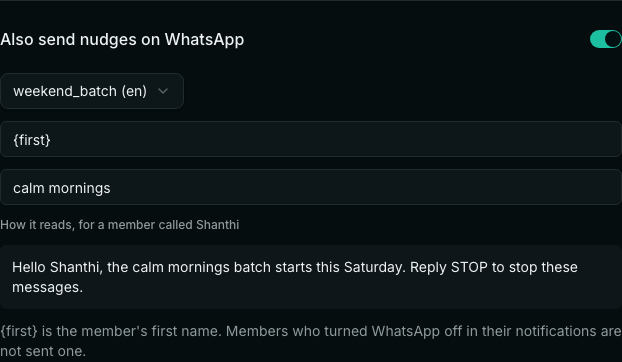
From then on every nudge — by hand or by itself — also goes on WhatsApp to members with a phone number.
A member who turned WhatsApp off in their notification settings is not sent one. If WhatsApp cannot be used (the template was removed, or the number disconnected), a nudge you send by hand says why; the app and email nudge still go.
Related