For creators
Import the website you already have
Paste the address of your current site and Prolaud reads it — your brand name, your colors, your logo, your typefaces and your pages — then builds your new site around them. One field instead of seven questions.
Last updated Sep 19, 2026
If you already run a website, you have answered every question a site builder could ask — publicly, on that website. So the first thing Auto Build asks for is the address, and everything else is optional.
How to do it
- Go to Public site → Overview and start Auto Build.
- Type your website address into the first box and press Read my site.
- You'll see exactly what was found — brand name, color swatches, logo, typefaces and the pages we saw.
- Press build. Your site is written around your real brand, not an invented one.
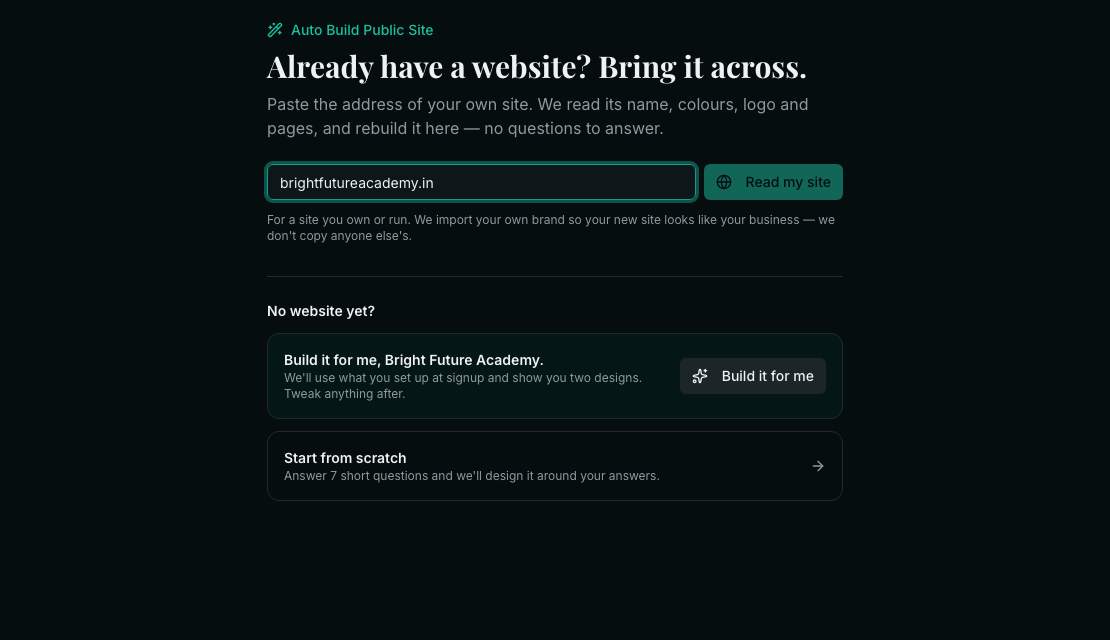

What comes across
- Your brand name and tagline, from the page itself.
- Your colors — the ones your site actually paints, ranked by how much they are used.
- Your logo, linked from where it already lives.
- Your typefaces, when the site names them.
- Your pages — the sections and links we could see, used to shape the new site.
If it finds very little
Many modern sites draw themselves with JavaScript after the page loads. There is nothing in the page we fetch for those, so we may come back with only a name and a color or two. You will be told when that happens rather than handed a confident-looking result built on nothing.
When that happens you have two good options: carry on anyway and change the colors yourself afterwards, or answer the seven questions instead — the from-scratch path is always one click away.
Nothing is locked in
What you get is a DRAFT. Every word, color, font and section can be changed afterwards in the editor, and visitors keep seeing your current site until you press Publish. If the import read something wrong, fixing it is editing — not starting again.
Related