For creators
Build a course from a PDF, Word file or old slide deck
You already wrote the material. Drop the syllabus, handout or deck into the AI Course Builder and it writes the course around that document — its topics, its order, its wording — instead of inventing a generic one from the title.
Last updated Sep 19, 2026
Most teachers come to Prolaud with a folder of material already written — a syllabus the school sent, a handout used for three years, a deck from last term. Typing all of that into a form is the hour you were trying to save. So don't: hand the file over and let the builder read it.
How to do it
- Go to Courses and press AI Course Builder.
- At the top of the dialog, press Have a syllabus or handout? Start from that and choose your file.
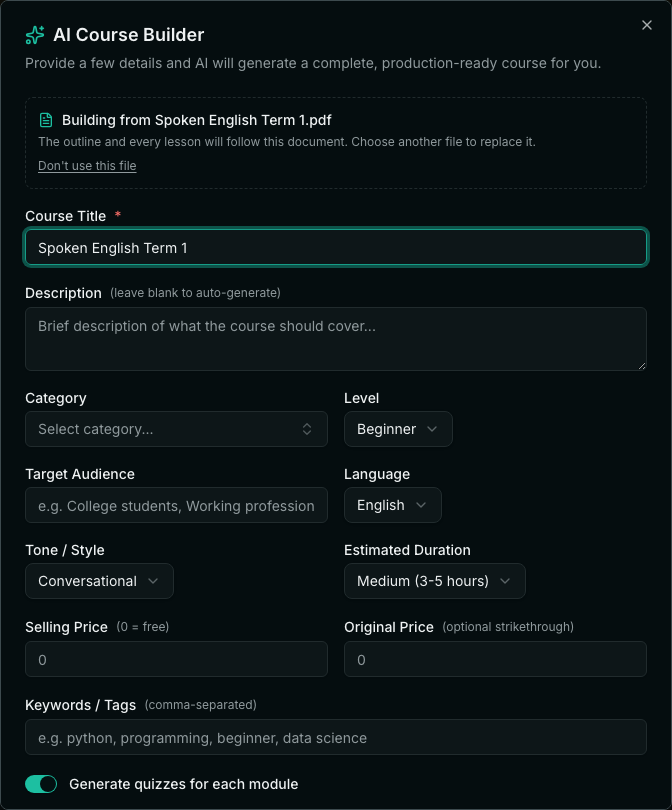
- The file is read on the spot. A panel appears saying which file the course will be built from, and if the title was empty it fills in from the filename.
- Adjust anything you like — level, tone, length — then press Generate Course.
What it reads
- PDF — the most common case.
- Word (.docx) and PowerPoint (.pptx).
- Plain text, Markdown and CSV.
What the course does with it
The document drives the outline AND every lesson body. A real example: a Bharatanatyam syllabus listing Aramandi, Tatta Adavu, Natta Adavu, the Asamyukta Hastas and a simple Alarippu produced modules in exactly that order, using those names. The syllabus also said no Abhinaya in Term 1 and no Varnam until Term 3 — and neither appeared in the course.
That last part is the point: it follows what your document says NOT to teach as much as what it says to teach. If your material has an order, a vocabulary or a boundary, it is respected.
When it won't work
- Very long documents are trimmed. The outline is built from roughly the first 12,000 characters, about five pages of dense text, so a syllabus or a handout fits and a whole textbook does not. Put the part that matters first.
- PDFs are read up to 30 pages.
- A file larger than 25 MB is refused.
After it generates
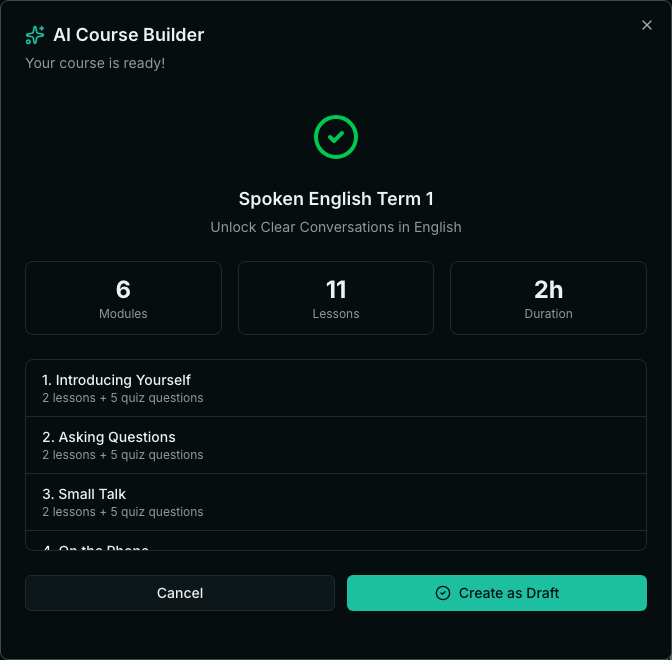
You get a summary — modules, lessons, estimated duration — and the module list before anything is saved. Press Create as Draft to keep it, or Cancel and change your answers. Nothing is published to students until you publish the course yourself.
Related