For creators
Connect Make (make.com): Prolaud events start scenarios, scenarios act in Prolaud
Make needs no special app: a Custom webhook module hears Prolaud's events, and an HTTP → Make a request module acts in Prolaud with your API key.
Last updated Nov 24, 2026
In short: Make → Webhooks → Custom webhook → copy the address → Prolaud Integrations → Make → Add a listening address → tick events → Send a test. Studio plan and up.
When something happens in Prolaud → a Make scenario
- In Make, create a scenario and add Webhooks → Custom webhook. Press Add, name it, and copy the address.
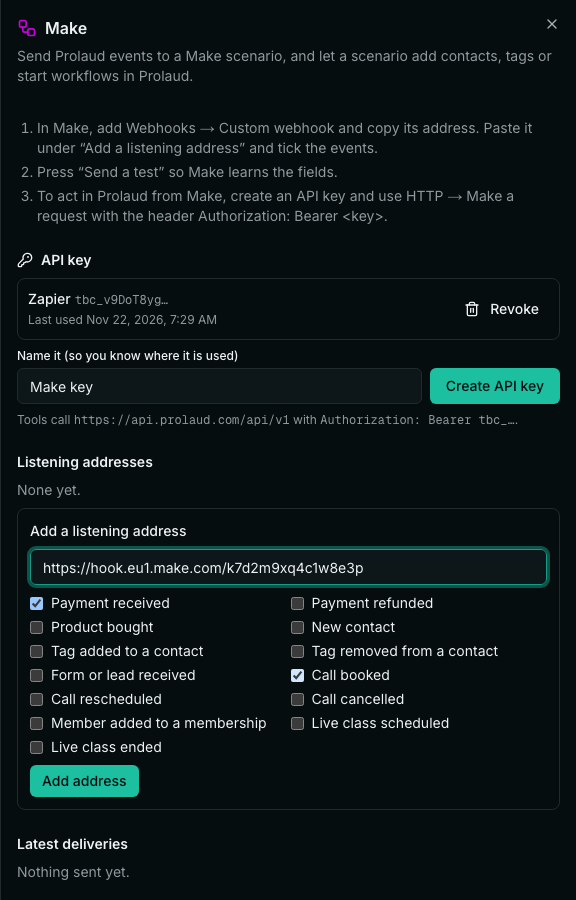
- In Prolaud open Integrations → Make. Under Add a listening address, paste it and tick the events you want — for example *Payment received* and *Call booked* — then Add address.
- Press Send a test on the address. Make shows *Successfully determined* and now knows every field.
- Build the rest of the scenario. Each event carries the person (name, first_name, email, phone, tags) and details such as amount, callTime or meetingUrl.
A Make scenario → do something in Prolaud
- In Prolaud, Integrations → Make → Create API key, and copy the key.
- In Make, add HTTP → Make a request: URL https://api.prolaud.com/api/v1/contacts/tags, method POST, a header Authorization with the value Bearer followed by your key, body type Raw, content type JSON.
- Request content, for example: {"email": "{{1.email}}", "add": ["from-make"]}. Tick Parse response.
- Run once: the contact appears in Prolaud with the tag, and any workflow waiting for it starts.
{
  "email": "[email protected]",
  "phone": "+91 90000 00013",
  "add": ["from-make"]
}- How do I check a delivery really came from Prolaud?
- Each one is signed: X-Prolaud-Signature: t=<time>,v1=<HMAC-SHA256 of "<time>.<body>" with the secret shown when you added the address>. Checking it is optional.
- Make says the webhook queue is full or failed.
- Prolaud retries a failed delivery several times over a day, then gives up on that event. After seven failures in a row the address is switched off — fix the scenario, then remove and add the address again.
- Which endpoints can Make call?
- Create or update a contact, add or remove tags, set custom fields, start a workflow, and lists of your tags, workflows, products and recent events — see the API reference.
Related