For creators
Auto-join students into a course's community
Choose a community on a course once, and every student who enrolls in the course — free, paid, or added by you — is a member of that community automatically. No 'now join the community' second step, no roster to keep by hand.
Last updated Oct 7, 2026
Choose the course's community
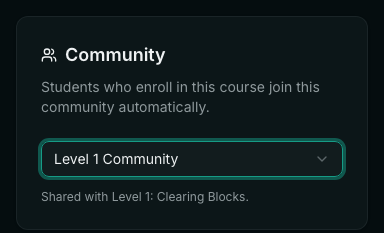
Open the course from Courses. In the right-hand column, find the Community card and choose one of your communities. Students already in the course join straight away, and everyone who enrolls from then on joins as they enroll. You can also set it from the other side: a community's own settings can name a course.
What happens when a student enrolls
- The student enrolls — a free course, a purchase, a payment link, or you adding them from Students.
- They become a member of the course's community. It is in their Communities list the next time it loads, with no join step.
- You see them in the community's member list without adding them.
- A second course that shares the same community adds the course, not a second community.
Why this matters for retention
Course completion rates are dragged down by 'I'll join the community later' — which almost always means 'never'. Auto-join removes the second sale: every buyer is in the room with the other students from the moment they pay, which means the first lesson question, the first 'hi I'm new' post, the first instructor reply all happen in one place instead of being spread across email threads.
Related