How to start an affiliate program for your online courses, and pay partners fairly
Your past students, fellow teachers and the creators your students follow can sell your courses for you. Here is how to set up an affiliate program that is fair to them and easy for you: the commission, the click window, the terms, the tracking and the payouts, with real screens.
The short answer
To start an affiliate program for your online courses, invite a few people who already talk to your future students, such as past students, teachers in a neighbouring subject and creators in your niche, and give each of them a personal link. Pay a commission you could afford on every sale, often worked out from what a new student is worth to you, and count a sale for a fixed number of days after someone clicks (30 is a common starting point). Give the sale to the last partner clicked before buying. Write short terms that say when and how you pay, that refunded sales don't earn, and that partners must say they earn a commission. Track every sale against its partner, take refunds off before you pay, and pay on a fixed day each month.
Most course creators already have an affiliate program; they just don't know it. A former student tells a colleague about your course. A teacher who runs a beginner class sends her students to your advanced one. A creator with a following mentions you in a post. Each of those people sent you a buyer, and none of them got anything for it, because nobody could see which sale came from whom.
An affiliate program makes that visible and fair. Each partner gets a link with their own code. When someone buys through it, the partner earns a share of the sale you agreed in advance. This guide covers the decisions that make a program work (who to invite, the commission, how long a click counts, the terms) and then shows each step on Prolaud, where the program is called the Affiliate programme and lives under Grow → Sales & Marketing on every plan. If you use something else, the decisions are the same.
What an affiliate program is, and what it isn't
An affiliate program pays people a commission for sales they bring in. Three things make it work: a link that identifies the partner, a rule for which sales count, and a record of what each partner is owed. Everything else, such as dashboards, banners and payout schedules, is there to make those three things easy.
It is worth separating it from two things it gets confused with:
- A referral reward pays your existing students for bringing friends, usually with a discount, a free month or a gift rather than cash. It suits people who love your course but don't think of themselves as marketers. You can run both.
- A discount code gives the buyer money off. A partner can share one, but a code alone doesn't tell you who sent the buyer unless each partner has their own, and buyers often find codes on coupon sites. A partner link counts the click even when nobody uses a code.
The other thing to settle early is who collects the money. In most course-platform affiliate programs, the buyer pays you as they normally would, and you pay your partners afterwards. That is how it works on Prolaud: buyers pay you as usual, you pay your partners yourself (by UPI, bank transfer, PayPal or whatever you agree), and the platform keeps the record of who is owed what. Prolaud does not pay partners for you.
Who makes a good partner
The best partners are people your future students already trust. A large following matters less than the right one: a teacher with forty students who are exactly your next level will usually send you more buyers than an account with a hundred thousand followers who are there for something else.
| Partner | Why it works | What to give them |
|---|---|---|
| Past students who finished | They can describe the result first-hand, and their friends have the same problem they had | A link, a short post they can adapt, a reminder after they finish |
| Teachers in a neighbouring subject | Your course is the natural next step for their students, and theirs for yours | A link per course, a short paragraph on who it suits |
| Creators and community hosts in your niche | They talk every week to the people you want to reach | Ready-made pictures and captions, and an honest summary of the course |
| Schools, clubs and coaching centres | Recommending a trusted outside course is part of what they already do | A link, a poster with a QR code for a noticeboard, a contact at your end |
Be choosier about who you accept than about what you pay. One partner who makes promises your course doesn't keep costs you refunds, reviews and trust that a commission can't buy back. This is why most academies start with approval: anyone can ask to join, and you say yes to each one.
Decide the commission
There is no correct rate, but there is a correct way to work one out: start from what a sale is worth to you, not from what others pay. Ask how much of a sale you could give away and still be glad the sale happened. For a recorded course, the cost of one more student is close to nothing, so you can afford a generous share. For a live cohort with limited seats or one-to-one time, every seat costs you hours, and the rate should be lower.
Take payment fees and taxes into account first, because a commission is usually a share of the price the buyer paid, not of what reaches you. Then look at what the buyer is worth over time: if a good share of students go on to buy your next course or join a membership, a first sale is worth more than its price, and a higher rate on it can pay for itself.
| Course price | At 10% | At 20% | At 30% | At 40% |
|---|---|---|---|---|
| $50 | $5 | $10 | $15 | $20 |
| $100 | $10 | $20 | $30 | $40 |
| $250 | $25 | $50 | $75 | $100 |
| $500 | $50 | $100 | $150 | $200 |
Three practical rules help:
- Make the number worth sharing. A partner who can earn a meaningful amount from a handful of sales will mention you more than once.
- Give your best partners their own rate. You don't need one number for everyone. On Prolaud you set a usual rate for the programme and can give any partner a different one; leave theirs empty and they get the usual rate.
- Change rates going forward only. A partner who shared your link at 20% should not find last month's sales recalculated at 15%. On Prolaud, the commission is worked out once, when the sale is first counted, at the rate in force then; changing a rate later only affects new sales.
Choose how long a click counts
Very few people buy a course the first time they see it. They click a partner's link, read the page, leave, think about it, and come back a week later by typing your name into a search box. The click window (sometimes called cookie duration or attribution window) decides whether that later purchase still earns the partner their commission.
Match it to how long your buyers take to decide. A low-priced recorded course is often bought within days; an expensive cohort that starts next month may take weeks. A window that is too short quietly cheats partners out of sales they really made; one that is too long pays for purchases the partner had little to do with. Thirty days is a sensible place to start. On Prolaud, 30 days is the default and you can set anything from 1 to 180.
You also need a rule for when two partners sent the same buyer. The common one, and the one Prolaud uses, is last click: the sale goes to the partner whose link the buyer clicked last before buying, within the window.
How the click is tied to the purchase
When someone opens a partner's link, Prolaud records the visit with the partner's code. A later purchase is matched to it through the buyer's account, or through the email they left on an enquiry form on your site. A purchase made on a device that never opened the link, under an email that never came with that click, can't be tied to it, which is true of every link-based program.
Decide who can become a partner
There are three sensible ways to let people in, and you can switch between them later:
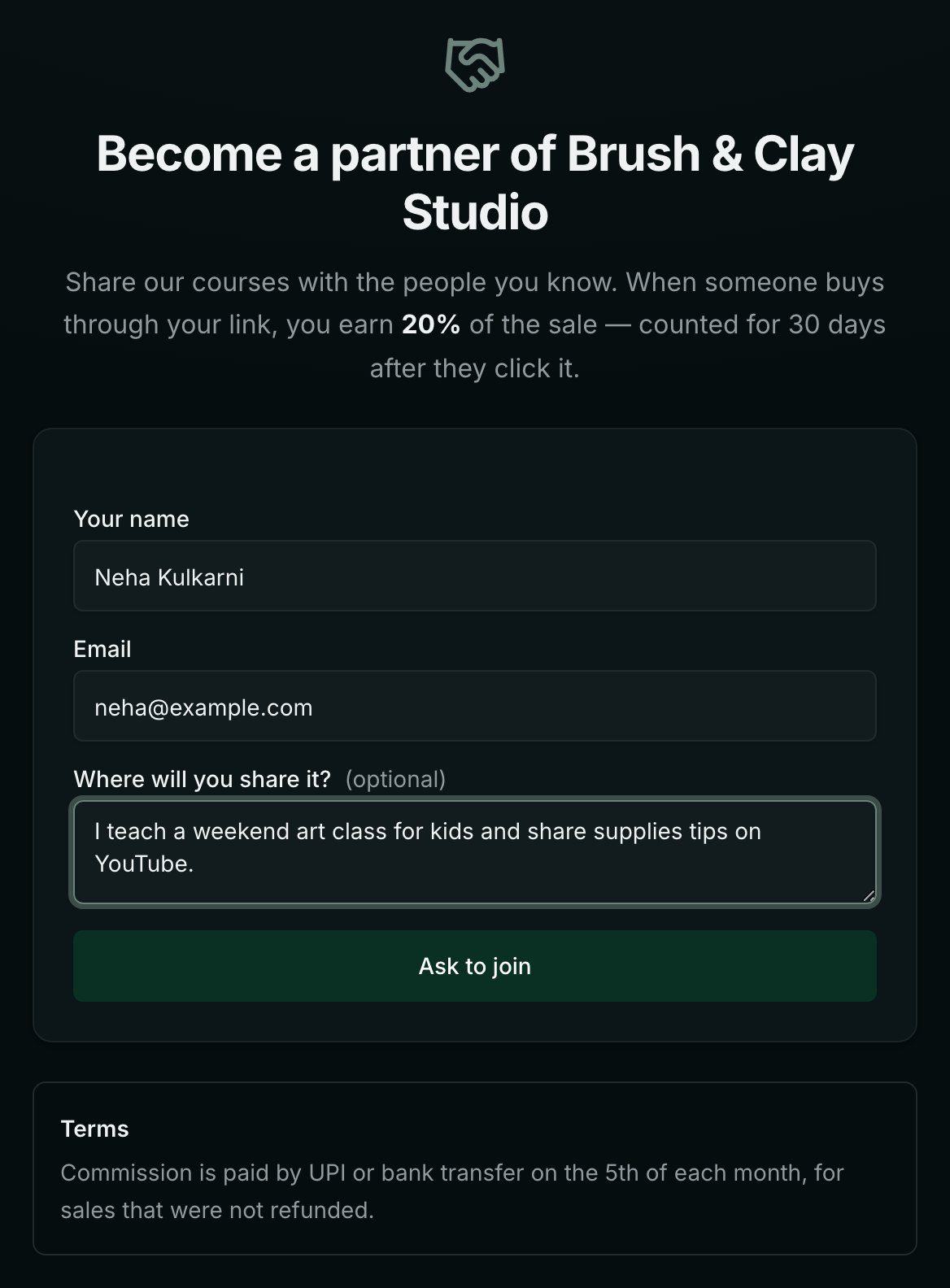
- Anyone can ask, and you approve each one. The usual choice. You share a join page; requests come to you with a note about where the person will share your course.
- Anyone can join and gets their link at once. Useful for a large, friendly community you trust, such as all of your past students. It lets more people in, so watch who joins.
- Only people you add. A small, invitation-only group of partners you know personally.
Write terms partners can trust
Terms do not need to be long. Partners mostly want to know three things: when they get paid, how, and what can stop a sale from counting. Answer those in plain words, and add the few rules that protect your name.
- When and how you pay. A fixed day each month, and the method (UPI, bank transfer, PayPal). If there is a minimum before you pay, say what it is.
- Refunds. A refunded sale does not earn a commission. If you pay monthly, sales are usually safe to pay once your refund period has passed.
- Own purchases. A partner buying through their own link does not earn on it.
- How partners may promote you. No spam, no promises the course doesn't make, no fake discounts, and no ads that bid on your academy's name unless you agree.
- Disclosure. Partners should say they earn a commission when they recommend you. Advertising rules in many countries expect this, including the FTC's in the United States and ASCI's guidelines for influencers in India.
Commission is paid by UPI or bank transfer on the 5th of each month, for sales that were not refunded. Please mention that you earn a commission when you share the course, and don't promise results the course doesn't promise.
On Prolaud, your terms appear on your join page, so every partner sees them before they ask.
Set it up on Prolaud, step by step
The screens below come from a small demo art academy, Brush & Clay Studio, with a teacher called Meera and partners called Riya, Arjun and Fatima. The academy sells in rupees; the programme works the same whichever currency your checkout uses.
1. Switch the programme on and set the rules
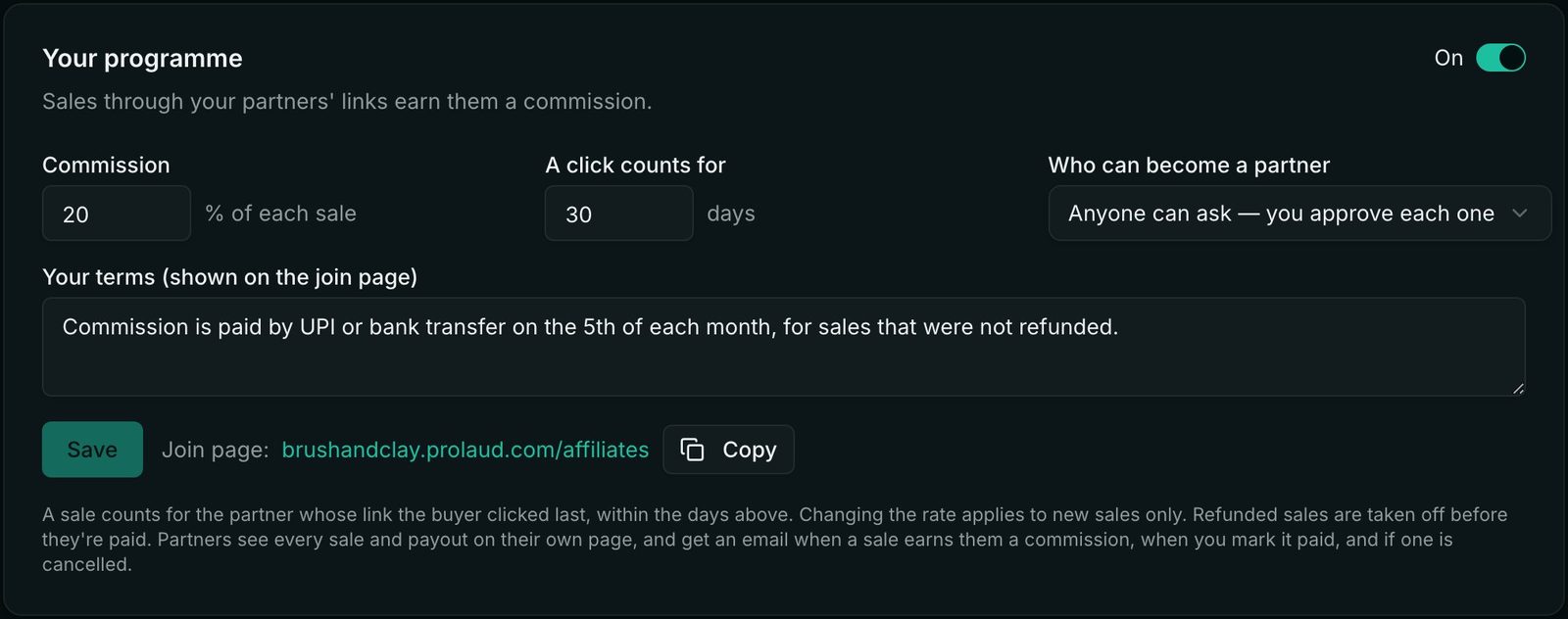
Open Grow → Sales & Marketing → Affiliate programme. A new programme starts switched off; while it is off, partners' links still open your site but no commission is counted. Switch it on, then set the commission, how many days a click counts for, and who can become a partner. Write your terms and save.
2. Add your first partners
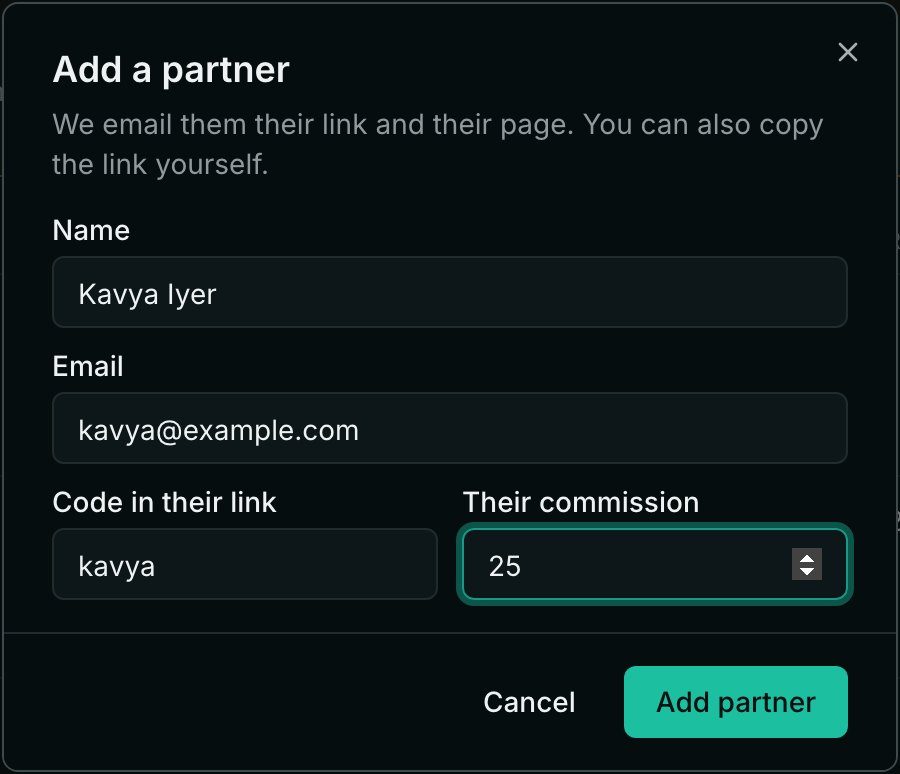
Click Add partner and enter their name and email. The code in their link is made from their name unless you type one; it can't be changed later, because links already shared would stop working. Leave their commission empty for your usual rate, or give them their own.
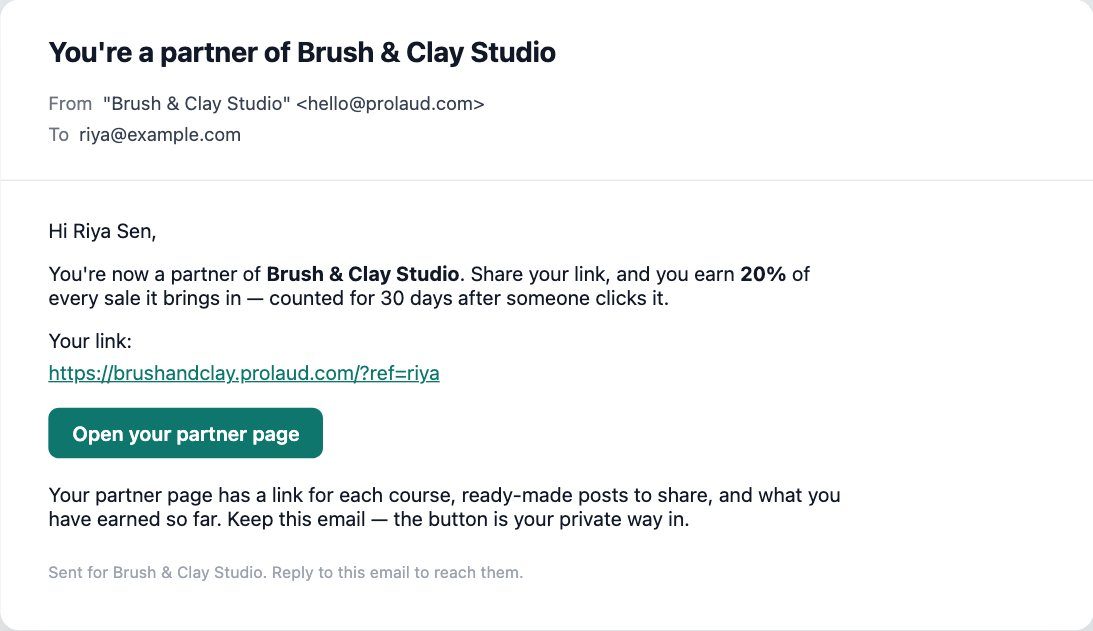
Prolaud emails each new partner their link, what they earn, and a button to their own partner page. The email is sent in your academy's name, and replies come to you.
3. Let people ask to join
If people can ask, share your join page. It sits on your own academy site and shows your commission, the click window and your terms. Requests appear at the top of your partners list with what the person wrote; Approve sends them the same welcome email, Decline removes the request.

Give partners everything they need to share
Partners share more when sharing takes thirty seconds. The fastest program is the one where a partner never has to ask you for a link, a picture or a number.
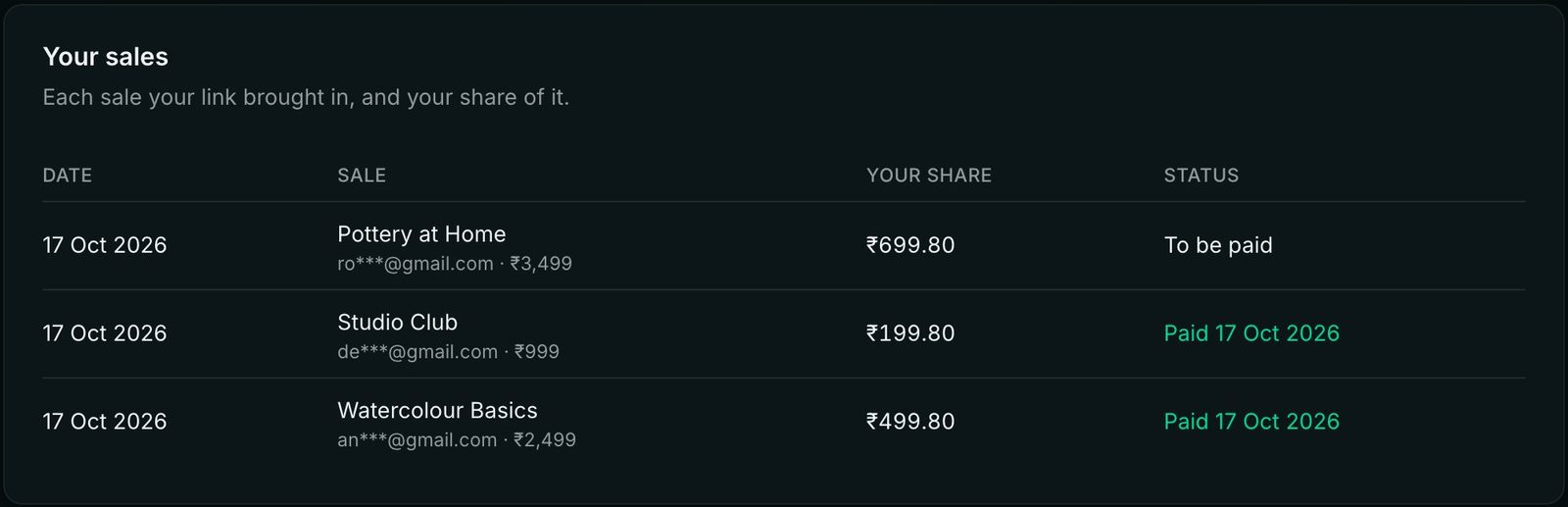
On Prolaud, each partner has a private page on your site. They need no account and no password: the button in their email is their way in. The top shows their visits, sales, what they are owed and what you have paid.
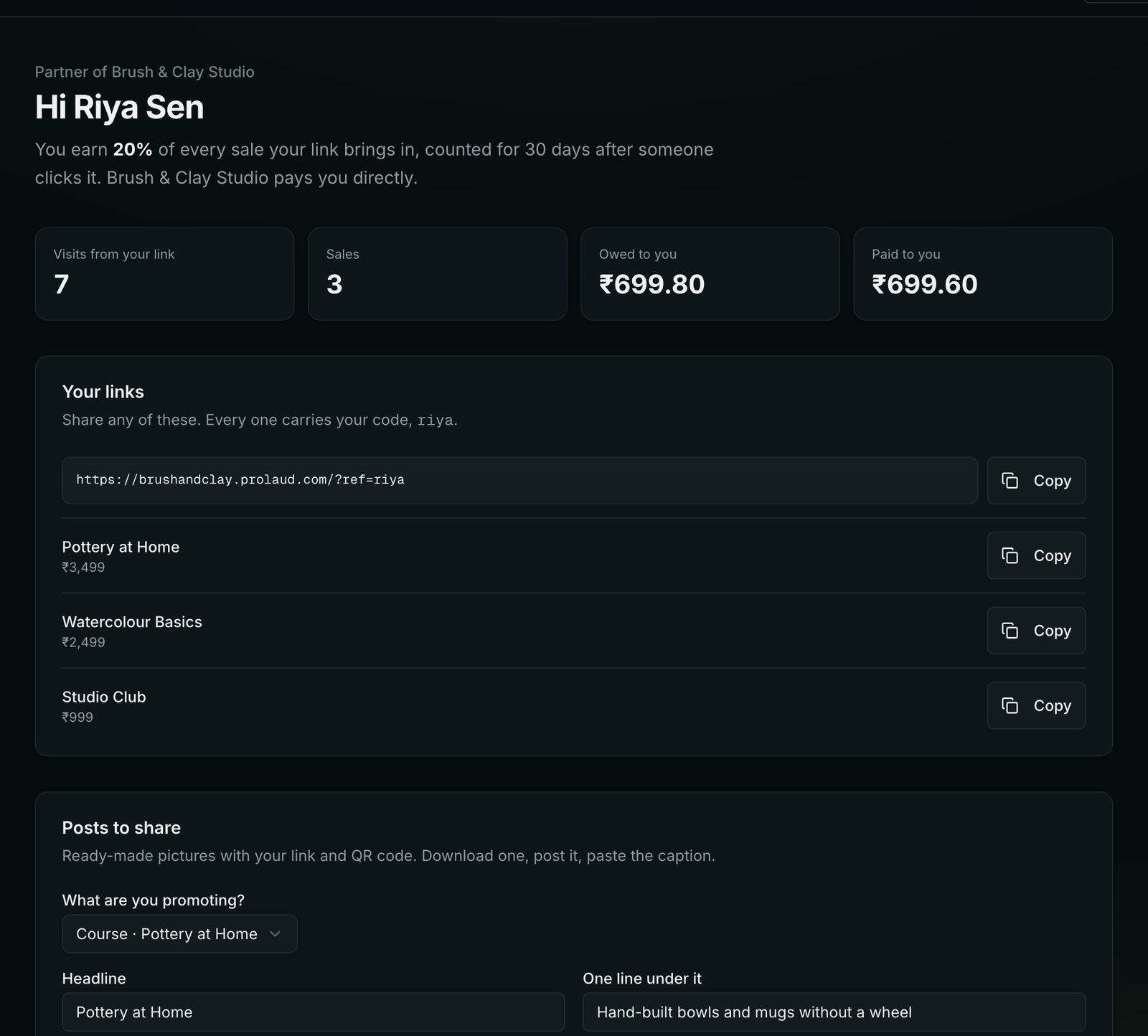
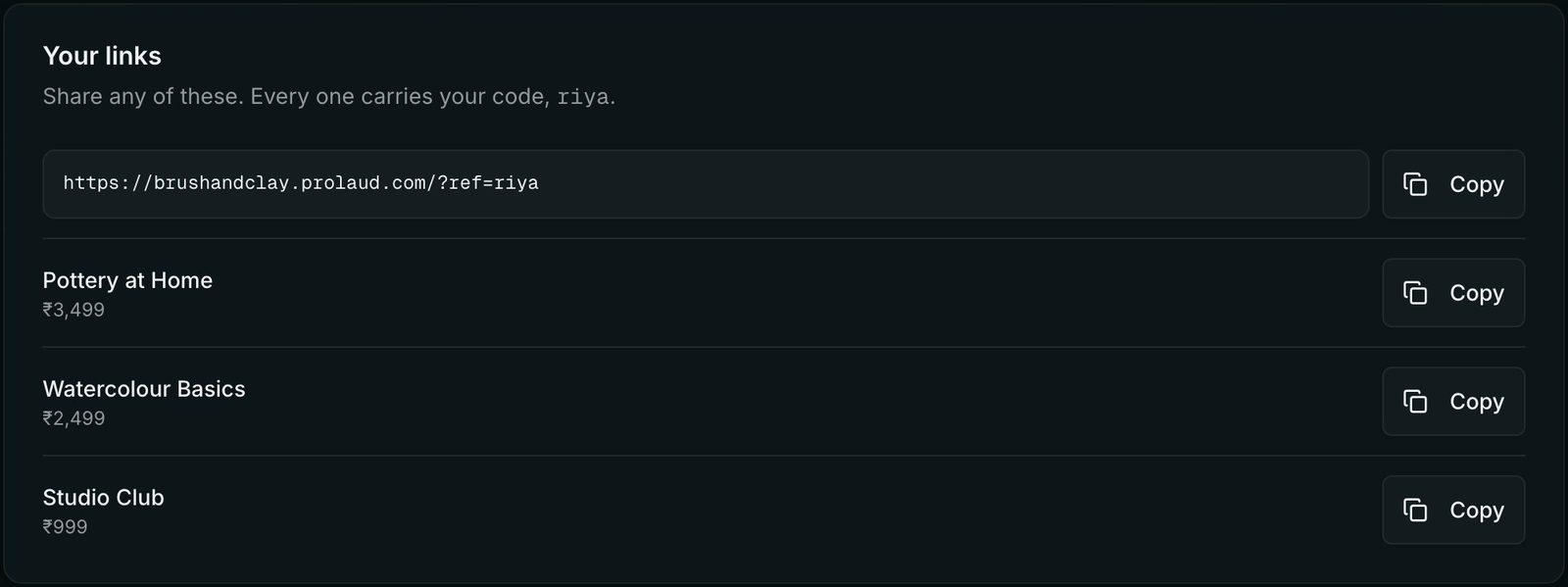
Below that is a link to your whole site and one for each published course and storefront product, each carrying their code.
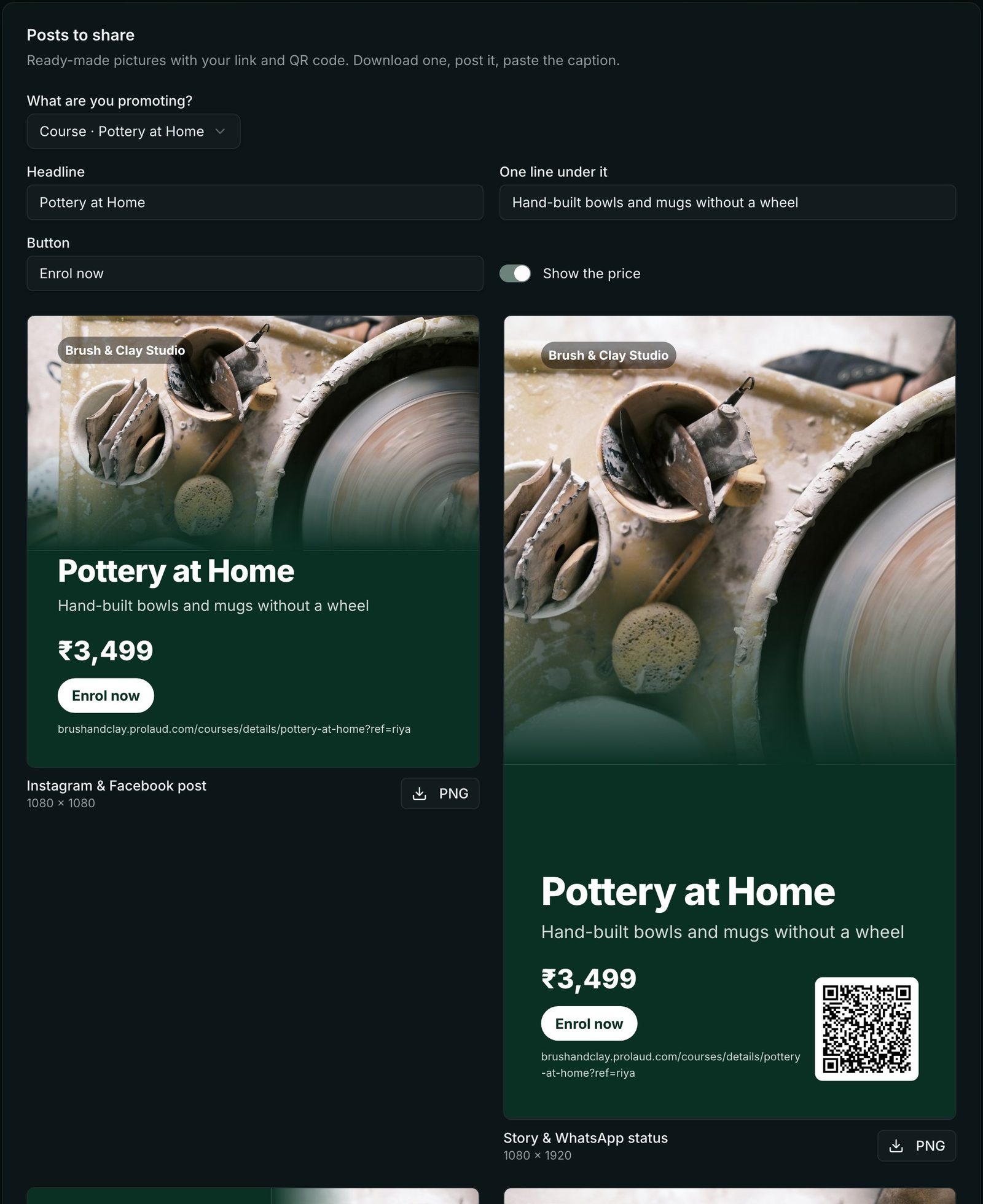
Then come ready-made posts: an Instagram and Facebook post, a story and WhatsApp status with a QR code, a LinkedIn and Facebook link picture and a printable poster with a QR code, all made from your course's cover, title and price, with the partner's link on every one. They can change the headline, download the picture and copy the caption.
Partners see their buyers only as a hint, such as an***@gmail.com, so a partner can recognise a friend's purchase without your students' details being shared.
Track sales and pay your partners
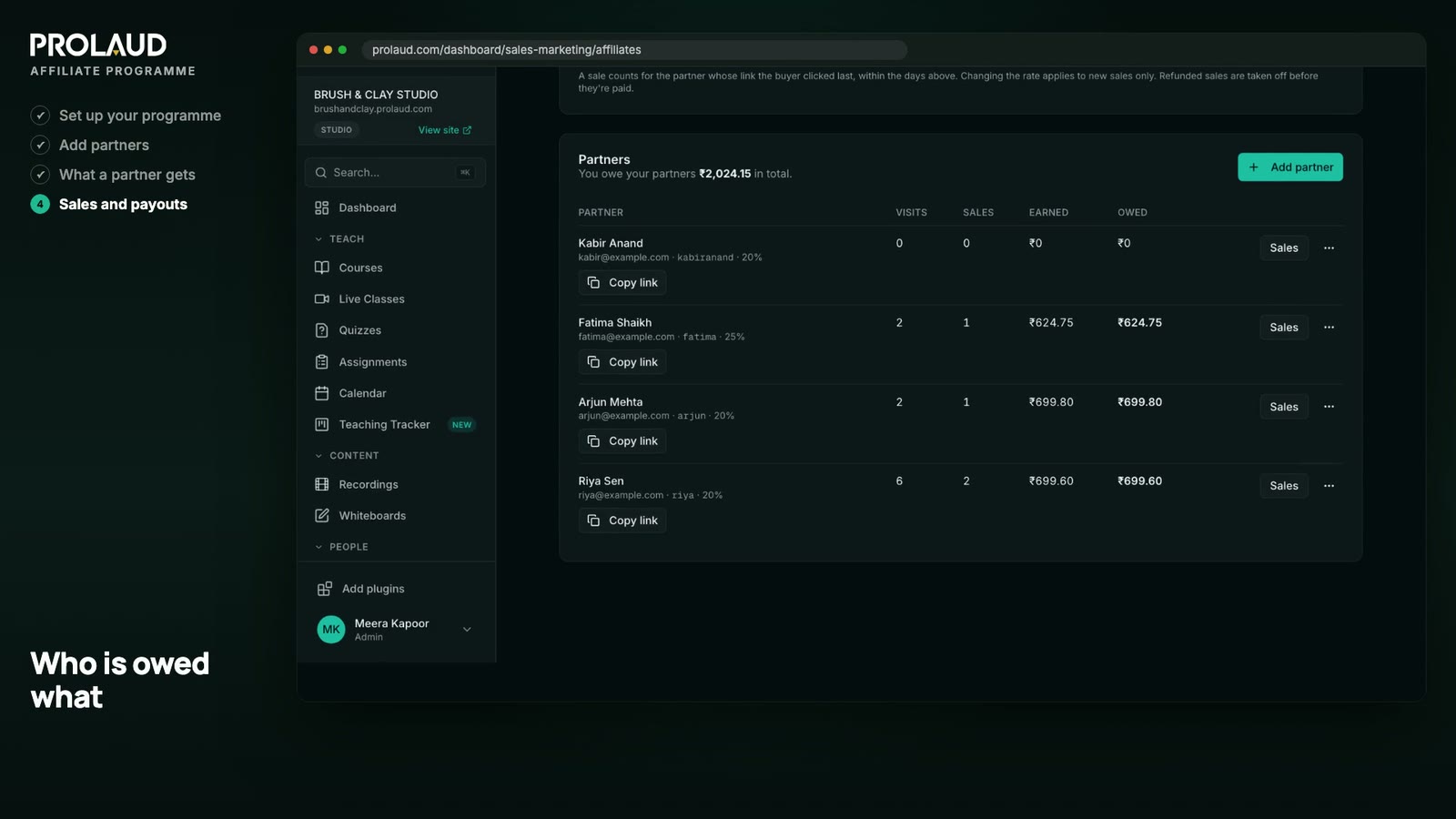
Once links are out, your partners list fills in by itself: each partner's visits, sales, what they have earned and what they are owed, and the total you owe at the top. Course checkouts and storefront orders both count.
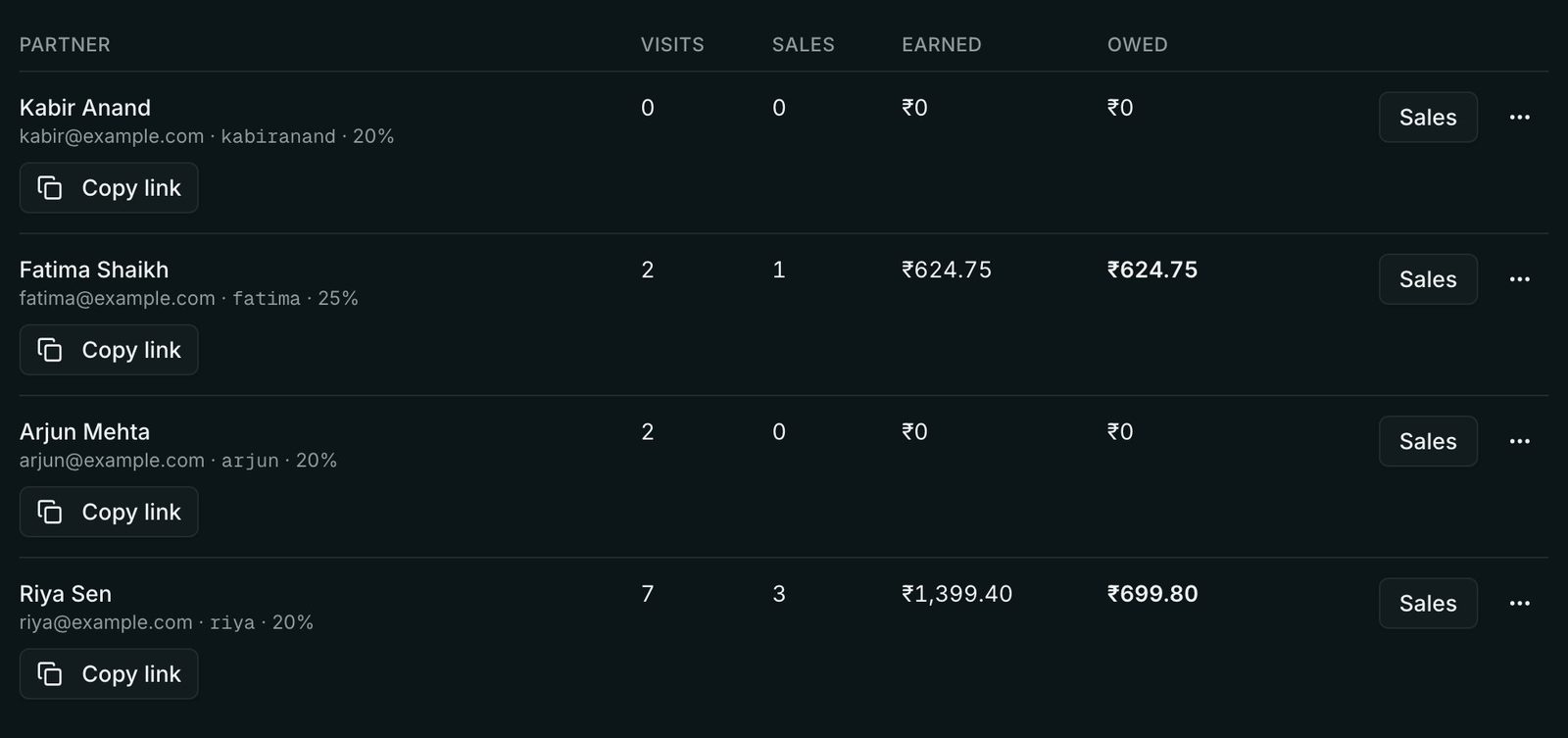
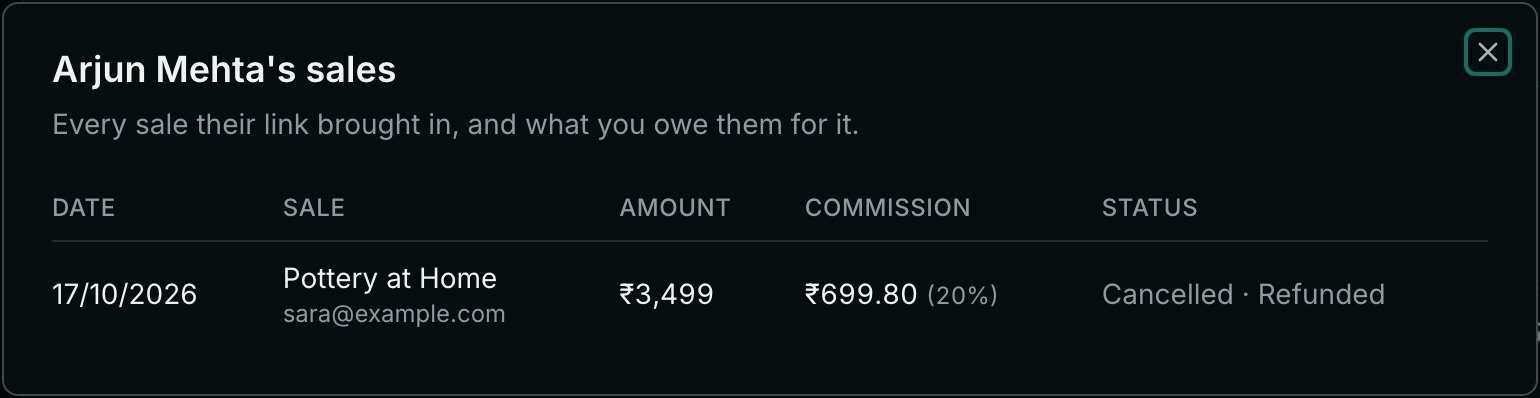
On your payout day, open a partner's Sales to see each sale: the date, what was bought, the amount and their share. Pay them however you agreed, type a note such as the payment reference, and click Mark as paid. It moves to Paid on your side and on theirs, with the date and your note.
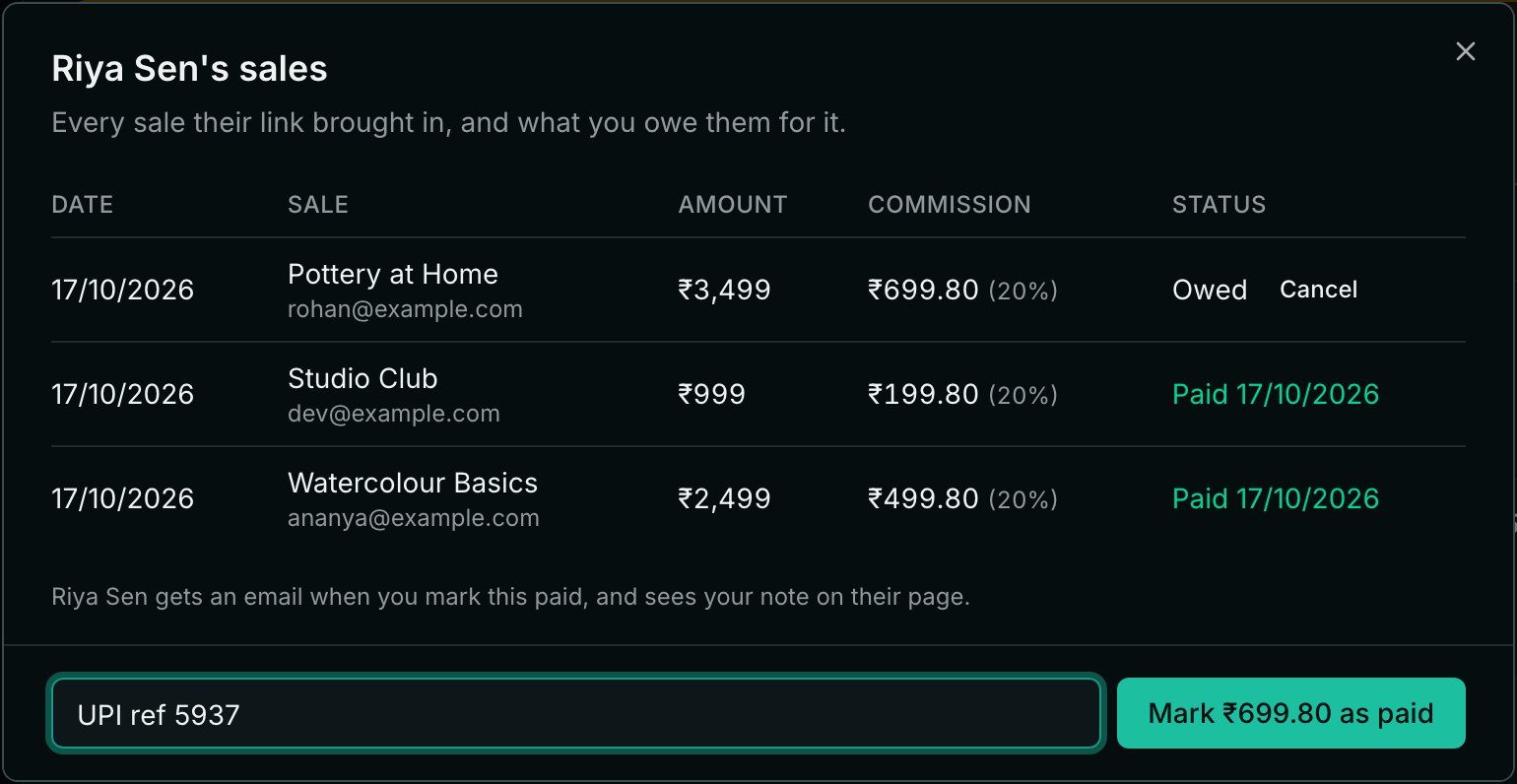
A good habit is to pay on the same day every month and only for sales older than your refund period. That way you rarely pay a commission on a sale that is later refunded, and partners know exactly when to expect money.
Keep partners in the loop: what they're told, and when
Partners stay with programs they trust, and trust comes from never having to ask "did that sale count?" or "when will I be paid?". The simplest rule is to tell a partner every time something happens to their money, the moment it happens, and to keep the whole history where they can check it.
On Prolaud this happens without you doing anything extra. Sales are checked every ten minutes, so nobody has to open a page for a partner to hear about one. Each email goes out in your academy's name, and if the partner replies, it comes to you.
| When this happens | Who is emailed | What the email says |
|---|---|---|
| You add a partner, or approve their request | The partner | Their link, their rate, how long a click counts, and a button to their partner page |
| A sale through their link earns a commission | The partner | What was bought, the buyer only as a hint, their share, and what they're owed in all. Several sales found at once arrive as one email. |
| You mark their sales as paid | The partner | The total, the sales it covers, and your note, such as the payment reference |
| A buyer is refunded before you've paid | The partner | That the commission is cancelled because the buyer was refunded |
| You cancel a commission yourself | The partner | That it's cancelled, with your reason if you gave one. Undo it within ten minutes and no email goes out. |
| You restore one they were told was cancelled | The partner | That it's back to be paid |
| Someone asks to join | You | Who they are and what they wrote, with a link to approve or decline |
When a sale earns them a commission
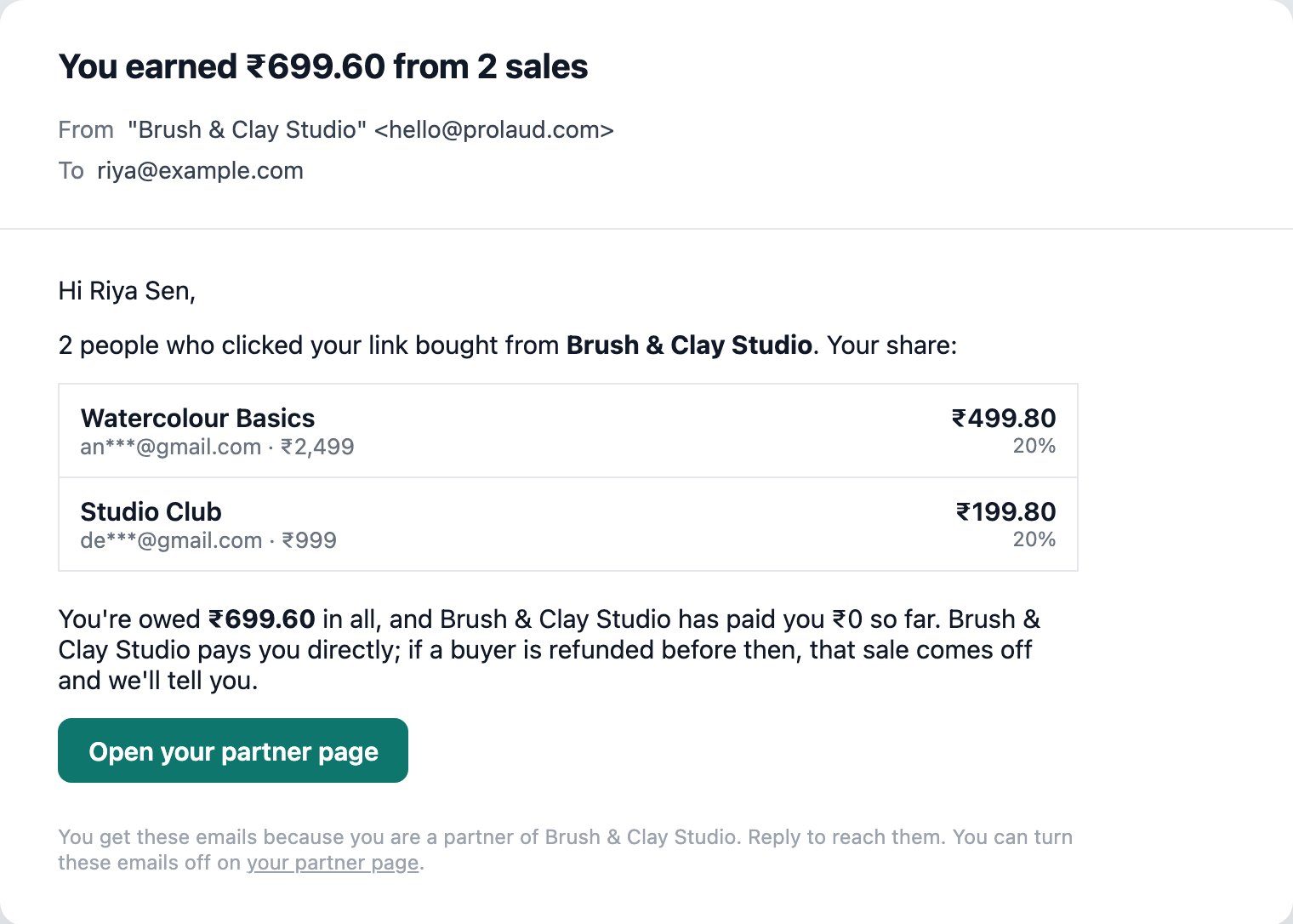
The email names each sale and the partner's share, and reminds them who pays: you do, directly. It also says that a sale refunded before then comes off, so a later cancellation never comes as a surprise.
When you pay them
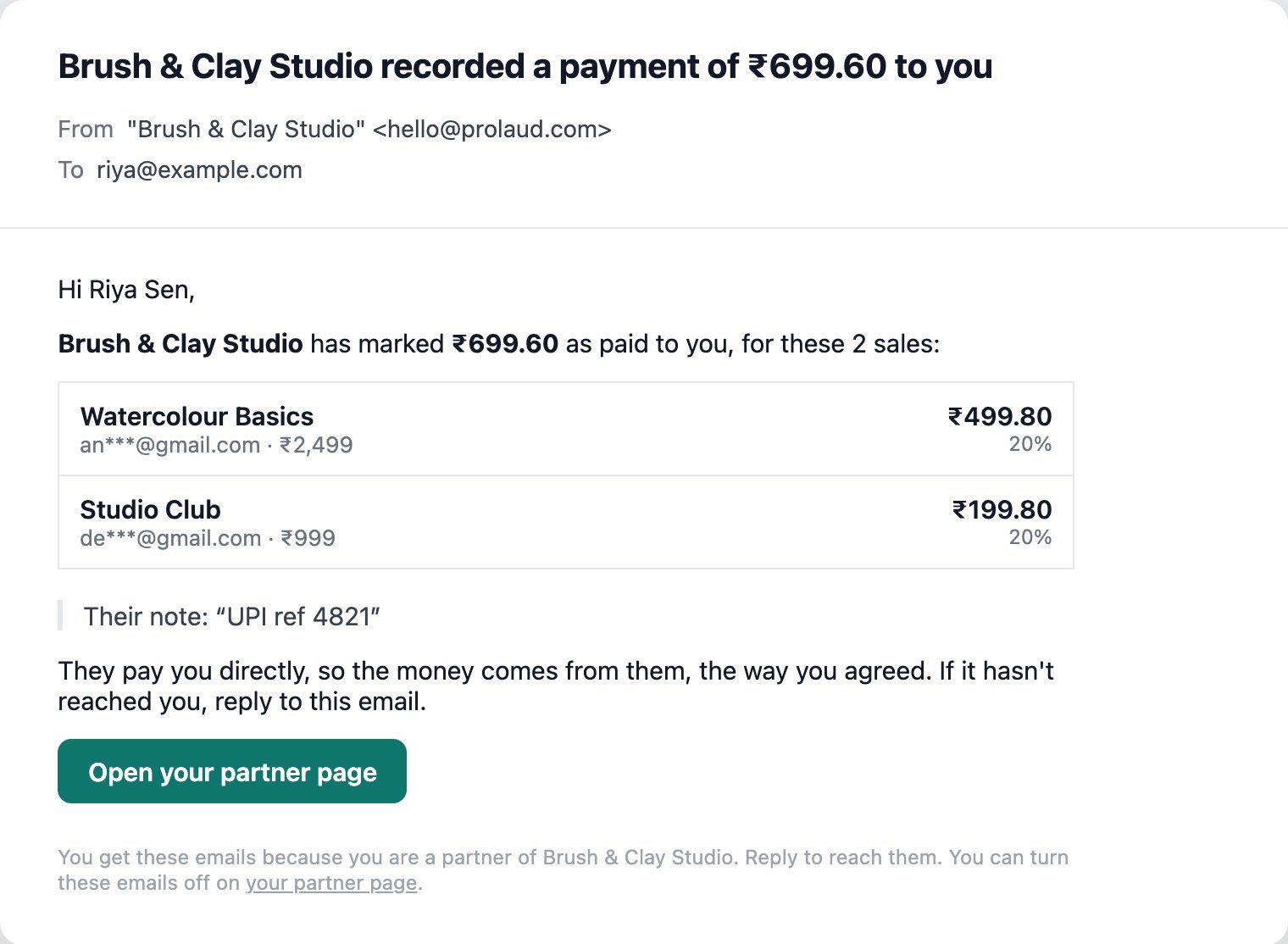
Write the note for the partner, not for yourself. A UPI or bank reference, or "PayPal, 5 Nov", lets them find the money in their own account in seconds. The email says plainly that the money comes from you, the way you agreed, and that they can reply if it hasn't arrived.
When a commission is cancelled
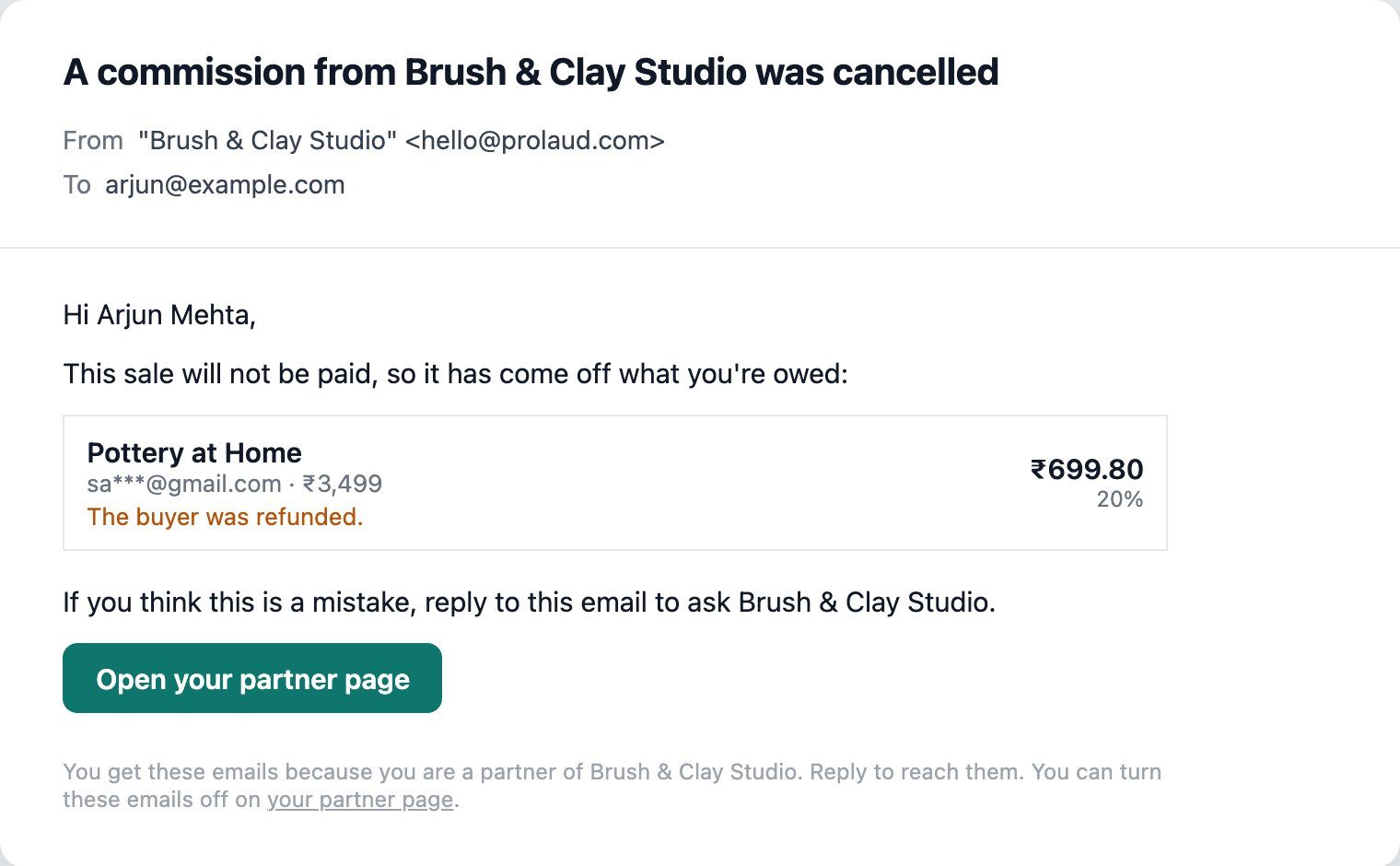
A refund is handled for you. When you cancel one yourself, Prolaud asks why, and the partner sees your reason; leave it empty and they're told you cancelled it. A cancel you undo within ten minutes is never emailed, so a mis-click doesn't alarm anyone. Restore one later and the partner hears that it's back.
And all of it on their page
The emails are the news; the partner page is the record. Next to each sale it shows its status and, for a cancelled one, the reason. Below that is every payout with its date and your note, and then the rules their sales follow, with your terms.

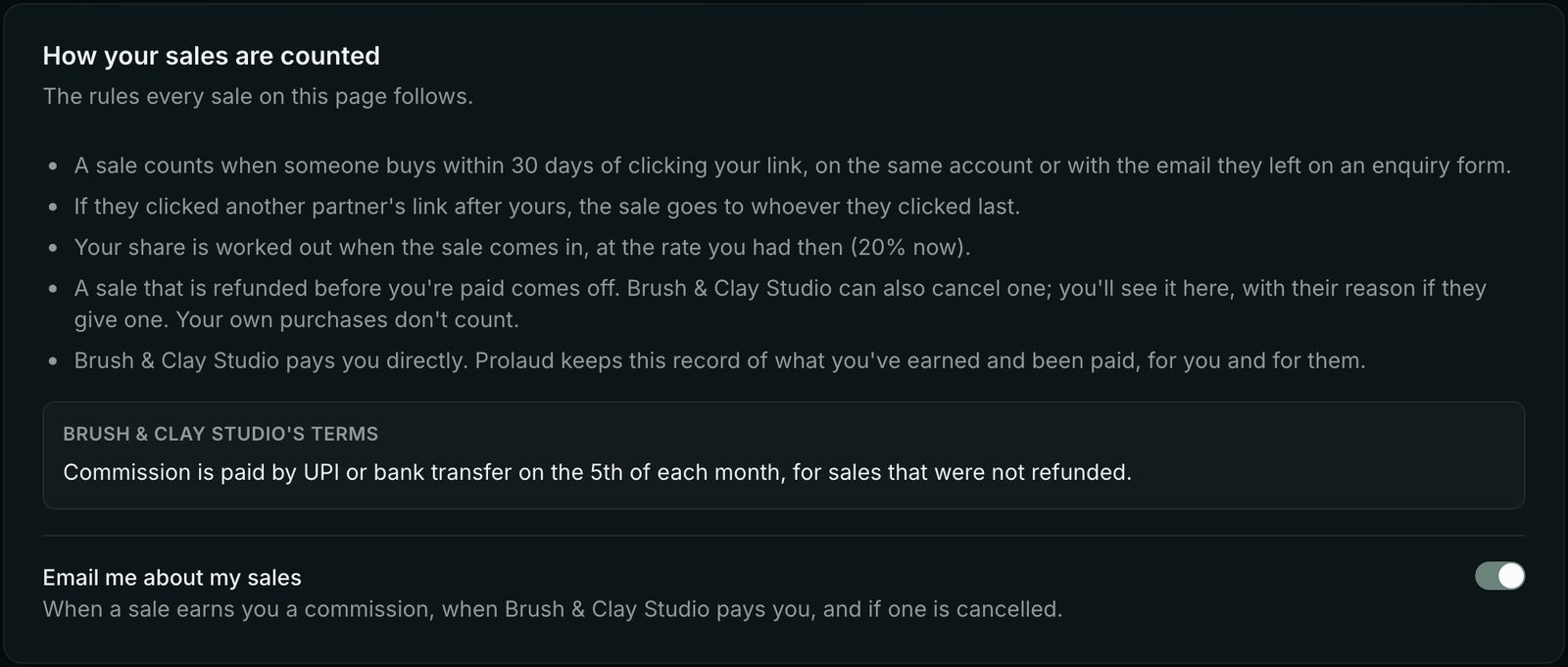
A partner who would rather not get emails can turn them off with that switch. You'll see Emails off next to their name, and their page keeps showing everything.
Refunds, own purchases and other edge cases
Write these down before your first payout, so you never decide them under pressure with a partner waiting:
- A refund before you pay. The commission should come off. On Prolaud this happens by itself: a refunded sale that is still owed is cancelled and marked Refunded, and the partner is emailed.
- A refund after you pay. The commission is already paid. Decide in your terms whether you take it off the next payout; Prolaud leaves paid commissions as they are.
- A sale you don't think should count. You can cancel any unpaid commission yourself, with a reason the partner sees, and restore it if you change your mind.
- A partner buying for themselves. No commission; Prolaud skips a purchase made with the partner's own email.
- Free orders. Nothing to share, so no commission.
- A partner who breaks your terms. Pause them (their link still opens your site, but no new commission counts) or remove them (their link stops earning, and what they are already owed stays on record).
- Clicks from before someone was a partner. They don't count; only visits after you added the partner can earn them a sale.
Keep records your accountant will thank you for
Commissions are a business cost, and in many countries paying them comes with paperwork: an invoice from the partner, a record of the payment, sometimes tax withheld or reported. The rules depend on where you and your partners are, so ask an accountant before your first payout rather than after your tenth.
Whatever the rules, keep the same record for every payout: which sales it covered, the rate, the amount, the date and the payment reference. On Prolaud, each sale keeps its rate and amount, and the note you type when you mark a payout as paid is stored with it. Partners can see the same history on their page, which settles most questions before they are asked.
Is it working? What to measure
Look at partners one at a time, not as a single number. For each partner, three figures tell you most of what you need: visits from their link, sales, and sales divided by visits. A partner with many visits and no sales is reaching the wrong people, or describing the course in a way the page doesn't match. A partner with few visits and several sales is talking to exactly the right people, and is worth a better rate and some help reaching more of them.
Ask your best partners what they posted and where; then turn the answer into a post or a short description you hand to everyone else. On Prolaud, partner links also show up in Where students come from (Analytics), next to your ads, search and email, so you can compare partners with the rest of your marketing.
Common mistakes
- Inviting everyone and supporting no one. Ten partners you talk to beat a hundred who signed up and forgot.
- A rate you can't keep. Lowering a commission later feels like a broken promise. Start at a level you're sure of, and give individual partners more.
- A window shorter than your buyers' decision. Partners notice when their friends' purchases don't show up.
- Paying late or irregularly. Nothing ends a program faster. Pick a day and keep it.
- Leaving partners guessing. If a partner has to ask whether a sale counted, trust is already slipping. Tell them about every sale, payout and cancellation, with the reason.
- No answer for refunds. Decide it in the terms, before the first one arrives.
- Asking partners to write everything themselves. Give them links, pictures and a paragraph they can copy.
A launch checklist
- Choose your usual commission and the click window, and write them down with a sentence on why.
- Write terms: payout day and method, refunds, own purchases, how partners may promote you, disclosure.
- Name three to five first partners and invite them personally.
- Check that your course pages answer the questions a partner's audience will ask: who it's for, what they'll be able to do, the price.
- Share your join page if you want people to ask.
- Put your payout day in your calendar, and pay on it.
- After a month, look at visits and sales per partner, and talk to the best ones.
For more on getting your first buyers, read how to get your first 100 students and online course marketing. The Affiliate programme help guide covers every setting in detail.
Start your affiliate programme today
The Affiliate programme is on every Prolaud plan: partner links, a join page on your own site, partner pages with ready-made posts, and a clear record of who is owed what.
Start free
Renu Rawat
Founder of prolaud.com. Helping teachers and creators build profitable, independent learning businesses without losing a cut of every sale to platform fees.
About the founderFrequently asked questions
- How much commission should I pay affiliates for an online course?
- Work it out from what a sale is worth to you rather than copying another program. Subtract payment fees and taxes, consider what an extra student costs you to teach (close to nothing for a recorded course, real hours for a live cohort), and how often first-time buyers go on to buy again. Then choose a rate you would be glad to pay on every sale for a year. You can give your best partners a higher rate than the usual one.
- How long should an affiliate click count for?
- As long as your buyers usually take to decide. Thirty days is a common starting point; a cheaper course can use less, and an expensive cohort that starts weeks later may need more. On Prolaud the default is 30 days and you can set anything from 1 to 180.
- Does Prolaud pay my affiliates?
- No. Buyers pay you as usual, so you pay your partners yourself, by UPI, bank transfer or however you agreed. Prolaud keeps the record: what each partner earned, what is owed, what is paid, and the note you added to each payout.
- What happens if two partners send the same buyer?
- The sale goes to the partner whose link the buyer clicked last before buying, as long as that click was within the window you set. The other partner's click still counts as a visit for them.
- Do partners need an account?
- No. Each partner gets a private link to their own page in the email Prolaud sends when they are added or approved. The page shows their links, ready-made posts, visits, sales and payouts. If they lose the email, you can send it again or copy the link from your partners list.
- Are partners emailed about their commissions?
- Yes. A partner gets an email when a sale through their link earns them a commission, when you mark a payout as paid (with the note you wrote, such as the payment reference), and when a commission is cancelled, saying whether the buyer was refunded or giving the reason you entered. Their partner page shows the same, and they can turn the emails off there.
- What if the buyer uses a different phone or laptop?
- Prolaud ties a purchase to a partner's click through the buyer's account, or through the email they left on an enquiry form on your site. A purchase on a device that never opened the partner's link, under an email that never came with that click, can't be tied to it.
- Can partners see my students' details?
- No. On their page, a buyer is shown only as a hint such as an***@gmail.com, next to what was bought and the partner's share. You see the full details on your side.
- What is the difference between an affiliate program and a referral program?
- An affiliate program pays partners, usually in cash, for sales they bring in, and often includes people who are not your students, such as other teachers and creators. A referral program usually rewards your existing students for inviting friends, often with a discount or a free month. Many academies run both.
Keep reading

The complete guide to Sales & Marketing on Prolaud
A tour of every tool on Prolaud's Sales & Marketing page — how to bring people in, turn visitors into students, close the sale and see what worked — with real screenshots and a narrated video.
Read
How to Get Your First 100 Students (Without a Big Audience)
You don't need a big following or an ad budget — you need the right hundred people. Here's the warm-first playbook to get your first 100 students in India.
Read
How to Market an Online Course in India
Build it and they won't come — you have to market it. Here's the complete, India-first playbook to market an online course, from owning your audience to launches and referrals.
Read
How to Price Your Online Course in India
Indian buyers aren't cheap — they're value-sensitive. Price to the result, not the runtime, and use tiers, anchoring and EMI to sell more without a race to the bottom.
Read