How to Run a University Programme Online — Admin, Teacher and Student
The whole academic year from three sides — the registrar's, the teacher's and the candidate's — with the rules a UGC ODL programme has to hold, and an honest account of what online proctoring can and cannot do.

A course platform models a shop: a catalogue, a buyer, a receipt. A university is not a shop. It has programmes with regulations, candidates with enrolment numbers, terms that open and close, examinations somebody must be able to defend at an appeal, and records that will outlive whatever software you pick this year.
That gap is where most distance programmes lose their weekends. The teaching runs on an LMS, the marks live in a spreadsheet, the marksheets are a mail-merge, and the Academic Bank of Credits filing is somebody's evening in July. It works until an appeal, a UGC inspection, or a graduation spike — and then it does not.
This is the whole year in order, written from three sides: the registrar's, the teacher's and the candidate's. Where a UGC rule applies, it is named. Where online examination has a real limit, that is named too, because a technical review will find it in an afternoon.
Start with the rulebook, not the courses
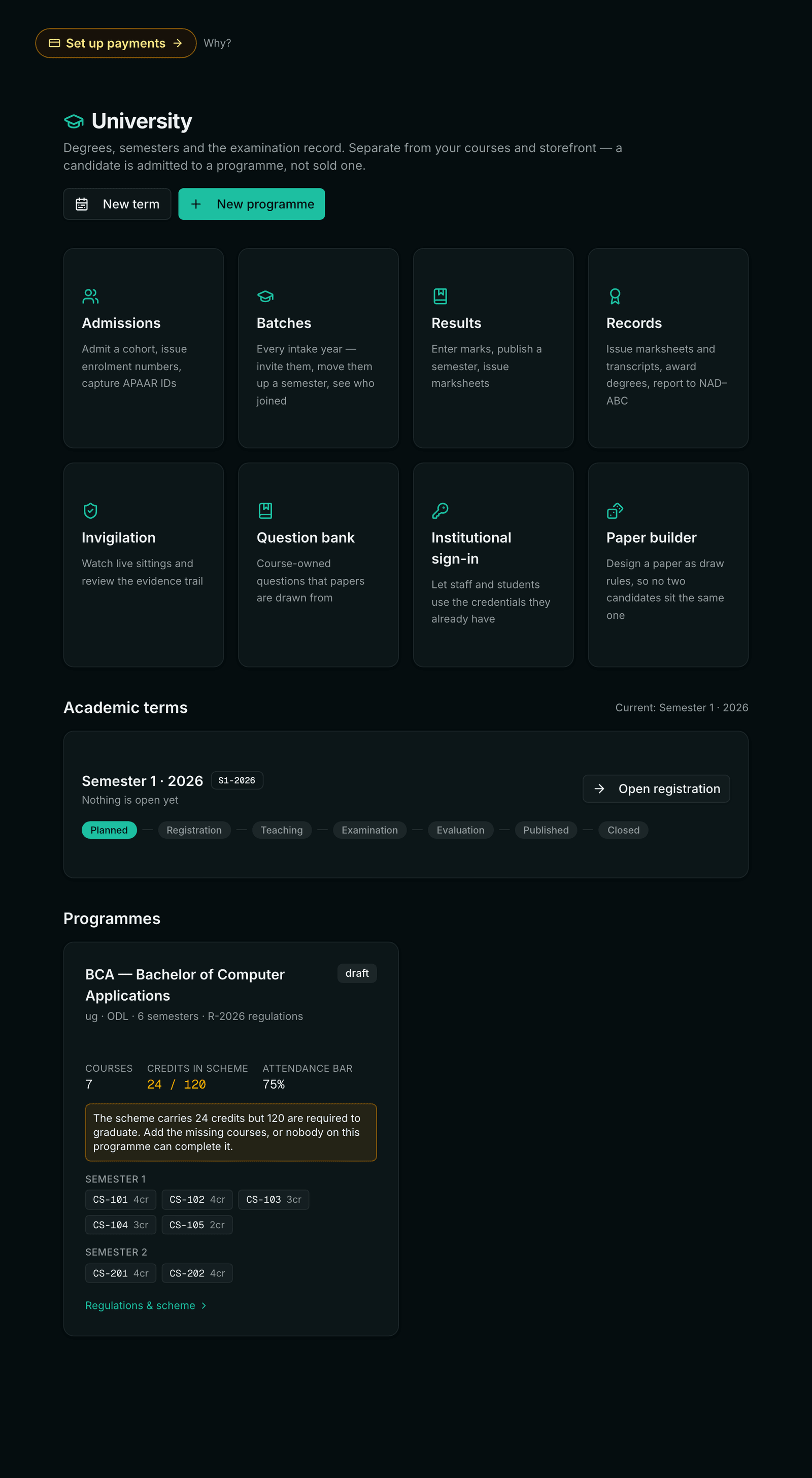
The instinct is to create courses first. Resist it. In a degree programme the course is the small unit; the programme is the rulebook, and everything downstream is decided against it — whether a candidate has passed, when their candidature lapses, how much credit they may bring in from elsewhere.
A programme worth the name carries at least:
- Duration in semesters and total credits — the shape of the qualification.
- Maximum duration, which under the UGC ODL regulations is double the programme length. A three-year degree is a six-year candidature, after which it lapses.
- Minimum attendance, expressed as a percentage a candidate must meet to be permitted to sit.
- Maximum transfer credit, capping what may be brought in from SWAYAM or another institution — 40% is the common ceiling.
- Credits per term, minimum and maximum, so nobody registers for a term they could never complete.
Then each course carries its credits, its category, and the part that decides results: an internal maximum and an external maximum, each with its own minimum.
The split that catches people out
A candidate with 40/40 internal and 18/60 external has 58% overall — and has failed, if the external minimum is 21. Store marks as a single total and you lose the ability to explain that decision at an appeal. Store them split, and the software applies the rule and states the reason on the result.
Admission is the moment to collect what you will need later
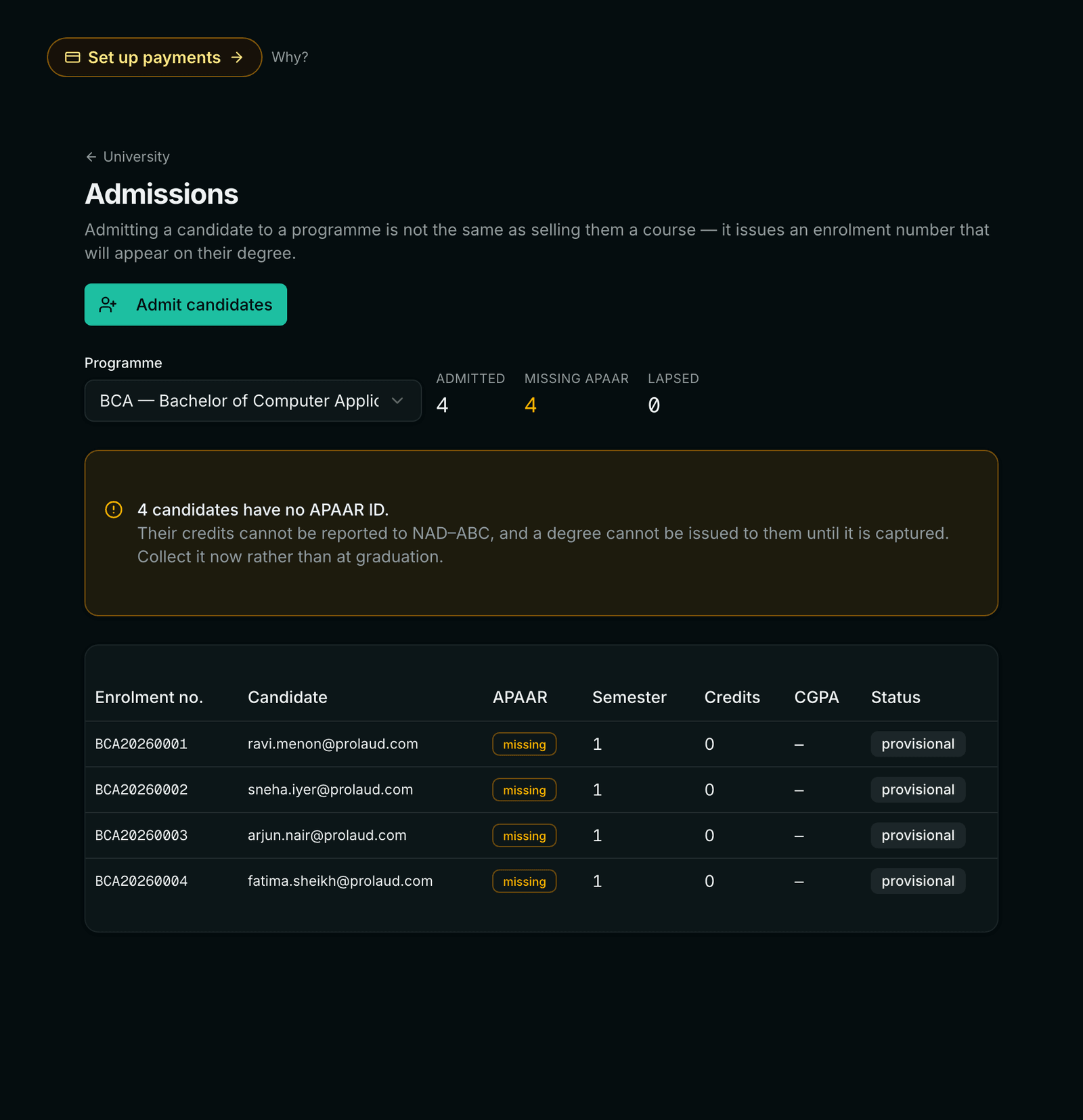
Admission creates the candidature: a candidate against a programme, an entry semester, an admission date and an enrolment number — generated as programme code, year and sequence, or supplied by you if your institution already numbers its own candidates. It should also create — or match — the person on your ordinary roster, so an admitted candidate is the same person the institution already knows rather than a second record of them that drifts.
Two things are much easier to collect now than later.
- The APAAR ID. It is what the Academic Bank of Credits keys on. Chasing it after a candidate has graduated and stopped reading your email is materially harder than putting a field on the admission form.
- A working email. Every downstream thing — results, documents, institutional sign-in — hangs off it.
Import the intake as a spreadsheet and deduplicate by email, so re-running a corrected file is safe rather than a second cohort. Then register the whole term for its core courses in one action; doing it candidate by candidate is a day nobody needs to spend.
The intake is the unit of work, not the programme
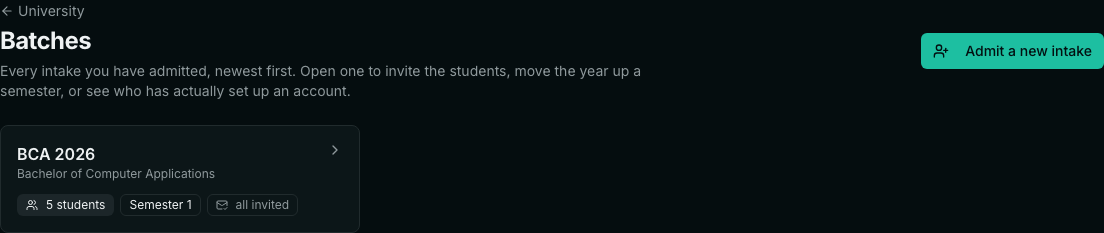
An institution does not manage “students on the BCA”. It manages the 2026 intake, which is in semester one, and the 2025 intake, which is in semester three, and it does different things to each. Any system where the year is a column you filter on rather than an object you open will make you rebuild that grouping by hand every time you act — and worse, will let an action aimed at one year quietly hit all of them.
The specific trap is course registration. “Register the first-year cohort for this term”, applied to a programme rather than an intake, sweeps in every student currently sitting in semester one — including people repeating it from an earlier year. They get registered for courses they are already carrying, and the error surfaces at mark entry, weeks later, when it is expensive.
Admitting somebody is not telling them
This is the gap most homegrown systems have, and it is invisible because nothing errors. The import runs, the enrolment numbers are issued, the records are correct — and the only party who does not know any of it happened is the student. They find out when somebody phones them.
Make the notification part of the admission flow rather than a separate errand in a different screen, and put the useful things in it: the enrolment number, the programme, the starting semester, and the address they must sign up with so they get matched to the candidature you just created. Then track two states separately — invited, and actually signed in. They are not the same, and the difference is exactly the list somebody works down in week one.
Preview a bulk admission before it runs. Enrolment numbers are consumed in sequence and cannot be handed back, so showing the registrar the exact numbers about to be issued — and the rows that will be skipped, with reasons — costs one screen and saves an unpickable mess.
Attendance: store the numerator and the denominator
Record attendance as two numbers per candidate per course — sessions held and sessions attended — rather than as a percentage. The percentage is derived.
This sounds pedantic until a class is cancelled. With a stored percentage, a change in the denominator means recomputing every candidate by hand, and somebody will miss a few. With two numbers, one correction fixes the cohort. It also means a detention can be explained with arithmetic rather than asserted, which matters when a candidate contests it.
Set papers from a bank, not from a document
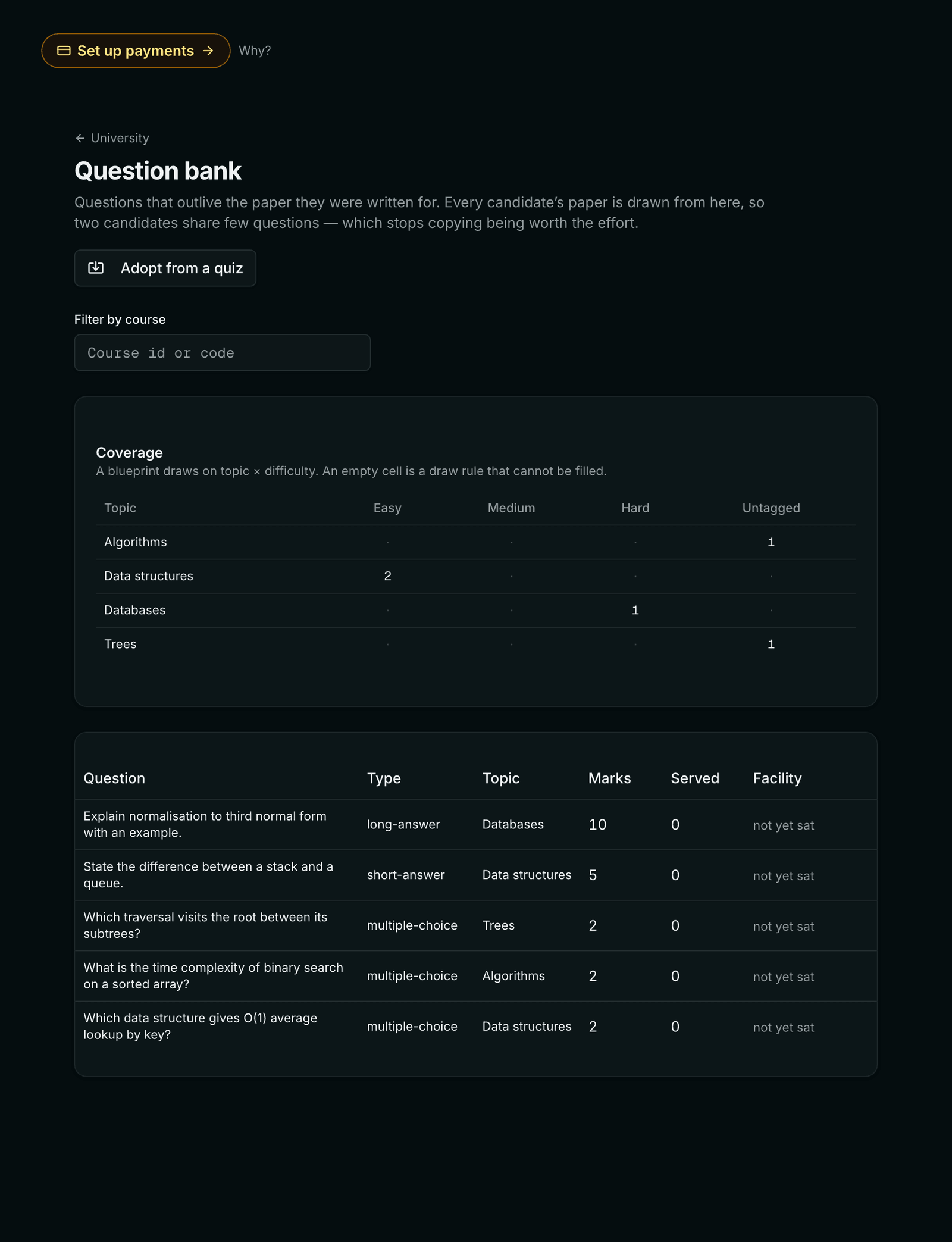
The usual way to set a paper is to write twenty questions into a document and give every candidate the same twenty. It costs you twice. The questions are used once and then live in a file nobody opens again, and identical papers make copying worth organising — one answer key, passed around a hostel, works for everybody sitting that session.
A question bank inverts both. Questions are written once, tagged by topic and difficulty, and drawn from for years. The paper becomes a set of rules — two easy questions from data structures, one medium from algorithms, answer any one of two essays — and each candidate is dealt a different selection against the same scheme. An answer that reaches the wrong person is then worth almost nothing.
The tagging is the part institutions skip and then regret. A draw rule asks for a topic at a difficulty; a question with neither is invisible to it. An untagged bank produces papers that are technically valid and pedagogically wrong — four objective questions from one unit and nothing from the rest of the syllabus — and nobody notices until the marks come back strange.
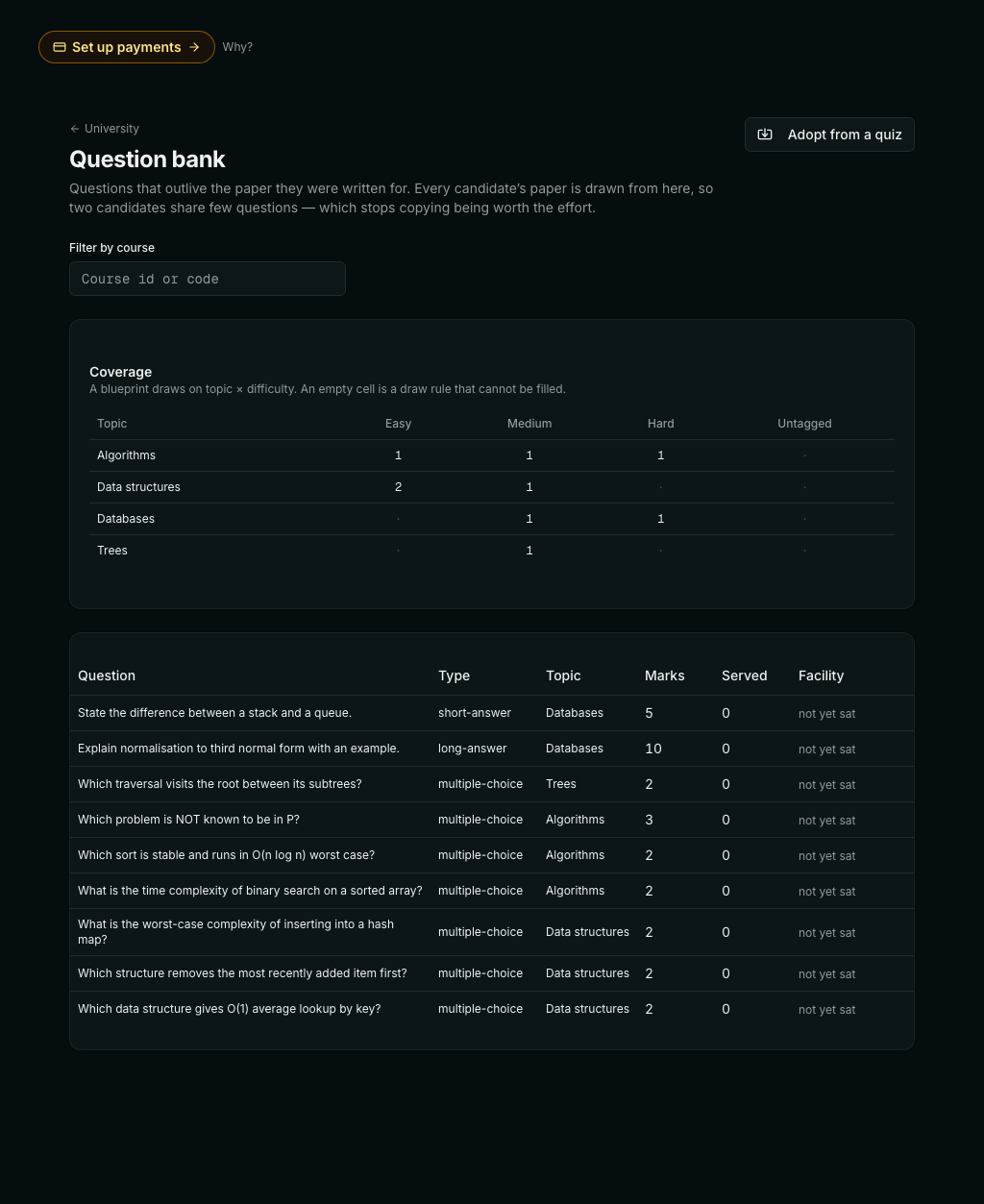
Two columns earn their place over years rather than terms. How many candidates a question has been SERVED to shows when one is becoming the question everybody has seen. Its FACILITY — the share who got it right — tells you which questions are broken rather than hard: one sitting at 5% is usually badly worded, and one at 98% is not separating anybody.
Examinations: assume the browser is hostile
This is where online programmes get genuinely difficult, and where most implementations have a hole in them.
Never send the answer key to the browser
The single most common failure in home-grown online examinations is delivering the paper with its answers attached and grading in JavaScript. It is convenient, it works in testing, and it means any candidate who opens the network tab has the key. Assemble the paper on the server, deliver it without answers, and grade it on the server. The browser should never hold the key at any point in the sitting.
Give every candidate a different paper
A question bank tagged by topic and difficulty, plus a blueprint that says what the paper should contain, produces a distinct paper per candidate to the same specification. Validate the blueprint against the bank before the examination: if it asks for eight hard questions on a topic that has five, you want to know now, not at nine on the morning.
Shuffling is not enough
If you permute the options of a question, use a derangement — a permutation with no fixed points — not an ordinary shuffle. A shuffle can return the original order. On a three-pair matching question that happens roughly one time in six, and that candidate receives the answer key in the correct order.
Put the clock and the answers on the server
Save answers to the server as the candidate writes and run the countdown there too. Closing the laptop then buys no time, and a crash costs no work — the candidate signs back in and resumes the same sitting.
Proctoring: what it can honestly do
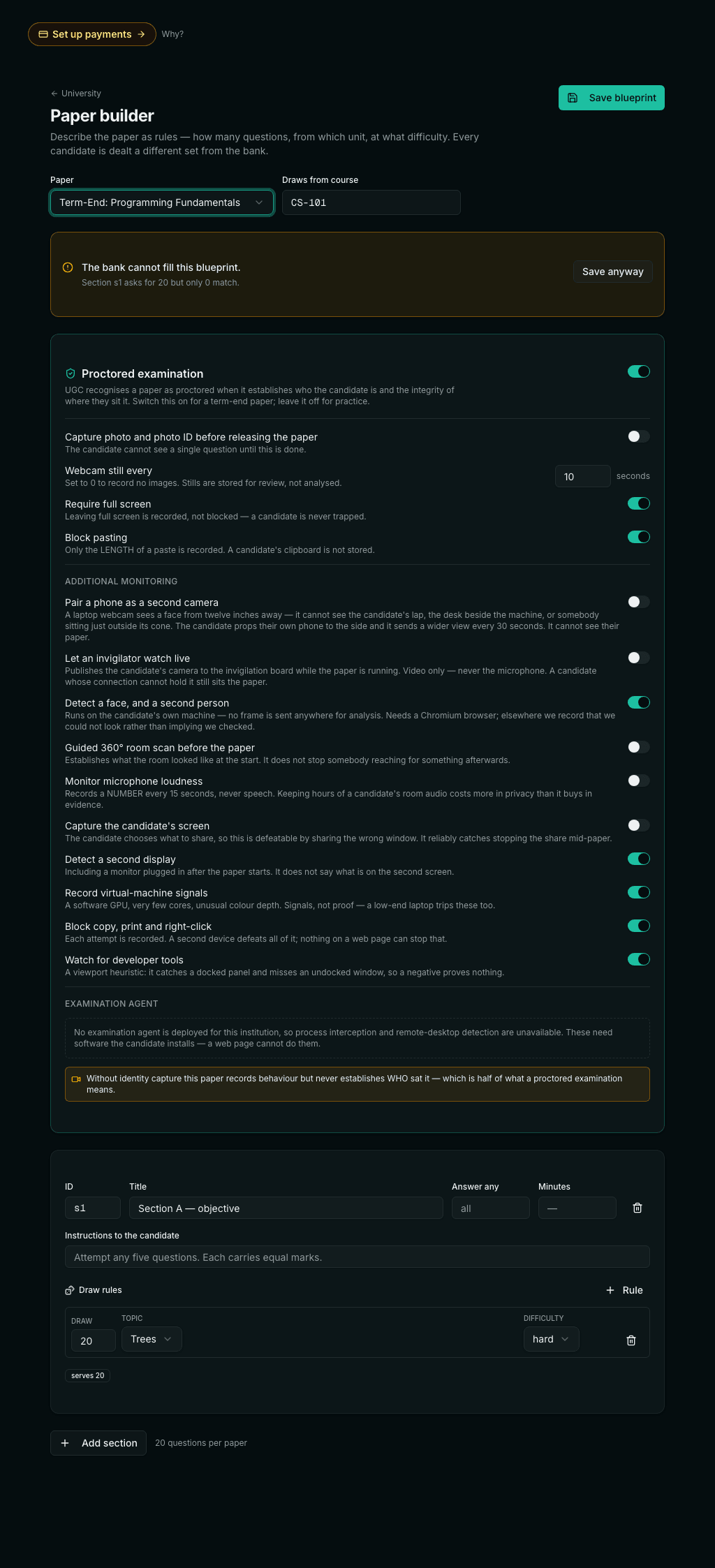
Online proctoring is oversold more than almost anything else in education technology, and a university's own IT team will puncture the claims in one meeting. It is worth being precise about what a browser can observe.
It can see that the examination window lost focus — not what the candidate switched to. It can record that a paste happened, and how long the pasted text was, without storing the text. It can take periodic camera snapshots. It can notice that the client stopped reporting. That is close to the whole list.
Check that your face detection actually runs
This one is worth a paragraph of its own, because it caught us and it will catch anybody building the same thing. Browsers have a built-in face detector — the Shape Detection API, `window.FaceDetector`. It is the obvious thing to call, it is a single line, and it works beautifully on the machine of the developer who enabled the experimental flag to try it.
It has been behind that flag in Chrome for years without ever launching, and no other engine ships it. So a system built on it performs a check that, for practically every real candidate, never happens at all. Ours did exactly that until somebody asked to see the second-person detection working and it turned out there was nothing to see. The client was honest at runtime — it recorded “this browser cannot analyse frames” rather than pretending — but honest-and-never-runs is not a feature, and nobody had read those events.
The test that would not have caught it
Our test asserted that the detector found no face in a synthetic camera pattern. That passes on a working detector — and equally on one hard-wired to return zero, which is what a missing API amounts to. A detection test needs the contrast: one face, two faces, and none. Only the difference between the three proves anything.
The fix was to stop asking the browser and ship the model: a 224 KB face detector on a WebAssembly runtime, served from our own origin, running in the candidate’s page. About 3.6 MB the first time a paper uses it, then cached, and fetched only when a paper turns detection on. No account with a cloud vendor, no fee per frame, and the webcam frame never leaves the machine to be analysed — which is a better privacy story than the API we were failing to call.
It cannot see the desktop, enumerate connected hardware, or tell a second monitor from a television. Products claiming to detect unauthorised USB devices from a web page are describing an API — WebUSB — that requires the candidate to grant permission for a specific device. Anyone intending to cheat will decline, so the check only ever succeeds against people who were not cheating.
Do not let a score become a verdict
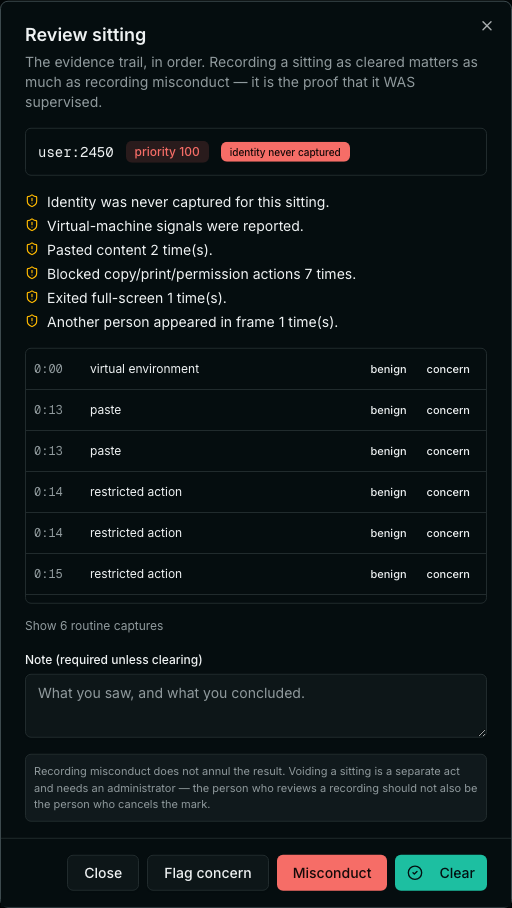
Every signal proctoring records has an innocent explanation that is more common than the guilty one. A notification steals focus. A family member walks past the camera. A home connection drops. Present these as a review priority for a human, never as a judgement — because a proctoring score that reads as a verdict gets used as one, and the software is not entitled to decide that a student cheated.
On automated face matching
Store the candidate's photo and photo ID side by side for a person to compare — which is what the UGC definition of a proctored examination actually asks for. If you add automated matching, let it raise review priority and never reject. Face recognition has badly distributed error: worse on darker skin, worse on women, worse in poor light — which is to say worse for a candidate sitting an evening examination under one ceiling bulb. Auto-rejection on that score is a system that will be wrong about real students, unevenly.
Watermarking is attribution, not prevention
A moving watermark carrying the candidate's registration number makes a leaked photograph traceable, and makes the candidate aware of it. It does not stop somebody pointing a phone at the screen. Use the registration number alone: a phone number or email in the watermark identifies exactly the same one person while exposing it to anyone who sees that screen.
Results: publish, then be able to correct
Publication does three things: it applies the programme's pass rules per course, computes the term's credit-weighted SGPA and the running CGPA on the UGC ten-point scale, and freezes the result.
Credit-weighted matters. A simple average of grade points across courses is not an SGPA, and a four-credit course cannot count the same as a one-credit one. Get this wrong and every transcript you have issued is wrong.
Two design decisions save a great deal of pain later:
- Scope publication by department. A head of department publishes their own results; one department being ready should not force the others, and no department should be able to touch another's marks. Enforce that on the server, not by hiding a button.
- Separate completing a term from graduating. They are different facts. Conflating them is how a candidate with a backlog receives a degree.
Then make correction a first-class path. A revaluation should recompute the SGPA, the CGPA and the marksheet immediately, keep the original, and record who changed what. A result you can quietly edit is one you cannot defend; a result you cannot correct at all is one that will be wrong on somebody's certificate forever.
Documents that outlive the software
A marksheet is not a screen. It is a PDF that will be photocopied, attached to a visa application and filed by an employer, and it needs a verification code that someone can check without an account.
Two rules for that verification endpoint:
- Return a confirmation, not a record. The verifier already holds the document; they need to know whether to believe it. An endpoint that returns a candidate's full academic history to anyone holding one code is a data leak with a search form attached.
- Never let it break. Those codes are on paper already in circulation. If verification failed because a subscription lapsed or a module was switched off, a genuine degree would start reading as forged.
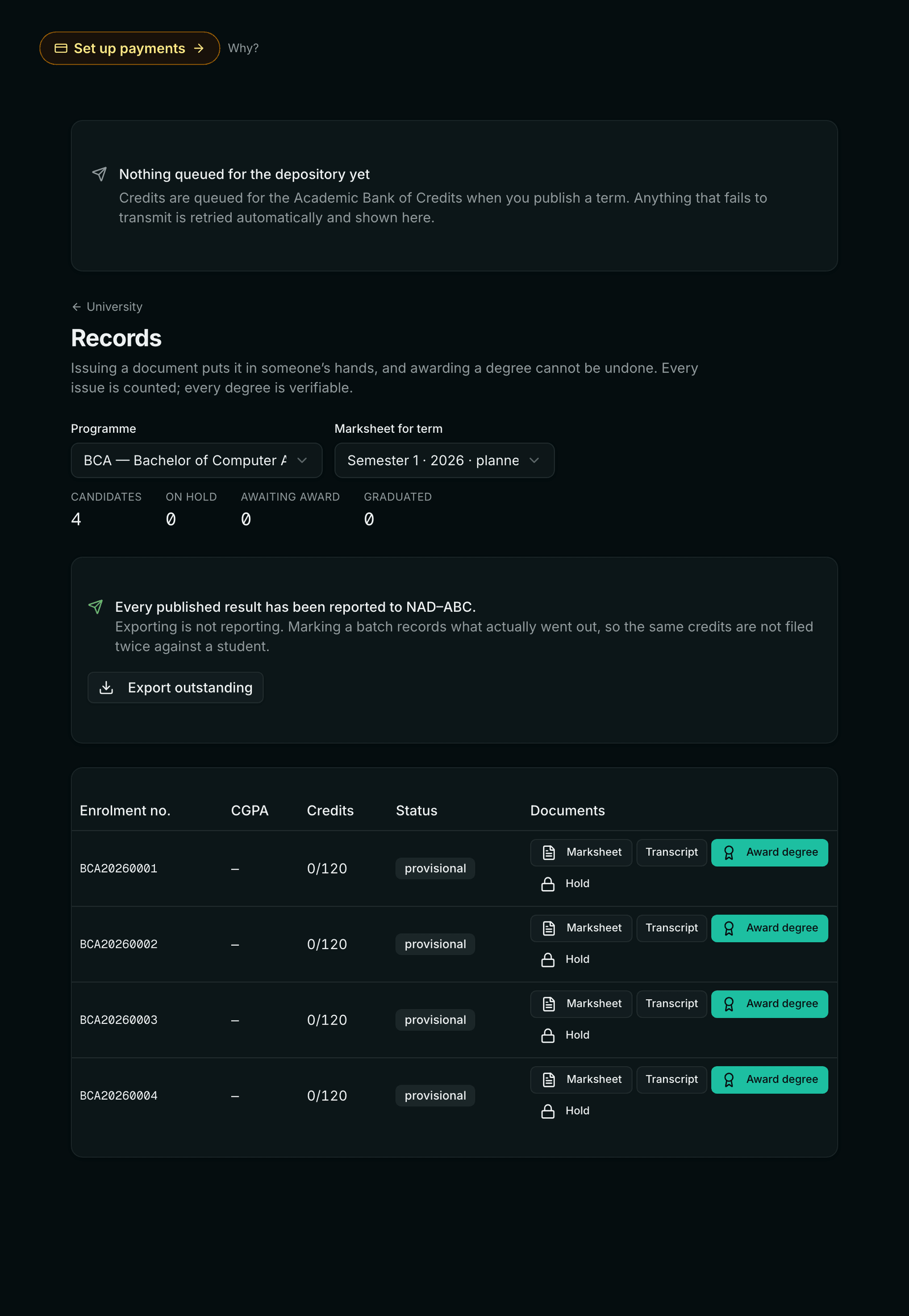
Filing credits: build a queue, not a button
Filing completed credits with the Academic Bank of Credits looks like an API call and is really a queue, because the moment it matters most is a graduation spike — thousands of records at once, which is exactly when somebody redeploys or the depository rate-limits.
- Durable — the work survives a restart. A queue held in memory is not a promise.
- Idempotent — a stable key per candidate, so a retry after an ambiguous timeout cannot credit somebody twice. Double-crediting is worse than failing: it is silent, and it corrupts a national record.
- Jittered — spread the retries. Thousands of records enqueued at once will otherwise retry in lockstep and synchronise a burst against a government endpoint.
- Visible — a queue whose failures live only in a log file is one nobody checks, and the day that matters is results day.
Classify failures rather than retrying everything the same number of times. A 409 usually means the depository already has the record — that is success, and treating it as failure discards records that were filed. A 422 means the payload is wrong and resending it unchanged cannot help. A 503 is their outage and deserves patience.
What to tell your students
Candidates are the third audience and the one most often left to discover the rules mid-examination. Publish, before the first paper:
- What is recorded — focus changes, paste length, camera snapshots, connection gaps — and, just as importantly, what is not: their other tabs, their desktop, their files.
- That nothing auto-fails them. Flags set a review priority, a person reviews the evidence, the academic board decides.
- What to do when the connection drops — reconnect and continue; answers are on the server and the gap is a normal event, not an accusation.
- Why their registration number is moving across the paper, and that it is only their registration number.
- How an employer verifies their marksheet, so they can answer that question themselves.
Institutional sign-in is worth the setup here too. Students use the credentials they already have, there is no second password to reset, and when the university closes an account, access closes with it. If you do it, bind sign-in to an email-domain allowlist — a Google or Microsoft provider will happily authenticate any account on earth, and without the allowlist a stranger signs in as a member of your institution.
A short evaluation checklist
Whatever you buy or build, these are the questions worth asking, and each has a wrong answer that is common:
- Is the answer key ever sent to the candidate's browser? (It should never be.)
- Is the SGPA credit-weighted, or an average of grade points? (It must be credit-weighted.)
- Can a head of department publish another department's marks? (They should not be able to.)
- Can a published mark be corrected, and does the correction leave a trail? (Both yes.)
- Does a marksheet verification link keep working if we stop paying? (It must.)
- What happens to filing when the depository is down for a day? (It should queue and retry, not drop.)
- What does the proctoring actually observe, in plain terms? (If the answer includes hardware, be sceptical.)
Run the academic side without the spreadsheets
Programmes and regulations, admissions with enrolment numbers, server-graded proctored examinations, credit-weighted results, and marksheets an employer can verify — installed only for the workspaces that need it.
Read the University guide
Renu Rawat
Founder of prolaud.com. Helping teachers and creators build profitable, independent learning businesses without losing a cut of every sale to platform fees.
About the founderFrequently asked questions
- Does this replace our university ERP?
- No. It covers the academic spine — programme, candidate, examination, result, record. There is no fee ledger, no hostel or transport module and no payroll, and it is designed to sit alongside whatever you already run for those.
- Can online proctoring detect a phone or a second person in the room?
- Partly, and less than most vendors imply. Camera snapshots can show a second face, which a reviewer then judges. A browser cannot see the room, the desktop or connected hardware. If your regulations require a locked-down machine you need a dedicated lockdown browser or a physical centre.
- How is SGPA calculated on the UGC ten-point scale?
- Each course produces a grade point from its percentage band. The SGPA is the sum of (grade point × course credits) divided by total credits for the term — credit-weighted, not a simple average. CGPA applies the same weighting across every completed term.
- What is the maximum duration of a candidature under UGC ODL rules?
- Double the programme duration. A three-year degree gives a six-year candidature, tracked from the entry semester, after which it lapses.
- How much credit can a student transfer in?
- It is capped per programme — 40% is the common ceiling for SWAYAM and similar transfers. The cap should be enforced by the software, with the arithmetic shown when a transfer is refused.
- Do students need a separate password?
- Not if you connect your directory. Institutional sign-in over OpenID Connect works with Microsoft Entra ID, Google Workspace and Okta, so students and staff use the credentials they already have. Bind it to your email domains, or the provider will authenticate accounts outside your institution.
Keep reading

Cohort-Based Learning, Explained — and When It Beats Self-Paced
Self-paced courses get finished by a tiny fraction of buyers. Cohorts — same start date, live, together — flip that. Here's how they work and when to run one.
Read
How to Choose the Best Online Course Platform in India
A clear, India-first way to choose a course platform — the six things that actually matter, an honest map of the options, and how to pick for your situation.
Read